NetWorker: Bootstrap-säkerhetskopierings- och Authc-kommandon misslyckas på klustrad Linux-server efter uppgradering till 19.7.0.3 eller 19.8.0.2 och tidigare
Summary: NetWorker-servern distribueras på en klustrad Linux NetWorker-server. Efter uppgradering av NetWorker-versionen till 19.7.0.3 eller 19.8.0.2 och tidigare misslyckas Säkerhetskopieringen av Server Protection bootstrap. Autentiseringstjänstkommandon (nsrlogin, authc_config, authc_mgmt) misslyckas också. Felet som returneras är att autentiseringstjänsten inte är tillgänglig med HTTP-fel 404 (hittades inte). ...
This article applies to
This article does not apply to
This article is not tied to any specific product.
Not all product versions are identified in this article.
Symptoms
NetWorker-servern distribueras på ett Red Hat Pacemaker-kluster
med hög tillgänglighet (pcs).NetWorker har uppgraderats till 19.7.0.4.
Det går bra att starta NetWorker-tjänsten och alla klusterresurser visas som "started" på en av klusternoderna:
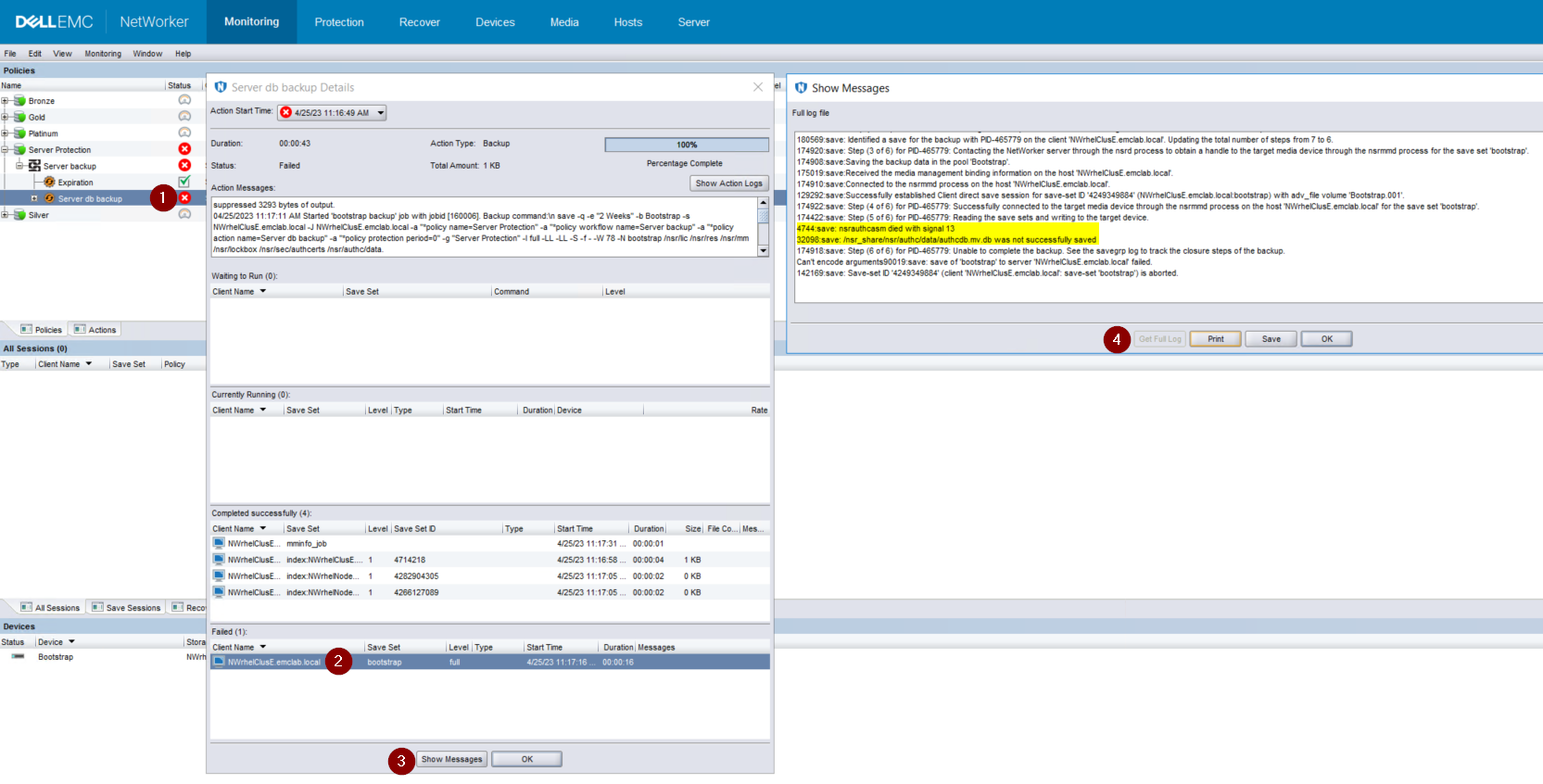
Bild 1: Bootstrap-säkerhetskopieringen säkerhetskopierar inte authcdb
med hög tillgänglighet (pcs).NetWorker har uppgraderats till 19.7.0.4.
Det går bra att starta NetWorker-tjänsten och alla klusterresurser visas som "started" på en av klusternoderna:
root@NWrhelNodeG:~# pcs resource * Resource Group: NW_group: * fs (ocf::heartbeat:Filesystem): Started NWrhelNodeG.emclab.local * ip (ocf::heartbeat:IPaddr): Started NWrhelNodeG.emclab.local * nws (ocf::EMC_NetWorker:Server): Started NWrhelNodeG.emclab.localnsrlogin-kommandot misslyckas med HTTP-fel 404 (hittades inte):
[admin@NWrhelNodeG linux_x86_64]$ nsrlogin -u Administrator 130136:nsrlogin: Please enter password: 117849:nsrlogin: Authentication library error: GET failed with HTTP-ERROR: 404 Server Message : Could not parse server-response from json string Server Message : Make sure that server is runningSäkerhetskopieringen "Server Protection" för bootstrap misslyckas med att säkerhetskopiera authcdb:
Bild 1: Bootstrap-säkerhetskopieringen säkerhetskopierar inte authcdb
Cause
Ändringar av authc under uppgraderingen användes inte för klusterdelade authcdb. Under uppgraderingsprocessen inaktiveras NWS-resursen på pc:n eller PCS-klusterresursen stoppas helt. När NWS inte körs länkas /nsr-katalogen symboliskt (med ett pekdon) till /nsr. NetWorker.local i stället för /nsr_share.
/Nsr. NetWorker.local är den fysiska nodkatalogen /nsr och innehåller endast klientrelaterade mappar. En /nsr. Mappen NetWorker.local/authc finns, men innehåller inte några av de filer som är specifika för NetWorker-serverns authcdb. Den finns under /nsr_share/nsr/authc.
Efter NetWorker-uppgraderingen väntar authc "version B" av authc-filerna, men ser "version A" av filerna från före uppgraderingen.
/Nsr. NetWorker.local är den fysiska nodkatalogen /nsr och innehåller endast klientrelaterade mappar. En /nsr. Mappen NetWorker.local/authc finns, men innehåller inte några av de filer som är specifika för NetWorker-serverns authcdb. Den finns under /nsr_share/nsr/authc.
Efter NetWorker-uppgraderingen väntar authc "version B" av authc-filerna, men ser "version A" av filerna från före uppgraderingen.
Resolution
Uppgradera NetWorker till en av följande versioner (eller senare):
Om du använder 19.8.0.4 eller 19.9.0.2 och senare gör du följande:
Nsrlogin-försök och bootstrap-säkerhetskopieringar bör lyckas.
- 19.8.0.4
- 19.9.0.2
Om du använder 19.8.0.4 eller 19.9.0.2 och senare gör du följande:
- På varje nod i klustret byter du namn på egenskaperna för /opt/nsr/authc-server/conf/h2_db.properties:
mv /opt/nsr/authc-server/conf/h2_db.properties /opt/nsr/authc-server/conf/h2_db.properties.bak
- På varje nod kör du /opt/nsr/authc-server/scripts/authc_configure.sh igen för att konfigurera om authc. Detta tar inte bort några inställningar eller konfigurationer som tidigare gjorts i auktorisering.
På den aktiva noden ser det ut ungefär så här:
På de passiva noderna ser det ut ungefär så här:
root@NWrhelNodeH:~# /opt/nsr/authc-server/scripts/authc_configure.sh

Specify the directory where the Java Standard Edition Runtime Environment (JRE) software is installed [/opt/nre/java/latest]:

The installation process will install an Apache Tomcat instance. For optimum security, EMC NetWorker Authentication Service will use a non-root user (nsrtomcat) to start the Apache Tomcat instance. If your system has special user security requirements, ensure that proper operational permissions are granted to this non-root user (nsrtomcat).
Please refer to NetWorker Installation Guide.

WARNING: Port 9090 is already in use.

Do you wish to specify a different port number [y]? n

The Apache Tomcat will use "NWrhelNodeH.emclab.local" as the host name. The Apache Tomcat will use "9090" as the port number.

The NetWorker Authentication Service requires a keystore file to configure encryption and to provide SSL support.

EMC recommends that you specify a keystore password that has a minimum of six characters.

Do you want to use the existing keystore /nsr/authc/conf/authc.keystore [y]?

Specify password for the existing keystore:
The install will use the existing certificate "emcauthctomcat" for Apache Tomcat.
The install will use the existing certificate "emcauthcsaml" for Authentication Service.

Creating the installation log in /opt/nsr/authc-server/logs/install.log.

Performing initialization. Please wait...

The installation completed successfully.
På de passiva noderna ser det ut ungefär så här:
root@NWrhelNodeG:~# /opt/nsr/authc-server/scripts/authc_configure.sh

Specify the directory where the Java Standard Edition Runtime Environment (JRE) software is installed [/opt/nre/java/latest]:

The installation process will install an Apache Tomcat instance. For optimum security, EMC NetWorker Authentication Service will use a non-root user (nsrtomcat) to start the Apache Tomcat instance. If your system has special user security requirements, ensure that proper operational permissions are granted to this non-root user (nsrtomcat).
Please refer to NetWorker Installation Guide.

The Apache Tomcat will use "NWrhelNodeG.emclab.local" as the host name. The Apache Tomcat will use "9090" as the port number.

The NetWorker Authentication Service requires a keystore file to configure encryption and to provide SSL support.

EMC recommends that you specify a keystore password that has a minimum of six characters.

Do you want to use the existing keystore /nsr/authc/conf/authc.keystore [y]?

Specify password for the existing keystore:
The install will use the existing certificate "emcauthctomcat" for Apache Tomcat.
The install will use the existing certificate "emcauthcsaml" for Authentication Service.

The NetWorker Authentication Service defines automatically an administrator user account named administrator in the NetWorker Authentication Service local database. This account is specific to the administration of the NetWorker Authentication Service, and is not related to other administrator accounts on this system.

*******************************************************************************************
Password criteria: Minimum required characters - 9 and Maximum allowed characters - 126 Minimum [alphabetic - 2, Uppercase - 1, Lowercase - 1, Numeric - 1, Special character - 1]
********************************************************************************************

Specify an initial password for administrator:
Confirm the password:

Creating the installation log in /opt/nsr/authc-server/logs/install.log.

Performing initialization. Please wait...

The installation completed successfully.
Obs! På den passiva noden uppmanas du att skapa ett nytt lösenord för NetWorker Administrator-kontot. Detta innebär inte att det befintliga lösenordet går förlorat. Det beror på att den authcdb som används av klustret är under /nsr_share/nsr/authc som bara finns i den aktiva noden. När en passiv nod blir den nya aktiva noden använder den den delade authcdb. Det authc_configure.sh skriptet körs på varje nod för att återskapa egenskaperna för /opt/nsr/authc-server/conf/h2_db.properties, som är lokal för varje nod.
- Starta om NWS-resursen:
pcs resource restart nws
- Kontrollera att NWS-resursen har startat:
pcs resource

root@NWrhelNodeH:~# pcs resource
   * Resource Group: NW_group:
      * fs (ocf::heartbeat:Filesystem): Started
NWrhelNodeH.emclab.local
      * ip (ocf::heartbeat:IPaddr): Started
NWrhelNodeH.emclab.local
      * nws (ocf::EMC_NetWorker:Server): Started
NWrhelNodeH.emclab.local
Nsrlogin-försök och bootstrap-säkerhetskopieringar bör lyckas.
Affected Products
NetWorkerProducts
NetWorker Family, NetWorker SeriesArticle Properties
Article Number: 000212755
Article Type: Solution
Last Modified: 12 Apr 2024
Version: 6
Find answers to your questions from other Dell users
Support Services
Check if your device is covered by Support Services.