PowerStore:遷移會話同步狀態失敗
Summary: 未建立裝置之間的 iSCSI 連線時,遷移會話同步會進入失敗狀態。
This article applies to
This article does not apply to
This article is not tied to any specific product.
Not all product versions are identified in this article.
Symptoms
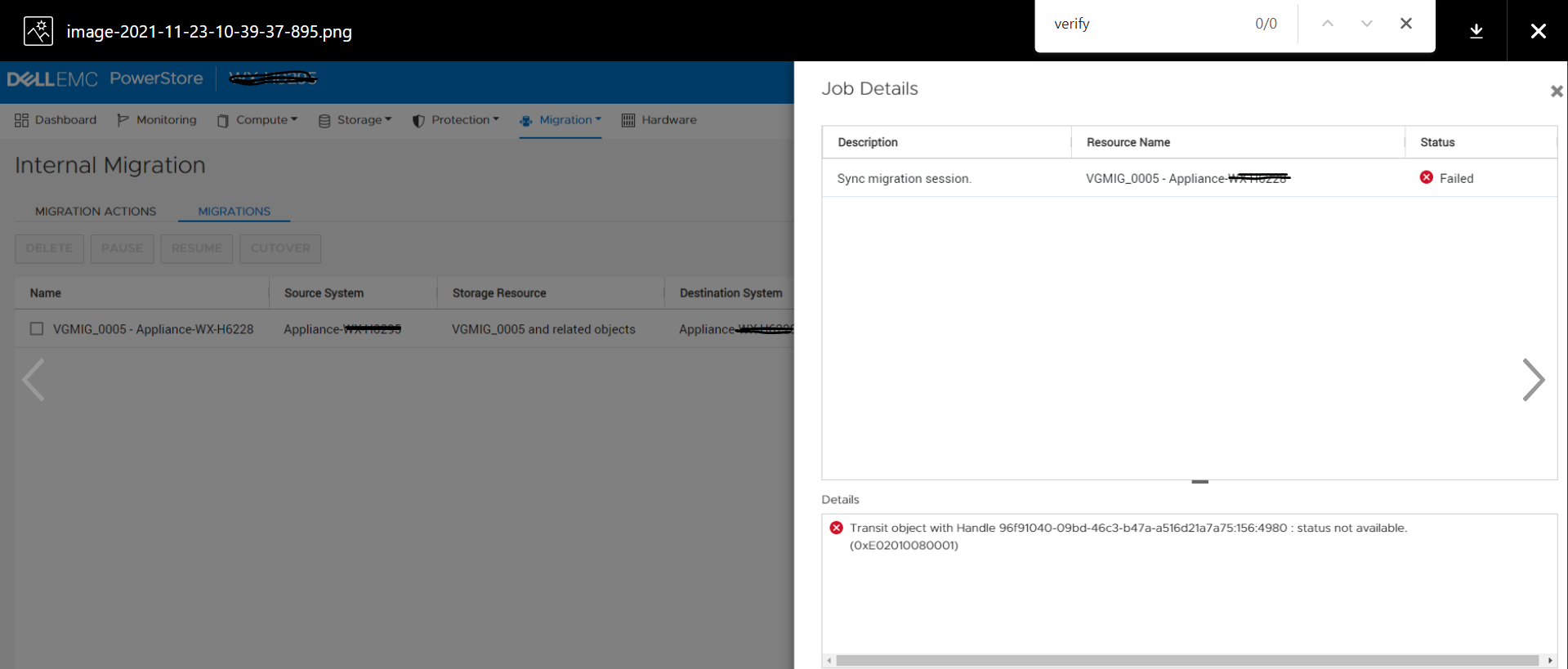
PowerStore Manager 會顯示遷移會話狀態為失敗,詳細資料如下:
具備手柄 96f91040-09bd-46c3-b47a-a516d21a7a75:751:686 的傳輸物件:狀態無法使用。
![]()
具備手柄 96f91040-09bd-46c3-b47a-a516d21a7a75:751:686 的傳輸物件:狀態無法使用。
Cause
如果應用裝置 (屬於同一叢集) 未同時啟動,或應用裝置之間發生網路連線問題,則可能無法建立裝置之間的 iSCSI 連線。 在這種情況下,如果嘗試遷移會話同步,其狀態會變更為「失敗」。
Resolution
本知識庫文章的問題預計在未來的版本中修正。請聯絡技術支援部門,以尋求進一步的協助。
Affected Products
PowerStoreArticle Properties
Article Number: 000195834
Article Type: Solution
Last Modified: 23 Feb 2022
Version: 1
Find answers to your questions from other Dell users
Support Services
Check if your device is covered by Support Services.