Avamar: How to enable debug mode for troubleshooting Avamar client migration issues
Summary: How to enable debug mode for troubleshooting migration issues.
Instructions
Enabling the debug mode can be useful when dealing with Avamar client migration issues (for example when using the Avamar to Avamar/DataDomain (av2avdd) Migration Utility).
To do this:
1. Open the Avamar Administrator UI of the Avamar server from where the migration task was configured.
2. Go to the "Replication/Migration" tab.
3. Edit the Migration Group.
4. Go to "Overview"
5. Click "More Options"
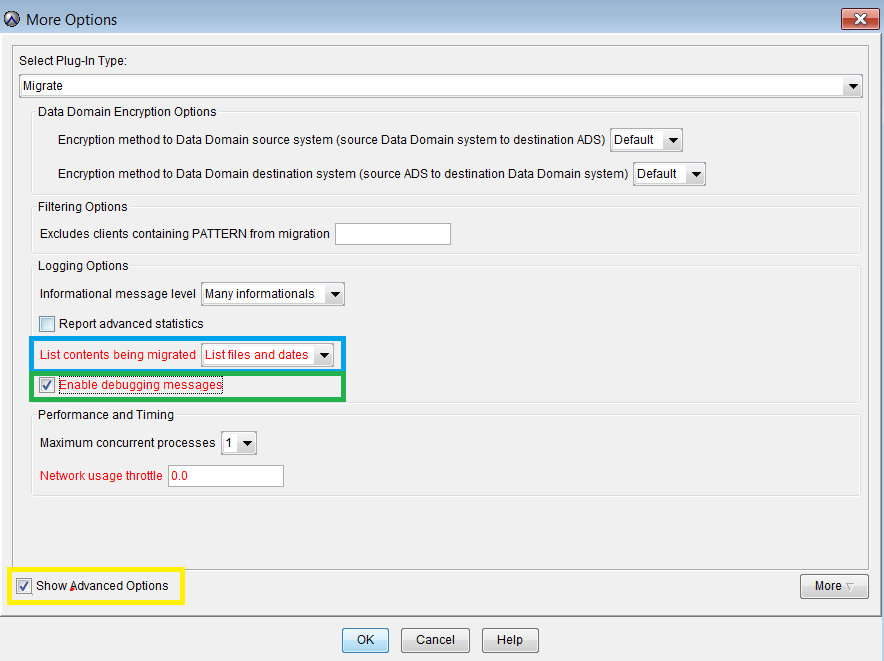
6. Ensure that "List contents being migrated" is set to "List files and dates" (Highlighted in blue above)
7. Ensure that "Enable debugging messages" is selected (Highlighted in green above)
8. Click "Show Advanced Options" (Highlighted in yellow above)
9. Within "Show Advanced Options" Click "More"
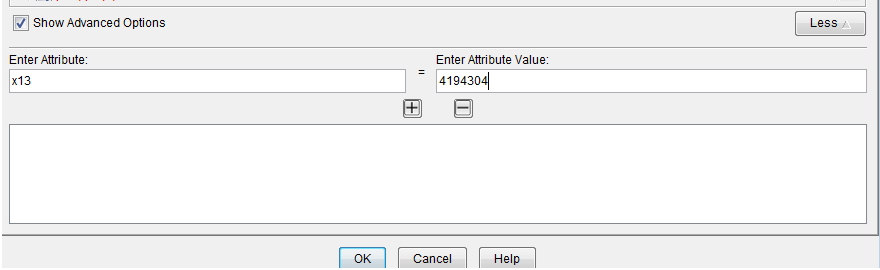
10. Add the "Attribute" "x13" and the "Attribute value" 4194304 as shown below:
11. Click OK 2-3 times as required to save the changes made to the migration group.