Windows Server 2019 離線更新未完成,並顯示「更新不適用於您的電腦」訊息
Summary: Windows Server 2019 離線更新未完成,並顯示「更新不適用於您的電腦」訊息。
This article applies to
This article does not apply to
This article is not tied to any specific product.
Not all product versions are identified in this article.
Symptoms
使用者嘗試離線更新至 Windows Server 2019 的最新累積更新 (請參閱下方連結的 Microsoft 文章5027222),但更新失敗,並顯示「更新不適用於您的電腦」的訊息。
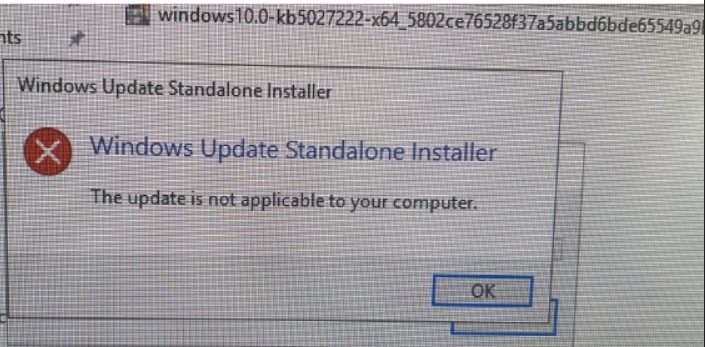
圖 1:Windows 更新失敗訊息的螢幕擷取畫面
圖 1:Windows 更新失敗訊息的螢幕擷取畫面
Cause
客戶未遵循 Microsoft 文章 2023 年 6 月 13 日 (2023 年 6 月 13 日) 的先決條件指示 KB5027222 (OS Build 17763.4499)
「安裝此更新
之前Microsoft 現在將作業系統的最新服務堆疊更新 (SSU) 與最新的累積更新 (LCU) 結合在一起。SSU 可提升更新程式的可靠性,以降低安裝 LCU 時的潛在問題。如需 SSU 的一般資訊,請參閱「維修堆疊更新與維修堆疊更新 (SSU):常見問題 (FAQ
) 先決條件:
您必須先安裝 2021 年 8 月 10 日 SSU (KB5005112),才能安裝 LCU。」
之前Microsoft 現在將作業系統的最新服務堆疊更新 (SSU) 與最新的累積更新 (LCU) 結合在一起。SSU 可提升更新程式的可靠性,以降低安裝 LCU 時的潛在問題。如需 SSU 的一般資訊,請參閱「維修堆疊更新與維修堆疊更新 (SSU):常見問題 (FAQ
) 先決條件:
您必須先安裝 2021 年 8 月 10 日 SSU (KB5005112),才能安裝 LCU。」
Resolution
根據 Microsoft 文章安裝 SSU 5005112 Windows 10 版本 1809 的維修堆疊更新:2021 年 8 月 10 日
 (如先前 Microsoft 文章 所述5027222
),然後安裝最新的 LCU。問題應解決。
(如先前 Microsoft 文章 所述5027222
),然後安裝最新的 LCU。問題應解決。

圖 2:Windows 更新完成訊息的螢幕擷取畫面
(如先前 Microsoft 文章 所述5027222
),然後安裝最新的 LCU。問題應解決。
圖 2:Windows 更新完成訊息的螢幕擷取畫面
Affected Products
Microsoft Windows Server 2016, Microsoft Windows Server 2019, Microsoft Windows Server 2022Article Properties
Article Number: 000215384
Article Type: Solution
Last Modified: 16 Dec 2024
Version: 4
Find answers to your questions from other Dell users
Support Services
Check if your device is covered by Support Services.