Dell Encryption 代理在 Dell Data Security 服务器控制台中报告不同的主机名
Summary: 本文提供了纠正资源清册报告为 Windows 客户端的错误主机名称的问题的步骤。
This article applies to
This article does not apply to
This article is not tied to any specific product.
Not all product versions are identified in this article.
Symptoms
受影响的产品:
- Dell Encryption
- Dell Endpoint Security Suite Enterprise
受影响的操作系统:
- Windows
Cause
如果 hosts 文件中的当前主机名之前有另一个主机名,则 Dell Data Security 产品可能会在资源清册上传到服务器期间报告错误的主机名。
Resolution
- 编辑位于 C:\Windows\System32\drivers\etc 的主机文件。

- 更改顺序以反映当前主机名作为主机文件中的第一个条目。
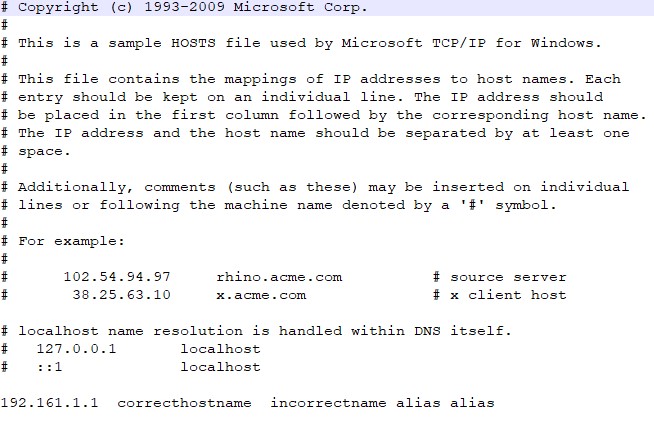
提醒:主机文件中的其他别名仍可以在当前主机名之后。
- 完成后,单击 文件>保存。
- 下次资源清册上传时,服务器内的主机名将更改。
要联系支持部门,请参阅 Dell Data Security 国际支持电话号码。
转至 TechDirect,在线生成技术支持请求。
要获得更多见解和资源,请加入戴尔安全社区论坛。
Additional Information
Affected Products
Dell Encryption, Dell Endpoint Security Suite EnterpriseArticle Properties
Article Number: 000187320
Article Type: Solution
Last Modified: 20 May 2024
Version: 4
Find answers to your questions from other Dell users
Support Services
Check if your device is covered by Support Services.