Dell Management Server Virtual Core Server Does Not Exist Notifications
Summary: Recipients of the email notifications are receiving error notifications hourly, when deploying or upgrading the Dell Management Server Virtual to v11.4, and enabling Email Notifications. ...
This article applies to
This article does not apply to
This article is not tied to any specific product.
Not all product versions are identified in this article.
Symptoms
Affected Products:
- Dell Management Server Virtual
Affected Versions:
- v11.4
Affected Operating Systems:
- Linux
Example of the email received:
Automatically generated alert from Dell Security Management Server Virtual – Service: Dell Core Server - HTTP / Event: Does not exist
Action: restart
Host: Server Hostname
Description: process is not running
Service: Dell Core Server - HTTP
Event: Does not exist
Cause
The service which checks the status of the Dell Management Server Virtual components fails to detect the core server as listening because netstat, part of the net-tools package, is not installed.
Resolution
- Log in to the Dell Management Server Virtual administration console.
Note:
- The default credentials for Dell Security Management Server Virtual are:
- Username:
delluser - Password:
delluser
- Username:
- An administrator can change the default password within the product’s virtual appliance menu.
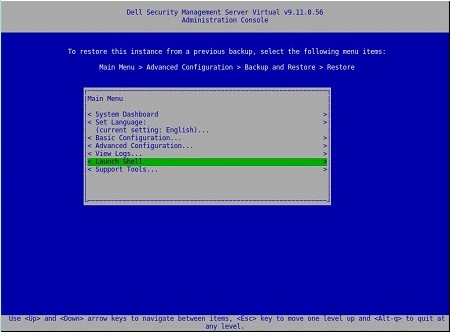
- From the Main Menu, select Launch Shell and press Enter.
- Change user to
dellsupportwith the commandsu dellsupport
 Note:
Note:- The default credentials for Dell Security Management Server Virtual are:
- Username:
dellsupport - Password:
dellsupport
- Username:
- An administrator can change the default password within the product’s virtual appliance menu.
- The default credentials for Dell Security Management Server Virtual are:
- Confirm the password for the
dellsupportuser.

- Check the status of
netstatwith the commandnetstat --version. - If
netstatis not installed, you see the following error.

- Run the command
sudo apt install net-toolsto install net tools. - Run
netstat --versionagain to verify thatnetstatis now installed.

- Type
exitand press Enter to log out ofdellsupport.

- Type
exitand press Enter to log out of the shell to the Main Menu.

Affected Products
Dell EncryptionArticle Properties
Article Number: 000202891
Article Type: Solution
Last Modified: 14 Sept 2026
Version: 3
Find answers to your questions from other Dell users
Support Services
Check if your device is covered by Support Services.