Dell Management Server Virtual Core Server 不存在通知
Summary: 在部署或升级 Dell Management Server Virtual 至 v11.4 并启用电子邮件通知时,电子邮件通知的收件人每小时会收到错误通知。
This article applies to
This article does not apply to
This article is not tied to any specific product.
Not all product versions are identified in this article.
Symptoms
受影响的产品:
- Dell Management Server 虚拟
受影响的版本:
- v11.4
受影响的操作系统:
- Linux
收到的电子邮件示例:
Automatically generated alert from Dell Security Management Server Virtual – Service: Dell Core Server - HTTP / Event: Does not exist
Action: restart
Host: Server Hostname
Description: process is not running
Service: Dell Core Server - HTTP
Event: Does not exist
Cause
检查 Dell Management Server 虚拟组件状态的服务无法将核心服务器检测为侦听,因为 netstat未安装网络工具包的一部分。
Resolution
- 登录 到 Dell Management Server 虚拟管理控制台。
提醒:
- Dell Security Management Server Virtual 的默认凭据为:
- 用户名:
delluser - 密码:
delluser
- 用户名:
- 管理员可以更改产品的虚拟设备菜单中的默认密码。
- 从主菜单中,选择 Launch Shell ,然后按 Enter 键。
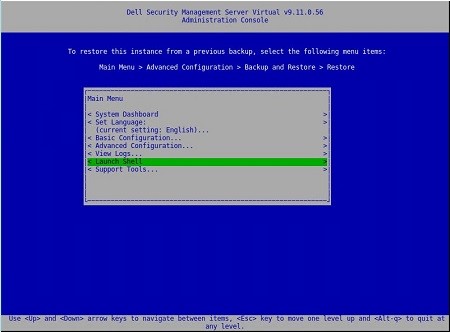
图 1:(仅限英文)启动 Shell
- 使用 命令将用户更改为
dellsupportsu dellsupport

图 2:(仅限英文)运行命令 su dellsupport
提醒:
- Dell Security Management Server Virtual 的默认凭据为:
- 用户名:
dellsupport - 密码:
dellsupport
- 用户名:
- 管理员可以更改产品的虚拟设备菜单中的默认密码。
- 确认
dellsupport用户的密码。

图 3:(仅限英文)确认密码
- 使用 命令
netstat --version检查 的netstat状态。 - 如果
netstat未安装,您将看到以下错误。

图 4:(仅限英文)错误(如果netstat 未安装)
- 运行 命令
sudo apt install net-tools以安装网络工具。 - 再次运行
netstat --version以验证是否netstat已安装。

图 5:(仅限英文)运行 netstat --version
- 键入
exit并按 Enter 键以注销dellsupport。

图 6:(仅限英文)键入 exit
- 键
exit入并按 Enter 键以从 shell 注销到主菜单。

图 7:(仅限英文)键入 exit
Affected Products
Dell EncryptionArticle Properties
Article Number: 000202891
Article Type: Solution
Last Modified: 02 Aug 2023
Version: 2
Find answers to your questions from other Dell users
Support Services
Check if your device is covered by Support Services.