VxRail: Enable vSphere Lifecycle Manager returns internal error with external vCenter
Summary: This article explains how enabling vSphere Lifecycle Manager (vLCM) for VxRail returns an unexpected internal error. This scenario happens when TCP port 5480 is closed between VxRail Manager and customer vCenter. ...
This article applies to
This article does not apply to
This article is not tied to any specific product.
Not all product versions are identified in this article.
Symptoms
Enabling vSphere Lifecycle Manager (vLCM) returns "unexpected internal error" on the "vCenter User Credentials" tab.
The server has experienced an unexpected internal error.
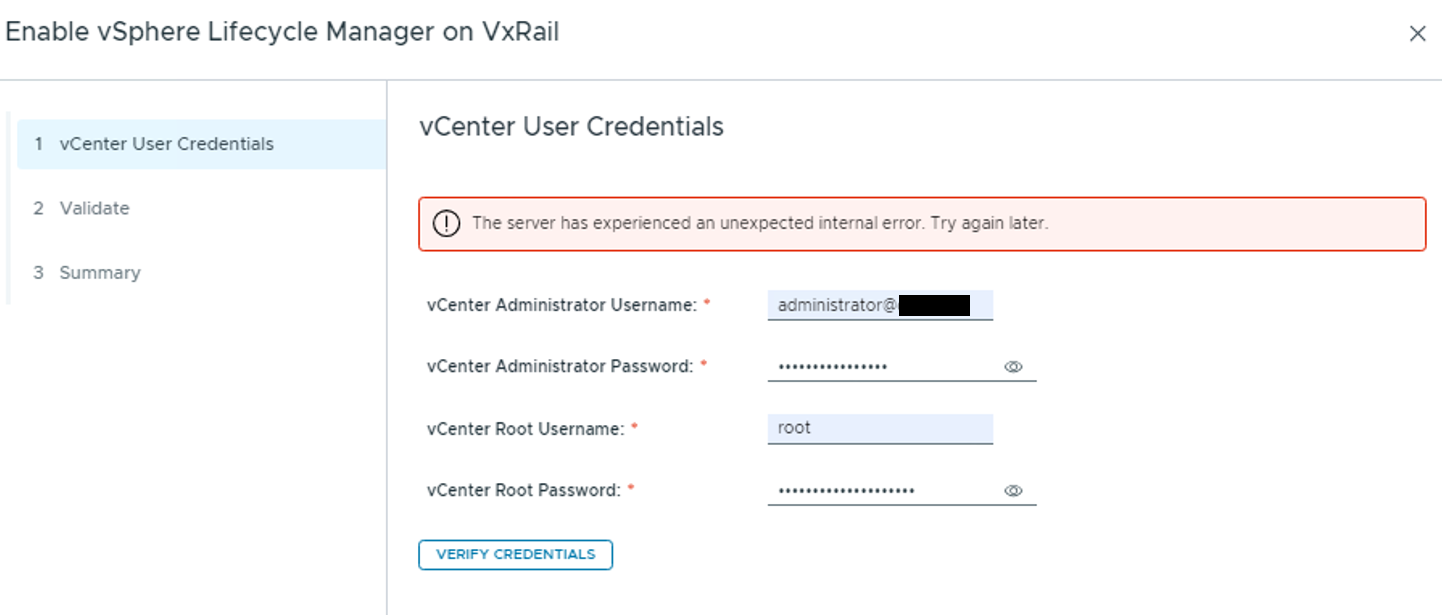
The log /var/log/mystic/lcm-web.log shows:
2024-12-10T13:43:08.875Z <7a452bd0839bef47d2ea3cb8fa0714d1> lcm [ERROR] <148> ScriptServiceImpl.java runLocalScript() (501): Script command error (/etc/vmware-marvin/scripts/lcm/scripts/ext-vc-root-account-verify.sh): [/bin/sh, /usr/lib/vmware-marvin/marvind/temp/20900
91812276686886.tmp, <vc fqdn> **** ****]
2024-12-10T13:43:08.875Z <7a452bd0839bef47d2ea3cb8fa0714d1> lcm [WARN] <148> ScriptServiceImpl.java runLocalScript() (502): [/etc/vmware-marvin/scripts/lcm/scripts/ext-vc-root-account-verify.sh]: Non-zero return code: 2
2024-12-10T13:43:08.875Z <7a452bd0839bef47d2ea3cb8fa0714d1> lcm [INFO] <148> ScriptServiceImpl.java runLocalScript() (503): [/etc/vmware-marvin/scripts/lcm/scripts/ext-vc-root-account-verify.sh@localhost]: <stdout> 000
Unable to verify account!

2024-12-10T13:43:08.875Z <7a452bd0839bef47d2ea3cb8fa0714d1> lcm [WARN] <148> ScriptServiceImpl.java runLocalScript() (507): [/etc/vmware-marvin/scripts/lcm/scripts/ext-vc-root-account-verify.sh@localhost]: <stderr>   % Total    % Received % Xferd  Average Speed   Time
   Time     Time  Current
                                 Dload  Upload   Total   Spent    Left  Speed
^M  0     0    0     0    0     0      0      0 --:--:-- --:--:-- --:--:--     0^M  0     0    0     0    0     0      0      0 --:--:-- --:--:-- --:--:--     0
curl: (35) Recv failure: Connection reset by peer

2024-12-10T13:43:08.876Z <7a452bd0839bef47d2ea3cb8fa0714d1> lcm [ERROR] <148> RestErrorHandler.java handleExceptionInternal() (188): Handling exception for request ServletWebRequest: uri=/lcm/mystic/private/vlcm/credential;client=<ip>
java.lang.IllegalStateException: Unable to verify the external VC roo account due to internal server error!
        at com.vce.lcm.service.verifier.AccountCredentialVerifier.verifyExternalVCVMRootAccount(AccountCredentialVerifier.java:294)
        at com.vce.lcm.service.verifier.AccountCredentialVerifier.verifyVCSARootAccount(AccountCredentialVerifier.java:130)
        at com.emc.mystic.manager.upgrade.controller.VlcmControllerImpl.enablementRequestValidate(VlcmControllerImpl.java:445)
        at com.emc.mystic.manager.upgrade.controller.VlcmControllerImpl.verifyCredential(VlcmControllerImpl.java:307)
        at java.base/jdk.internal.reflect.NativeMethodAccessorImpl.invoke0(Native Method)
        at java.base/jdk.internal.reflect.NativeMethodAccessorImpl.invoke(NativeMethodAccessorImpl.java:62)
        at java.base/jdk.internal.reflect.DelegatingMethodAccessorImpl.invoke(DelegatingMethodAccessorImpl.java:43)
        at java.base/java.lang.reflect.Method.invoke(Method.java:566)

...

2024-12-10T13:43:08.877Z <7a452bd0839bef47d2ea3cb8fa0714d1> lcm [ERROR] <148> RestErrorHandler.java handleExceptionInternal() (189): Get REST error: error code=1, http status code=500, message=The server has experienced an unexpected internal error. Try again later.
Cause
In customer managed external vCenter configurations the script "/etc/vmware-marvin/scripts/lcm/scripts/ext-vc-root-account-verify.sh" is used to validate root access to the vCenter.
In locked down environments the required TCP port 5480 may be closed from VxRail Manager to the vCenter.
To validate if the port can communicate from the VxRail Manager (return code 200 is OK):
vxrail_mgr:/home/mystic # curl -k -u 'root:<vc root password>' -H "Content-Type: application/json" -X GET https://<vc ip>:5480/rest/appliance/access/ssh -w %{http_code}
{"value":true}200
vxrail_mgr:/home/mystic #
Resolution
To pass the check script, work with the network or firewall team to allow communication from VxRail Manager to vCenter on TCP 5480.
Affected Products
VxRail Appliance SeriesArticle Properties
Article Number: 000258975
Article Type: Solution
Last Modified: 02 Jan 2025
Version: 2
Find answers to your questions from other Dell users
Support Services
Check if your device is covered by Support Services.