Dell Unity: Error Code 0x7d13001 Explained
Summary: Error Code 0x7d13001 is a generic Unity management error that can occur during job monitoring, management service operations, or Unity OE upgrade uploads. The error may cause Unisphere operations to fail or become unresponsive and can be accompanied by backend database or management service errors. This article helps identify the underlying cause and provides the appropriate resolution for each known scenario. ...
This article applies to
This article does not apply to
This article is not tied to any specific product.
Not all product versions are identified in this article.
Symptoms
Error Code 0x7d13001 may be observed in Unisphere or through command-line operations. The error can occur unexpectedly and may not immediately indicate the underlying cause.
One or more of the following symptoms may be observed:
- Unisphere becomes unresponsive and requires the user interface to be refreshed or reloaded.
- Operations initiated through Unisphere fail with Error Code
0x7d13001. - Background Unity management processes may stall, resulting in delays or failures of administrative operations.
- Accessing Events > Jobs in Unisphere fails and displays the following message:
The system encountered an unexpected error. Search for the error code on the support website or product forums, or contact your service provider, if available.
(Error Code:0x7d13001)

Reload Unisphere UI?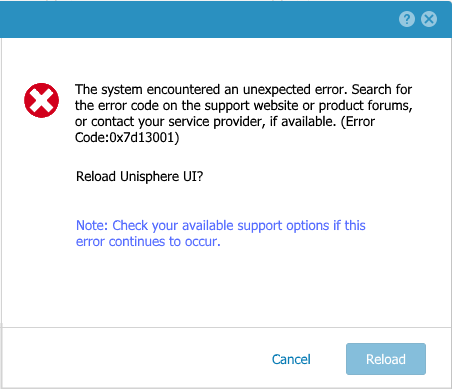
- Unity OE upgrade uploads may fail while staging or validating the upgrade package.
- During a Unity OE upgrade, the upload progress may reach approximately 99% before failing with:
The system encountered an unexpected error. Search for the error code on the support website or product forums, or contact your service provider, if available.

(Error Code:0x7d13001)
- The following error messages may be present in
\EMC\CEM\log\cemtracer.log:
23 Aug 2018 11:50:16  - [COMMON_DB_SHARED_LIB] ERROR - {0:254709:387164896}[22728|28131|d77ffb40][performRequest @ ../../../components/UI/CLI/plugins/commands/common_db/src/DBOperating.cpp:55] Caught pqxx::pqxx_exception (ERROR:  integer out of range).
<.>
23 Aug 2018 11:50:16  - [UemCliProvider] ERROR - {0:254709:388543223}[22728|28131|d77ffb40][processRequest @ ../../../components/providers/native/CliProvider/src/UemCliProvider.cpp:435] Request processing completed with error: The system encountered an unexpected error. Search for the error code on the support website or product forums, or contact your service provider, if available. (Error Code:0x100e000)
Additional Indicators
- Errors may be observed when querying job history or other database-driven operations.
- Multiple management functions can be affected simultaneously because the issue impacts backend database processing used by Unisphere and CLI operations.
- Secondary errors, including
0x100e000, may accompany Error Code0x7d13001in logs.
Cause
Error Code 0x7d13001 is a generic error that may be reported when Unity management operations fail unexpectedly. The error can originate from several underlying conditions and additional investigation may be required to determine the exact root cause.
Known causes include:
Long-Running or Stalled Job Records
In some cases, a job record within the Unity Management Server database contains an abnormally large elapsed time value. For example, jobs with an elapsed time exceeding approximately 24 days may trigger database processing errors when the system attempts to retrieve job information.
When this occurs:
- The Events > Jobs page may fail to load.
- Unisphere may become unresponsive or require a refresh.
- CLI requests that query job-related information may fail.
- Database-related errors may be observed in
\EMC\CEM\log\cemtracer.log, including messages similar to:
pqxx::pqxx_exception (ERROR: integer out of range)
Unity OE Upgrade File Upload Issues
Error Code 0x7d13001 may also occur during Unity OE upgrade file uploads. This can occur when the uploaded upgrade package cannot be successfully processed by the system.
Common reasons include:
- The OE upgrade file is corrupted or incomplete.
- The OE upgrade file was not downloaded successfully from the support site.
- An intermittent connectivity issue occurs while transferring the file to the Unity system.
- Communication between the Unisphere UI and the source location of the OE package is interrupted, causing the upload process to fail, often near completion.
Unity Management Server Processing Issues
In some situations, the error may be associated with failures within the Unity Management Server or related backend management services. When these services encounter database or processing errors, management operations initiated through Unisphere or the CLI may fail and return Error Code 0x7d13001.
This can result in stalled management processes, failed administrative operations, and unexpected Unisphere behavior.
Resolution
The appropriate resolution depends on the underlying cause of Error Code 0x7d13001.
Scenario 1: Events > Jobs Page Fails to Load
If the error occurs when accessing Events > Jobs, the issue may be caused by a long-running or stalled job record within the Unity Management Server database.
This issue is cosmetic and primarily affects the display of active jobs within Unisphere. Storage operations are generally not impacted.
Recommended Action:
- Restart the Unity Management Services.
- Verify whether the Events > Jobs page can be accessed after the services restart.
For instructions, see Dell Unity: How to Restart or Failover the Management Services (User Correctable).
If the issue persists after restarting the management services, additional investigation using support-only procedures may be required. Contact Dell Technical Support and reference this Knowledge Base article.
Scenario 2: Unity OE Upgrade File Upload Fails
If Error Code 0x7d13001 occurs while uploading a Unity OE package, the issue is commonly related to a corrupted upload file or an interruption during file transfer.
Recommended Action:
- Restart the Unity Management Services.
- Retry the upgrade process from the beginning.
- Verify the integrity of the OE package:
- Download the upgrade image again.
- Confirm the file size matches the source file.
- Verify the package checksum (
md5sum) against the value provided on the Dell Support site. - Confirm the file was completely downloaded before attempting the upload.
- Verify there are no network or connectivity interruptions between the client system and the Unity management interface during the upload process.
After completing these steps, attempt the upload again.
If the issue persists, contact Dell Technical Support and reference this Knowledge Base article.
Scenario 3: General Unity Management Server Issues
If Error Code 0x7d13001 is observed outside of the scenarios described above, the issue may be related to a Unity Management Server processing failure.
Recommended Action:
- Restart the Unity Management Services.
- Reattempt the failed operation.
- Monitor Unisphere for:
- UI responsiveness issues
- Reoccurrence of Error Code
0x7d13001 - Additional management or CLI failures
If the error continues to occur after restarting the management services, collect diagnostic information and contact Dell Technical Support for further analysis.
Additional Information
Error Code 0x7d13001 is a generic management-layer error that can be associated with multiple underlying conditions. The symptoms, logs, and operational context should be reviewed to determine which resolution path is applicable. If the root cause cannot be determined from the observed behavior, engage Dell Technical Support for assistance.
Additional Information
Related Articles:
Affected Products
Dell Unity 300, Dell EMC Unity 300F, Dell EMC Unity 350F, Dell EMC Unity 400, Dell EMC Unity 400F, Dell EMC Unity 450F, Dell EMC Unity 500, Dell EMC Unity 500F, Dell EMC Unity 550F, Dell EMC Unity 600, Dell EMC Unity FamilyProducts
Dell EMC Unity 600F, Dell EMC Unity 650F, Dell EMC Unity Family |Dell EMC Unity All Flash, Dell EMC Unity Family, Dell EMC Unity HybridArticle Properties
Article Number: 000057318
Article Type: Solution
Last Modified: 01 Sept 2026
Version: 9
Find answers to your questions from other Dell users
Support Services
Check if your device is covered by Support Services.