IDPA:DPAをSCGゲートウェイに登録する方法。
Summary: SCGゲートウェイでDPAを手動で登録する手順
This article applies to
This article does not apply to
This article is not tied to any specific product.
Not all product versions are identified in this article.
Instructions
アプリケーション サーバーにroot
としてログインします 次のコマンドを使用して、SCG
#dpa.sh app support
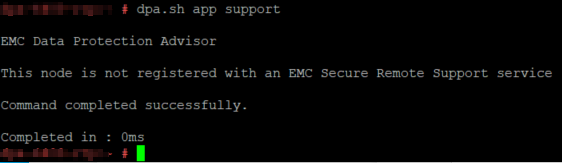 にすでに登録されているDPAを検索します 次のコマンドを使用して、ゲートウェイ
dpa.sh アプリケーション サポートに登録します--register SCG_IP

First Prompt for DPA authorized user and password.デフォルトのユーザーは管理者とIDPAの共通パスワード
です。次に、SCG登録の詳細を入力します。
デルの従業員ユーザーIDとRSAパスコード
の場合 お客様がDellサポートWebログイン認証情報
を使用している場合 ゲートウェイ
dpa.sh アプリ サポートで登録解除するには、次のコマンドを実行します --deregister SCG_IP
問題がある場合は、次のコマンドを使用してデバッグ ログ
を取得 dpa.sh アプリ サポート --register SCG_IP --debug
としてログインします 次のコマンドを使用して、SCG
#dpa.sh app support
にすでに登録されているDPAを検索します 次のコマンドを使用して、ゲートウェイ
dpa.sh アプリケーション サポートに登録します--register SCG_IP
First Prompt for DPA authorized user and password.デフォルトのユーザーは管理者とIDPAの共通パスワード
です。次に、SCG登録の詳細を入力します。
デルの従業員ユーザーIDとRSAパスコード
の場合 お客様がDellサポートWebログイン認証情報
を使用している場合 ゲートウェイ
dpa.sh アプリ サポートで登録解除するには、次のコマンドを実行します --deregister SCG_IP
問題がある場合は、次のコマンドを使用してデバッグ ログ
を取得 dpa.sh アプリ サポート --register SCG_IP --debug
Affected Products
PowerProtect DP4400, PowerProtect DP5300, PowerProtect DP5800, PowerProtect DP8300, PowerProtect DP8800, PowerProtect DP5900, PowerProtect DP8400, PowerProtect DP8900Article Properties
Article Number: 000210951
Article Type: How To
Last Modified: 15 Aug 2025
Version: 4
Find answers to your questions from other Dell users
Support Services
Check if your device is covered by Support Services.