IDPA:如何将 DPA 注册到 SCG 网关。
Summary: 使用 SCG 网关手动注册 DPA 的步骤
This article applies to
This article does not apply to
This article is not tied to any specific product.
Not all product versions are identified in this article.
Instructions
以 root 用户
身份登录应用程序服务器 使用以下命令查找已向 SCG
#dpa.sh 应用程序支持
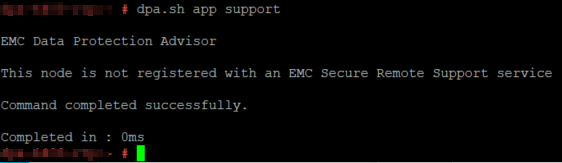
注册的 DPA 使用以下命令向网关
注册 dpa.sh 应用程序支持 --register SCG_IP
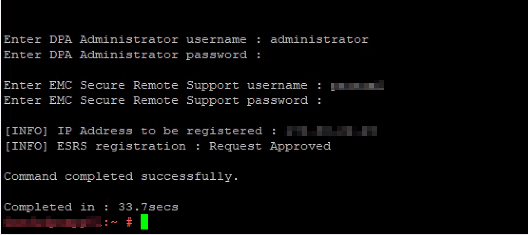
DPA 授权用户和密码的第一个提示符。默认用户为管理员和 IDPA 常用密码
,然后输入 SCG 注册详细信息;
如果戴尔员工用户 ID 和 RSA 密码
如果您是客户,请使用以下 Dell 支持 Web 登录凭据
用户 使用网关
dpa.sh 应用程序支持取消注册 --取消注册 SCG_IP
如果您遇到问题,请使用以下命令获取调试日志
,dpa.sh 应用程序支持 --register SCG_IP --debug
身份登录应用程序服务器 使用以下命令查找已向 SCG
#dpa.sh 应用程序支持
注册的 DPA 使用以下命令向网关
注册 dpa.sh 应用程序支持 --register SCG_IP
DPA 授权用户和密码的第一个提示符。默认用户为管理员和 IDPA 常用密码
,然后输入 SCG 注册详细信息;
如果戴尔员工用户 ID 和 RSA 密码
如果您是客户,请使用以下 Dell 支持 Web 登录凭据
用户 使用网关
dpa.sh 应用程序支持取消注册 --取消注册 SCG_IP
如果您遇到问题,请使用以下命令获取调试日志
,dpa.sh 应用程序支持 --register SCG_IP --debug
Affected Products
PowerProtect DP4400, PowerProtect DP5300, PowerProtect DP5800, PowerProtect DP8300, PowerProtect DP8800, PowerProtect DP5900, PowerProtect DP8400, PowerProtect DP8900Article Properties
Article Number: 000210951
Article Type: How To
Last Modified: 15 Aug 2025
Version: 4
Find answers to your questions from other Dell users
Support Services
Check if your device is covered by Support Services.