Dell Data Protection Encryption Device enters a boot loop after hibernating
Summary: This article includes information regarding a constant boot loop after battery drains with Dell Data Protection | Encryption installed.
Symptoms
Affected Products:
- Dell Data Protection | Encryption
Cause
Not Applicable
Resolution
Devices are seen to enter hibernation automatically, but those devices have failures when attempting to boot or when attempting to resume from hibernation.
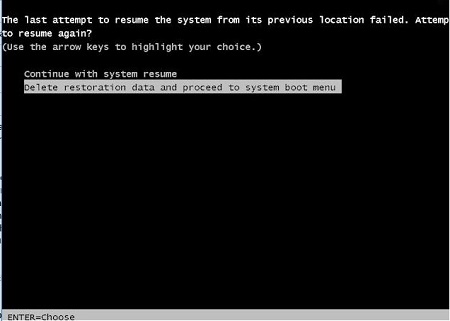
If this issue is experienced, the user is presented with two options when the computer attempts to resume from hibernation. The computer gives the options to either continue to resume or to delete the hibernation file and start with computer boot. Choose the second option to delete the hibernation file and start with computer boot. This temporarily resolves this issue. Reentering a hibernation state causes this issue to resurface.
To permanently resolve this issue, ensure that the System BIOS is up to date. You can find this at https://www.dell.com/support/home and by searching for the affected device by platform or by service tag.
To contact support, reference Dell Data Security International Support Phone Numbers.
Go to TechDirect to generate a technical support request online.
For additional insights and resources, join the Dell Security Community Forum.