Dell Security Management Server Virtual Server 記錄命令
Summary: 本文概述 Dell Security Management Server Virtual (先前稱為 Dell Data Protection |Virtual Edition Server) 「View Logs」功能表畫面。
This article applies to
This article does not apply to
This article is not tied to any specific product.
Not all product versions are identified in this article.
Symptoms
受影響的產品:
- Dell Security Management Server Virtual
- Dell Data Protection | Virtual Edition
Cause
不適用
Resolution
Dell Security Management Server Virtual 可讓 Server Administrator 快速存取記錄檔以進行故障診斷。在 GNU Nano 畫面中,您可以檢查 Dell Security Management Server Virtual View 記錄 並選取 系統記錄、 伺服器記錄,或 Databasesecustomizer log 是查看伺服器問題並加以解決。
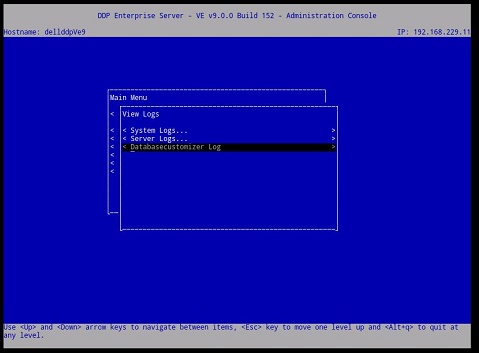
圖 1:(僅限英文)Virtual Edition Server 的檢視記錄選單
選取記錄後,它會在 GNU Nano 文字編輯器中開啟。
GNU Nano 是適合在 UNIX 中工作的文字編輯器,因為它不依賴滑鼠,但仍有許多實用的功能。
大多數的 nano 命令是按住 Ctrl 鍵 (即控制鍵),然後按下另一個按鍵。在此文字中,控制鍵是使用 ^ (例如, ^G 表示按住 CTRL 鍵,然後按下 g 鍵)。大部分重要的 Dell 安全性管理伺服器虛擬命令列于下圖 2。
例如,輸入 ^G GNU nano 說明功能表的 (CTRL+G)。
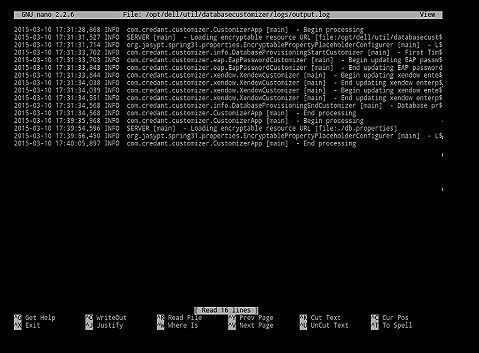
圖 2:(僅限英文)Virtual Edition GNU Nano 使用者介面
最常使用的命令:
| 常用的命令 | 鍵盤組合 |
|---|---|
| 取得說明 | Crtl G |
| 退出 | Crtl X |
| 在哪裡 | Crtl W |
| 登出 | Crtl O |
| 前置頁面 | Crtl Y |
| Cur Pos | Crtl C |
其他可用命令:
- 證明 = Crtl J
- 讀取檔案 = Crtl R
- 剪取文字 = Crtl K
- UnCut Text = Crtl U
- 拼寫 = Crtl T
如要聯絡支援部門,請參閱 Dell Data Security 國際支援電話號碼。
請前往 TechDirect,以線上產生技術支援要求。
如需更多深入見解與資源,請加入 Dell 安全性社群論壇。
Affected Products
Dell EncryptionArticle Properties
Article Number: 000130664
Article Type: Solution
Last Modified: 08 Mar 2023
Version: 8
Find answers to your questions from other Dell users
Support Services
Check if your device is covered by Support Services.