Dell Security Management Server Virtual Server 日志命令
Summary: 本文概述了 Dell Security Management Server Virtual(以前称为 Dell Data Protection |)中使用的命令行语言Virtual Edition Server)“View Logs”菜单屏幕。
This article applies to
This article does not apply to
This article is not tied to any specific product.
Not all product versions are identified in this article.
Symptoms
受影响的产品:
- Dell Security Management Server Virtual
- Dell Data Protection | Virtual Edition
Cause
不适用
Resolution
Dell Security Management Server Virtual 使 Server Administrator 可以快速访问日志文件以进行故障排除。从 GNU nano 屏幕中,可以通过检查 Dell Security Management Server 虚拟 视图日志 并选择 系统日志 、 服务器日志 或 Databasesecustomizer log来查看和解决服务器问题。
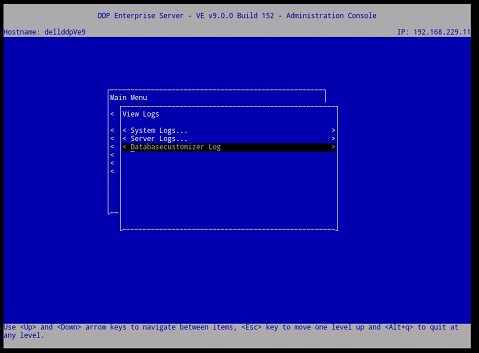
图 1:(仅限英文)Virtual Edition Server 的 View Logs 菜单
选择日志后,它将在 GNU Nano 文本编辑器中打开。
GNU Nano 是适合在 UNIX 中工作的文本编辑器,因为它不依赖于鼠标,但仍有许多有用的功能。
大多数 nano 命令都通过按住 Ctrl 键(即控制键)并按其他键之一来调用。在此文本中,使用 ^ 引用控制键(例如, ^G 意味着按住 CTRL 键并按 g 键)。下面列出了大多数重要的 Dell Security Management Server Virtual 命令。
例如,输入 ^G GNU nano 帮助菜单的 (CTRL+G)。
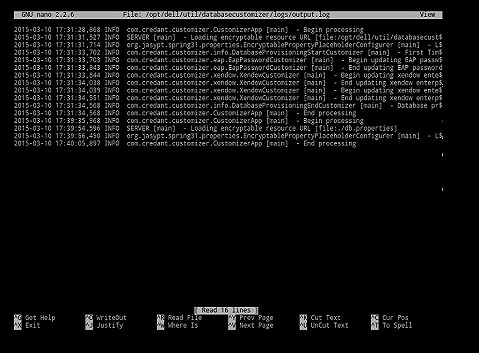
图 2:(仅限英文)Virtual Edition GNU nano 用户界面
最常用的命令:
| 常用命令 | 键盘组合 |
|---|---|
| 获取帮助 | Crtl G |
| 退出 | Crtl X |
| 在哪里 | Crtl W |
| 注销 | Crtl O |
| 前页 | Crtl Y |
| Cur Pos | Crtl C |
其他可用命令:
- 合理性 = Crtl J
- 读取文件 = Crtl R
- 剪切文本 = Crtl K
- 取消文本 = Crtl U
- 拼写 = Crtl T
要联系支持部门,请参阅 Dell Data Security 国际支持电话号码。
转至 TechDirect,在线生成技术支持请求。
要获得更多见解和资源,请加入戴尔安全社区论坛。
Affected Products
Dell EncryptionArticle Properties
Article Number: 000130664
Article Type: Solution
Last Modified: 08 Mar 2023
Version: 8
Find answers to your questions from other Dell users
Support Services
Check if your device is covered by Support Services.