使用 ClickOnce 部署的应用程序无法在运行 Dell Encryption Enterprise 或 Dell Encryption Personal 的计算机上启动
Summary: 在运行 Dell Encryption Enterprise 或 Dell Encryption Personal 的计算机上重新启动后,使用 ClickOnce 部署的应用程序可能无法启动。
This article applies to
This article does not apply to
This article is not tied to any specific product.
Not all product versions are identified in this article.
Symptoms
受影响的产品:
- Dell Encryption Enterprise
- Dell Encryption Personal
受影响的版本:
- v10.2 至 11.0
受影响的操作系统:
- Windows
已观察到,使用 ClickOnce 部署的应用程序在重新启动后无法在具有 Dell Encryption 的计算机上启动,并显示应用程序由于并排配置不正确而无法启动的错误。当用户尝试启动应用程序时,可能会显示以下错误:
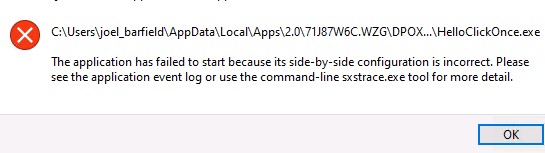
图 1:(仅限英文)尝试启动应用程序时出错
Cause
这是因为 ClickOnce 应用程序.config使用的文件或 .manifest文件损坏结束。加密驱动程序无法正确地硬链接这些元数据文件。
Resolution
此问题已在 Dell Encryption Enterprise 和 Dell Encryption Personal Edition 的 v11.1 中得到解决。
要联系支持部门,请参阅 Dell Data Security 国际支持电话号码。
转至 TechDirect,在线生成技术支持请求。
要获得更多见解和资源,请加入戴尔安全社区论坛。
Affected Products
Dell EncryptionArticle Properties
Article Number: 000191189
Article Type: Solution
Last Modified: 06 Sept 2023
Version: 3
Find answers to your questions from other Dell users
Support Services
Check if your device is covered by Support Services.