PowerProtect Data Protection 어플라이언스: IDPA: 검색 구성 요소 업그레이드 절차
Summary: 검색 구성 요소를 독립적으로 업그레이드하는 절차입니다. 이 절차는 버전 2.7.8을 실행하는 IDPA에서 검색 구성 요소를 버전 19.6.6.5331로 업그레이드하는 데 사용할 수 있습니다.
This article applies to
This article does not apply to
This article is not tied to any specific product.
Not all product versions are identified in this article.
Instructions
검색을 19.6.6으로 업그레이드하는 절차입니다.
이 절차는 이미 버전 2.7.8 이상에 있는 IDPA에 대해서만 따라야 합니다. 호환성이 손상될 수 있으므로 이 절차를 사용하여 Search의 IDPA를 다른 버전으로 업그레이드하거나 다른 버전에서 업그레이드하지 마십시오.
IDPA가 2.7.8보다 낮은 버전인 경우 계속하기 전에 IDPA를 업그레이드하십시오.
절차
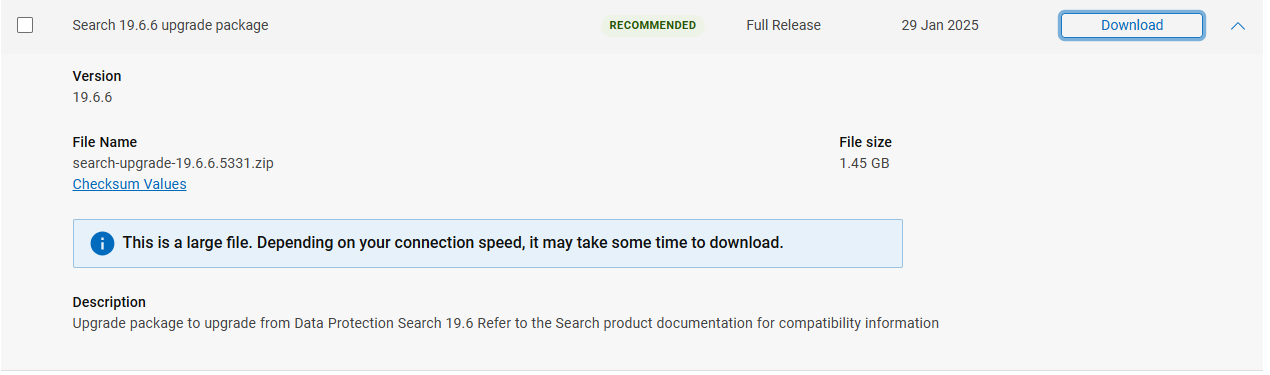
- 아래 링크에서 Search 19.6.6 업그레이드 파일을 다운로드합니다.
Search 19.6.6 업그레이드 패키지 다운로드(이 다운로드를 보려면 등록된 사용자로 Dell 지원에 로그인해야 함)
참고: 파일을 다운로드하기 전에 Dell 지원 포털에 로그인하십시오.
Search Control Index 노드에서 다음을 수행합니다.
참고: IDPA 8X00 Series에는 3개의 인덱스 노드가 있습니다.
Control Index Node
- 루트 권한으로 업그레이드 파일을 복사합니다
search-upgrade-19.6.6.5331.zip의 출력을/tmp에Search Master Index노드를 사용하여 SCP 소프트웨어를 사용합니다. - SSH를 통해 검색 제어 인덱스 노드에 연결하고 다음 명령을 실행하여 Lockbox를 재설정합니다.
ruby /usr/local/search/cis/Tools/update_passphrase.rb /home/search/passphrase

LD_LIBRARY_PATH=/usr/local/search/cis/CST/lib ruby usr/local/search/cis/Tools/reset_lockbox.rb- 모델이 DP8x00인 경우 SSH를 통해 두 번째 및 세 번째 검색 인덱스 노드에 연결하고 다음 명령도 실행합니다.
LD_LIBRARY_PATH=/usr/local/search/cis/CST/lib ruby /usr/local/search/cis/Tools/reset_lockbox.rb-
Search Control Index 노드(모든 모델)에서 다음 명령을 실행합니다.
service puppetmaster stop
service puppet stop
rm -rf /etc/puppet/status/*-
업그레이드 바이너리를 다음으로 이동합니다.
/etc/puppet/repository/를 클릭하고 적절한 권한을 부여한 다음 Puppet Services를 시작합니다.
mv /tmp/search-upgrade-19.6.6.5331.zip /etc/puppet/repository/
chmod 777 /etc/puppet/repository/search-upgrade-19.6.6.5331.zip
service puppetmaster start
service puppet start
- 잠시 기다리면 업그레이드가 시작됩니다. 5분 이상 걸릴 수 있습니다.
업그레이드가 시작되었는지 확인하려면 파일을 확인합니다 search-upgrade-19.6.6.5331.zip-running 에 존재합니다. /etc/puppet/status 폴더에 있습니다.
- 해야 한다
/etc/puppet/status/search-upgrade-19.6.6.5331.zip-running15분 후에 나타나지 않습니다. 실행되지 않는 이유에 대한 자세한 내용은 다음 로그를 확인하십시오./etc/puppet/log/puppet_agent.log - 그대로 실행하면 업그레이드 워크플로 중에 검색 노드가 여러 번 재부팅됩니다.
참고: Integrated Data Protection Appliance 8X00 Series에서는 검색 제어 인덱스 노드를 먼저 수행한 후 재부팅합니다. 그런 다음 첫 번째 인덱스 노드로 이동하여 재부팅한 다음 두 번째 인덱스 노드로 마무리합니다.
- 다음 파일이 다음 위치에 나타나면 업그레이드가 완료된 것입니다.
/etc/puppet/status폴더에 있습니다.
search-upgrade-19.6.6.5331.zip-allcompleted
search-upgrade-19.6.6.5331.zip-completed
상태가 다음과 같이 변경되는 경우:
search-upgrade-19.6.6.5331.zip-failed
업그레이드에 실패했음을 의미합니다. 다음 사항을 제공하는 Dell 지원에 문의하십시오. /etc/puppet/log/puppet_agent.log.
- 만약
.zip-failed파일이 표시되지 않으면 다음 명령을 실행하여 업그레이드가 성공했는지 확인합니다.
bash /home/search/validate_search_install.sh 19.6.6.5331 admin
메시지가 표시되면 암호를 입력합니다.
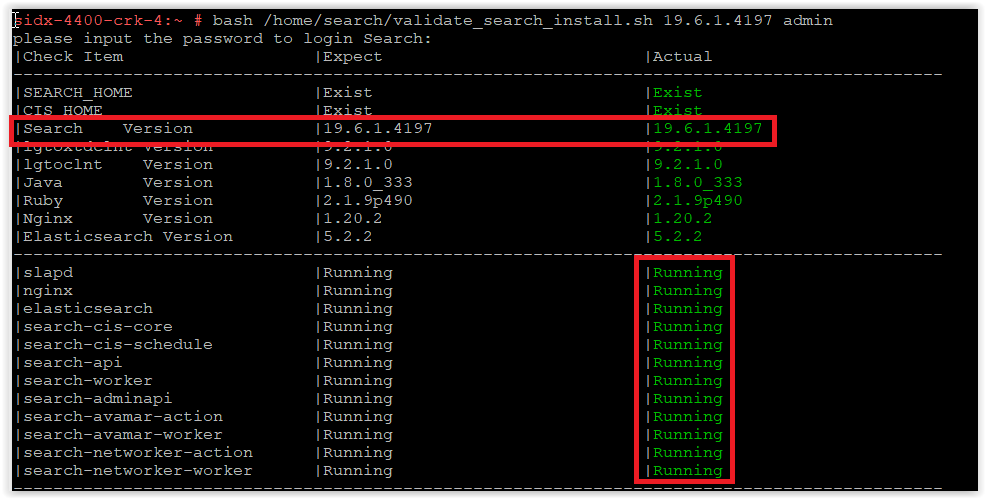
다음 스크린샷과 같이 검색이 19.6.6.5331로 업그레이드되었는지 확인합니다.
다음 스크린샷과 같이 검색이 19.6.6.5331로 업그레이드되었는지 확인합니다.
참고: 스크린샷은 19.6.1.4197을 보여 주며 다음이 표시되어야 합니다. 19.6.6.5331
만일
search-cis-core service 가 실행되고 있지 않으면 다음 두 명령을 실행합니다.
ruby /usr/local/search/cis/Tools/update_passphrase.rb /home/search/passphrase
LD_LIBRARY_PATH=/usr/local/search/cis/CST/lib ruby /usr/local/search/cis/Tools/reset_lockbox.rb
IDPA가 DP8x00 모델인 경우 SSH를 통해 두 번째 및 세 번째 검색 인덱스 노드에 연결하고 다음 명령을 실행합니다.
LD_LIBRARY_PATH=/usr/local/search/cis/CST/lib ruby /usr/local/search/cis/Tools/reset_lockbox.rb
service search-cis-core start
검증된 스크립트를 다시 실행하고 모든 서비스가 실행 중인지 확인합니다.
bash /home/search/validate_search_install.sh 19.6.6.5331 admin
만약
search-cis-core 그래도 실행되지 않으면 Dell 지원 부서에 문의하십시오.
- 업그레이드가 성공한 것으로 확인되면 업그레이드 패키지를 제거합니다.
rm /etc/puppet/repository/search-upgrade-19.6.6.5331.zip
- 이것으로 PowerProtect Data Protection Series 어플라이언스 및 IDPA 내의 검색 구성 요소 업그레이드를 마칩니다.
Additional Information
Search 19.6.2에서 해결된 보안 문제
구성 요소 |
문제 ID |
문제 제목 |
|---|---|---|
| 검색 | 751600 | Linux 커널용 SUSE Enterprise Linux 보안 업데이트(SUSE-SU-2022:0068-1) |
| 검색 | 751683 | samba용 SUSE Enterprise Linux 보안 업데이트(SUSE-SU-2022:0323-1) |
| 검색 | 751696 | Linux 커널용 SUSE Enterprise Linux 보안 업데이트(SUSE-SU-2022:0364-1) |
| 검색 | 751712 | glibc용 SUSE Enterprise Linux 보안 업데이트(SUSE-SU-2022:0441-1) - 새로 감지됨 |
| 검색 | 751721 | tiff용 SUSE Enterprise Linux 보안 업데이트(SUSE-SU-2022:0496-1) - 새로 감지됨 |
| 타사 구성 요소 | CVE | 추가 정보 |
|---|---|---|
| Oracle JRE | CVE-2022-32215 (영문)CVE-2022-21634, CVE-2022-21597, CVE-2022-21628, CVE-2022-21626, CVE-2022-21618, CVE-2022-39399, CVE-2022-21624, CVE-2022-21619 |
https://www.oracle.com/security-alerts/cpuoct2022.html #AppendixJAVA  |
| Nginx | CVE-2022-41742 (영문) | http://nginx.org/en/security_advisories.html |
| Apache log4j | CVE-2021-44228 (영문)CVE-2021-45046 (영문)CVE-2021-45105 (영문)CVE-2021-44832 (영문) |
Apache Log4j 원격 코드 실행 |
| 삼 바 | CVE-2022-32746 (영문)CVE-2022-32745 (영문)CVE-2022-1615 (영문) |
https://www.suse.com/security/cve/CVE-2022-32746.html |
| 커널 | CVE-2022-33981 (영문) | https://www.suse.com/security/cve/CVE-2022-33981.html |
| Python | CVE-2021-28861 (영문) | https://www.suse.com/security/cve/CVE-2021-28861.html |
| Openssl | CVE-2022-1292 (영문)CVE-2022-2068 (영문) |
https://www.suse.com/security/cve/CVE-2022-1292.html https://www.suse.com/security/cve/CVE-2022-2068.html |
Affected Products
PowerProtect Data Protection Appliance, PowerProtect Data Protection Software, Integrated Data Protection Appliance Family, Integrated Data Protection Appliance SoftwareProducts
PowerProtect DP4400, PowerProtect DP5300, PowerProtect DP5800, PowerProtect DP8300, PowerProtect DP8800, PowerProtect DP5900, PowerProtect DP8400, PowerProtect DP8900Article Properties
Article Number: 000206371
Article Type: How To
Last Modified: 01 May 2025
Version: 10
Find answers to your questions from other Dell users
Support Services
Check if your device is covered by Support Services.