PowerFlex 4.x Unable to access PowerFlex Manager User Interface
Summary: PowerFlex Manager UI becomes inaccessible.
This article applies to
This article does not apply to
This article is not tied to any specific product.
Not all product versions are identified in this article.
Symptoms
-The PowerFlex Manager UI login screen displays, but login attempts do not succeed.
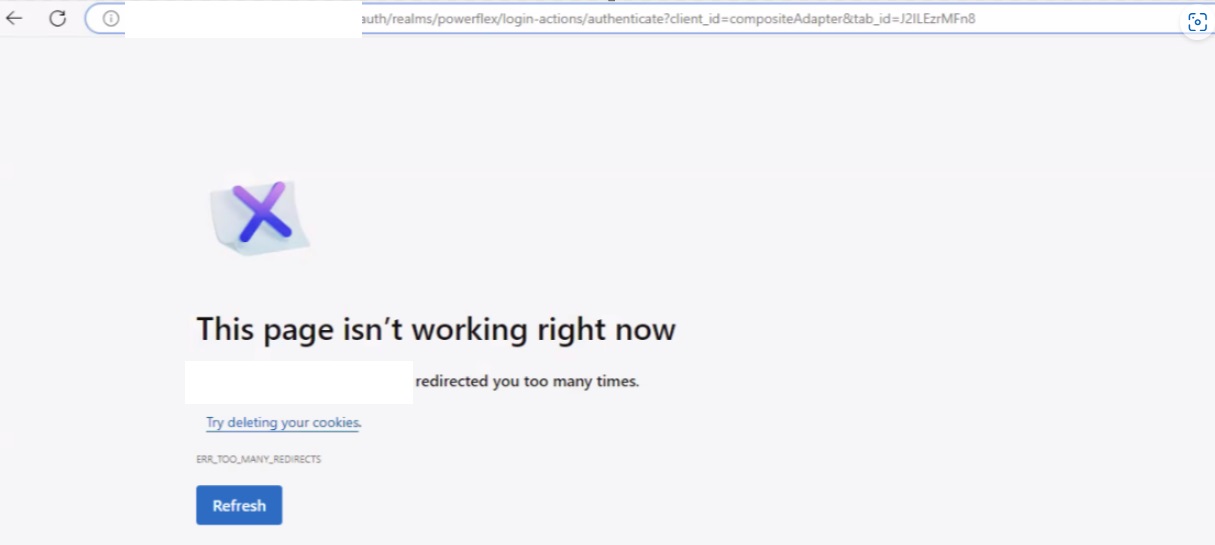
-After entering credentials, users encounter an error screen (see screenshot below).
Cause
- Clearing cache and browser history did not work
- Checked the pods' status using the below command and all pods were "Running"
kubectl get pods –n powerflex
- I checked the asmManager pod logs, and it appeared login attempts were stuck at the SSO login stage
Resolution
Restart the keycloak pods using the command below.
kubectl rollout restart sts -n powerflex keycloak
NOTE: As observed, "rollout restart deployment" only starts one key cloak pod, so you must restart the other key cloak pod separately.
Affected Products
PowerFlex Appliance, ScaleIO, PowerFlex appliance Intelligent Catalog Software, PowerFlex appliance R650, PowerFlex appliance R6525, PowerFlex appliance R640Products
PowerFlex rack, PowerFlex appliance R660, PowerFlex appliance R6625, Powerflex appliance R750, PowerFlex appliance R760, PowerFlex appliance R7625, PowerFlex custom node, PowerFlex custom node R650, PowerFlex custom node R6525
, PowerFlex custom node R660, PowerFlex custom node R6625, PowerFlex custom node R750, PowerFlex custom node R760, PowerFlex custom node R7625, PowerFlex rack connectivity, PowerFlex rack HW, VxFlex Ready Node, VxFlex Ready Node R640, VxFlex Ready Node R740xd, PowerFlex appliance R740XD, PowerFlex appliance R7525, PowerFlex appliance R840, VxFlex Ready Node R840
...
Article Properties
Article Number: 000233358
Article Type: Solution
Last Modified: 16 Sept 2025
Version: 2
Find answers to your questions from other Dell users
Support Services
Check if your device is covered by Support Services.