PowerEdge: BOSS-N1 "No Boot Device Available" Error During POST After Enabling Encryption

Summary: When encryption is enabled on BOSS-N1, the system may stop during POST with the message: "No Boot Device Available or Operating System Detected."

This article applies to This article does not apply to This article is not tied to any specific product. Not all product versions are identified in this article.

Symptoms

When encryption is enabled on the BOSS-N1 controller, the system may stop during the Power-On Self-Test (POST) and display the following error message:
"No Boot Device Available or Operating System Detected."
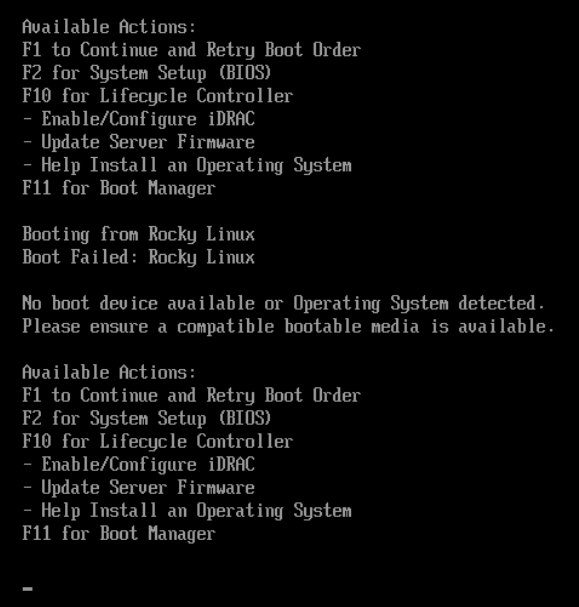
No Boot Device Available or Operating System Detected error

Cause

This issue is triggered when the Controller Enable (CC.EN) interrupt is received from the host system (UEFI). In response, the firmware invokes the Resume Background Operations routine within the RAID module.
If this routine is performed while the RAID module is performing Disk Data Format (DDF) read operations on physical drives, it disrupts the RAID state machine. The namespace table is not updated as expected, resulting in the system’s inability to detect the boot device.

Resolution

A firmware update addressing this issue is scheduled for release by mid to late August 2025.
For 16G platforms, the resolved firmware version is 2.1.13.2037.
For 17G platforms, the resolved firmware version is 2.2.13.2037.


Workaround:
If the error occurs, perform a warm system reboot. On subsequent warm boot, the system should correctly recognize the boot device and proceed as normal.

Note: A cold reboot may still cause the issue.


Affected Products

Storage Adapters & Controllers, Boot Optimized Server Storage (BOSS), PowerEdge C6615, PowerEdge C6620, PowerEdge HS5610, PowerEdge HS5620, PowerEdge MX760c, PowerEdge R260, PowerEdge R360, PowerEdge R470, PowerEdge R570, PowerEdge R660 , PowerEdge R660xs, PowerEdge R6615, PowerEdge R6625, PowerEdge R670, PowerEdge R6715, PowerEdge R6725, PowerEdge R760, PowerEdge R760XA, PowerEdge R760xd2, PowerEdge R760xs, PowerEdge R7615, PowerEdge R7625, PowerEdge R770, PowerEdge R770AP, PowerEdge R7715, PowerEdge R7725, PowerEdge R7725xd, PowerEdge R860, PowerEdge R960, PowerEdge T160, PowerEdge T360, PowerEdge T560, PowerEdge XE7740, PowerEdge XE7745, PowerEdge XE8640, PowerEdge XE9640, PowerEdge XE9680, PowerEdge XE9680L, PowerEdge XE9685L, PowerEdge XR5610, PowerEdge XR7620, PowerEdge XR8610t, PowerEdge XR8620t ...
Article Properties
Article Number: 000342517
Article Type: Solution
Last Modified: 03 Sept 2025
Version:  3
Find answers to your questions from other Dell users
Support Services
Check if your device is covered by Support Services.