ECS:如何在本地電腦上為啟用 TLS/SSL 的應用程式安裝憑證
Summary: 本知識文章提供逐步指南,說明如何在本機上安裝和設定 SSL/TLS 憑證,以便為 S3 相容儲存服務等應用程式啟用安全通訊。它涵蓋了憑證格式、信任存放區組態和驗證步驟,以確保能與支援 TLS/SSL 的工具和環境整合。
This article applies to
This article does not apply to
This article is not tied to any specific product.
Not all product versions are identified in this article.
Instructions
- 透過命令行介面 (CLI) 存取 ECS 節點,然後使用下列命令前往 ECS 憑證工具目錄:
admin@ecsnode2:~> cd ecs_certificate_tool-1.7
注意:如果該工具在您的節點上不可用,請參閱相關的 KB 以取得安裝指示:ECS:資料與管理 SSL 憑證工具
- 使用以下命令列出可用檔案。然後,下載資料憑證檔案 (通常使用
.crt分機):
admin@ecsnode2:~/ecs_certificate_tool-1.7> ls -lrt
total 72
-rwxr-xr-x  1 admin users  1025 Sep 24  2021 config.ini
drwxr-xr-x 18 admin users  4096 Sep 24  2021 libs
-rwxr-xr-x  1 admin users 49912 Apr 29  2022 ecs_certificate_tool.py
drwxr-xr-x  2 admin users    34 Jul  9  2024 logs
drwxr-xr-x  2 admin users  4096 Jan 20  2025 generated_files
-rwxr-xr-x  1 admin users     0 Mar 12  2025 privkey.pem
-rwxr-xr-x  1 admin users    21 Mar 12  2025 gregtest.txt
-rwxr-xr-x  1 admin users    21 Mar 12  2025 gregtest2.txt

admin@ecsnode2:~/ecs_certificate_tool-1.7> cd generated_files
admin@ecsnode2:~/ecs_certificate_tool-1.7/generated_files> ls -lrt
total 24
-rwxr-xr-x 1 admin users 1358 Jan 20  2025 CKM0xxxxxxxxxx-data.csr
-rwxr-xr-x 1 admin users 1675 Jan 20  2025 CKM0xxxxxxxxxx-data_private.key
-rwxr-xr-x 1 admin users 1663 Jan 20  2025 CKM0xxxxxxxxxx-data-ssc.crt
-rwxr-xr-x 1 admin users 1907 Apr 15 19:25 CKM0xxxxxxxxxx-management-ssc.crt
-rwxr-xr-x 1 admin users 1675 Apr 16 11:11 CKM0xxxxxxxxxx-management_private.key
-rwxr-xr-x 1 admin users 1602 Apr 16 11:11 CKM0xxxxxxxxxx-management.csr
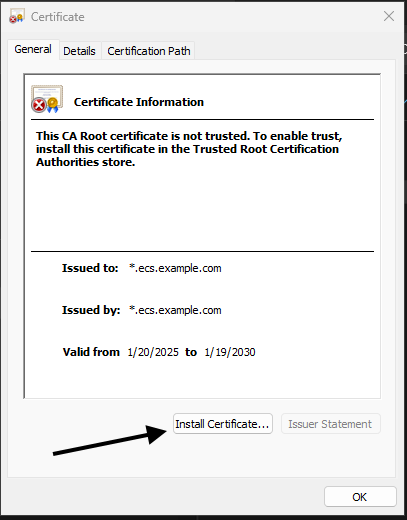
- 下載檔案後,在近端機器上找到它。連按兩下認證檔案 (範例:
.crt或.pem) 將開啟憑證安裝精靈,然後按一下安裝。

- 在「憑證安裝精靈」中,選取「本機」的憑證安裝選項,然後按一下「下一步」以繼續。

- 在「憑證匯入精靈」中,按一下「將所有憑證放入下列存放區」,然後按一下「瀏覽」。
從證書存儲清單中,選擇“受信任的根證書頒發機構”,單擊“確定”,然後按兩下一步繼續。
此步驟可確保將證書放置在受信任的根存儲中,從而使系統能夠將其識別為受信任的頒發機構。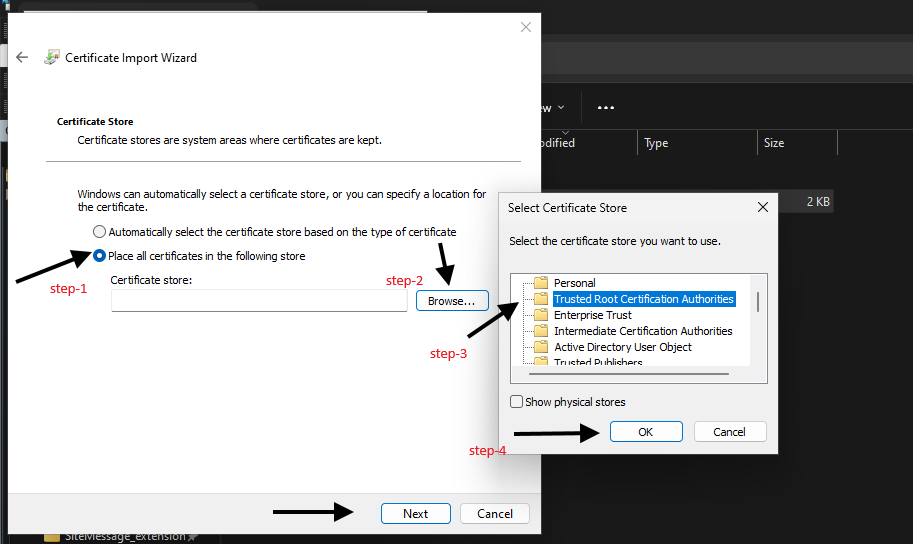
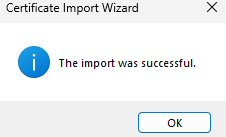
- 按一下「完成」以完成憑證安裝。安裝后,您的系統將信任該證書,您現在可以安全地使用支援 TLS/SSL 的應用程式,例如與 S3 相容的工具。
證書現在是受信任的根存儲的一部分,可啟用加密通信而不會產生信任錯誤。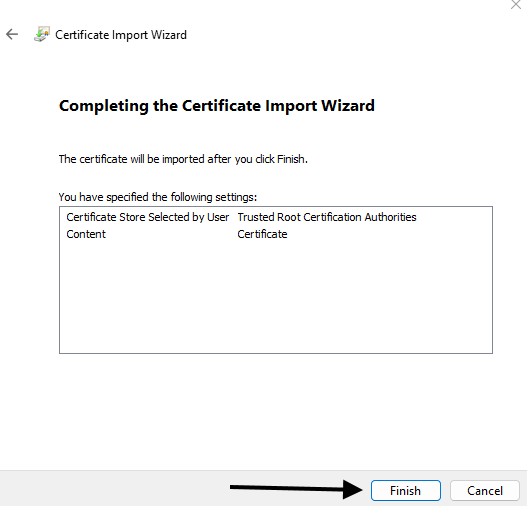
Affected Products
ECS Appliance, ECS Appliance Gen 3, ECS Appliance Hardware SeriesArticle Properties
Article Number: 000373920
Article Type: How To
Last Modified: 08 Oct 2025
Version: 1
Find answers to your questions from other Dell users
Support Services
Check if your device is covered by Support Services.