NVP-vProxy Triage Guide: NetWorker VMware Protection vProxy Triage and Log Overview
Summary: This KB is intended to aid backup administrators and support agents who are unfamiliar with the NetWorker VMware Protection (NVP) solution. It gives a general overview of vProxy components and logs, additional relevant articles are also provided. This KB can be used to perform initial diagnoses when engaging support to ensure that an accurate issue statement is provided. ...
This article applies to
This article does not apply to
This article is not tied to any specific product.
Not all product versions are identified in this article.
Instructions
GETTING STARTED
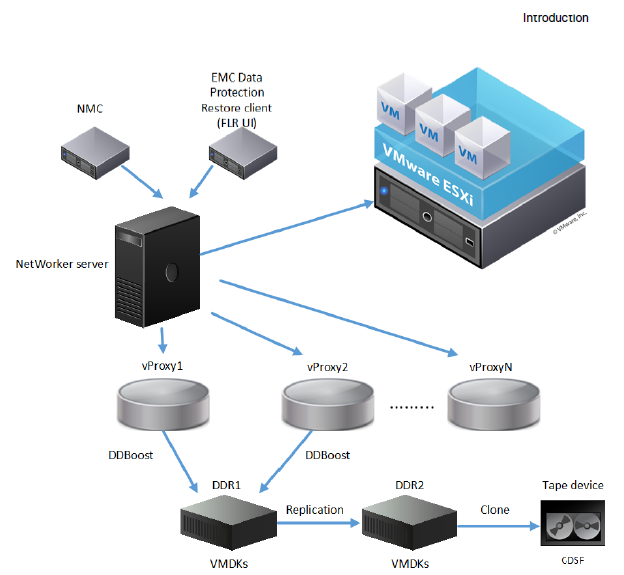
NVP-vProxy stands for NetWorker VMware Protection with the vProxy Appliance. This appliance is used to backup and restore virtual machines with NetWorker. Backup data is stored on the Data Domain target device. It can also be cloned to disk or tape devices.
This article outlines how to approach initial analysis of an issue with the NVP-vProxy solution.
ISSUE DETAILS
In order to generate a complete problem description, address the following questions:
- What operation is being attempted which is not working?
- Is the issue consistent or intermittent?
- If intermittent, is there a known trigger?
- Did this work better before?
- When did the issue first occur (and if known, what changed)?
- What is the precise expected behavior and what is this expectation based on?
- Times of occurrences and observed behavior trend
- Does the issue happen only at times of heavy load on the backup environment or backups of a large group of Virtual Machines (VM)?
- What is the scope of the issue (all policies or some policies, all VMs or some VMs)?
- What has been tried so far to fix and what conclusions have been drawn from this?
ENVIRONMENT DETAILS
- Full NetWorker server version+build and operating system platform.
- vProxy appliance version (In NMC under Devices->VMware Proxies).
- Overview of how many vProxies are in use.
- ESXi and vCenter versions are in use.
- Name of VM being backed up or recovered that is experiencing issues.
- Target media for these backups; including device name and DDOS version.
PROXY HEALTHCHECK
The ProxyHC tool was developed to help diagnose and correct some issues which may be observed when using the NVP vProxy appliance:
NVP-vProxy: How to use health check tool ProxyHC on vProxy appliance
LOG COLLECTION
NOTE: See "Additional Info" section for enabling debug options on NVP vProxy. For most initial diagnosis debug is not required; however, debug may be requested if standard logging is determined to be insufficient.
Log collection processes are detailed in: NVP-vProxy: Log Collection Processes for VMware Protection Issues
VMware INVENTORYING ISSUES
The NetWorker server performs an inventory process (nsrvim) of the NetWorker Server Resource (NSR) Hypervisor resources added to the NetWorker server. This process completes:
- Every 15 minutes (by default),
- At the start of any VMware Protection policy
- During any VM restore operation initiated from the NetWorker Management Console (NMC).
- During a VMware View refresh operation from the NMC or NetWorker Web User Interface (NWUI)
The nsrvim process is logged in the NetWorker server daemon.raw:
Linux: /nsr/logs/daemon.raw
Window (Default): C:\Program Files\EMC NetWorker\nsr\logs\daemon.raw
NetWorker: How to use nsr_render_log
Inventory processes are also logged in the following locations on the NetWorker server.
| Log Path | Purpose |
|
Linux: |
Inventory session details. |
|
Linux: /opt/nsr/vproxy/logs/nsrvisd/nsrvisd-daemon.log |
nsrvisd service log. |
vPROXY UPGRADE ISSUES
The following logs are only applicable when the vProxy is upgraded using the nsrvproxy_mgmt commands on the NetWorker server.
NVP vProxy: How To Upgrade the NVP vProxy Appliance Using nsrvproxy_mgmt
| Log Path | Purpose |
Linux: /nsr/logs/adhoc/nsrvproxy_mgmt/<job-uuid>.logWindows (Default): C:\Program Files\EMC NetWorker\nsr\logs\adhoc\nsrvproxy_mgmt\<job-uuid>.log |
vProxy management job log is created during the redeployment of the associated vProxy. |
Linux: /nsr/logs/adhoc/nsrvproxy_mgmt/vproxy_upgrade_sessio n__<jobuuid>Windows (Default): C:\Program Files\EMC NetWorker\nsr\logs\adhoc\nsrvproxy_mgmt\vproxy_upgrade_session__<jobuuid> |
Associated nsrvisd log file is created during redeployment of the vProxy. |
Linux: /nsr/logs/adhoc/nsrvproxy_mgmt/ProxySessions-<session-uuid>.logWindows (Default): C:\Program Files\EMC NetWorker\nsr\logs\adhoc\nsrvproxy_mgmt\ProxySessions-<session-uuid> .log |
Associated ProxySessions log file is created during redeployment of the vProxy. |
When a vProxy is redeployed manually from VMware, these logs are not generated.
REGISTRATION ISSUES:
Start on the NetWorker server daemon.raw:
Linux: /nsr/logs/daemon.raw
Window: C:\Program Files\EMC NetWorker\nsr\logs\daemon.raw
NetWorker: How to use nsr_render_log
On the vProxy appliance: /opt/emc/vproxy/runtime/logs/vrapid/vrapid-engine.log
COMMUNICATION ISSUES
The following KB can be used to identify port requirements for NetWorker VMware Protection and provides troubleshooting procedures for testing port connectivity in the environment:
NVP vProxy: Troubleshooting Network Connectivity For Backup and Restore Operations
BACKUP ISSUES:
Start on the NetWorker server with the policy logs:
Linux: /nsr/logs/policy/policy_name
Window (Default): C:\Program Files\EMC NetWorker\logs\policy\policy_name
vProxy Backup (log overview):
/opt/emc/vproxy/runtime/logs/vbackupd/opt/emc/vproxy/runtime/logs/recycle/vbackupd/DATE(logs moved here after job has completed or failed)
| Log Name | Function |
<session-uuid>.log |
Backup Session Log |
<daemon>-engine.log |
vbackupd service engine log |
<daemon>-snapmgr.log |
VMware Snapshot Manager log |
<daemon>-boost.log |
DD Boost session log |
<daemon>-vddk.log |
VMware Virtual Disk Development Kit (VDDK) session log |
Troubleshooting Common Backup Errors:
- NetWorker: NVP vProxy Troubleshooting VM Backup and Restore Performance and Throughput
- NVP vProxy: VM backups failing with "no matching devices for save of client 'vCenter Name': Check storage nodes, device, or pools"
- NVP vProxy: (Troubleshooting Guide) Backups fail with "NSR VMware proxy is not available for datastores"
- NVP vProxy: VM backups fail with "VDDK Error 13: You do not have access rights to this file" - Troubleshooting Guide
- NVP vProxy: Troubleshooting VMware Snapshot Issues during NetWorker backups.
RECOVERY ISSUES:
On the NetWorker server:
| Log Path | Purpose |
Linux: /nsr/logs/recover/SessionName_Date.log Windows (Default): C:\Program Files\EMC NetWorker\nsr\logs\recover\SessionName_Date.log |
Saved recover session logs from NMC recover wizard. |
|
Linux:
|
FLR mounts, browse, and recover session logs when the FLR is performed from the Dell Data Protection Restore Client (DPRC). |
Linux: /nsr/logs/adhoc/nsrvproxy_flr_app_recoverWindows (Default): C:\Program Files\EMC NetWorker\nsr\logs\adhoc\nsrvproxy_flr_app_recover |
MSVMAPPAGENT (SQL) restores performed from the Dell Data Protection Restore Client (DPRC). |
Linux: /nsr/logs/restapi/restapi.logWindows (Default): C:\Program Files\EMC NetWorker\nsr\logs\restapi\restapi.log |
NetWorker REST Application Programming Interfaces (API) log |
Linux: /nsr/authc/logs/flr-server.log Windows (Default): C:\Program Files\EMC NetWorker\nsr\authc-server\tomcat\logs\flr-server.log |
Dell Data Protection Restore Client (DPRC) logs |
On the vProxy appliance used for recovery (log overview):
/opt/emc/vproxy/runtime/logs/vrecoverd//opt/emc/vproxy/runtime/logs/recycle/vrecoverd/DATE(logs moved here after job has completed or failed)/opt/emc/vproxy/runtime/logs/vflrd/opt/emc/vproxy/runtime/logs/recycle/vflrd/DATE(logs moved here after job has completed or failed)
| Log Name | Function |
<daemon>-engine.log |
vrecoverd or vflrd service log. |
<daemon>-boost.log |
DD Boost session log |
<daemon>-vddk.log |
VMware VDDK session log |
mountsessionnumber.log |
FLR Mount session log |
browsesessionnumber.log |
FLR Browse session log |
Target VM Logs:
Linux:/opt/emc/vproxyra/logs/vflragentd/vflragentd-agent.log
Windows (Default): C:\Program Files (x86)\EMC\vProxy FLR Agent\logs\vflragentd\vflragentd-agent.log
MSVMAPPAGENT LOGS:
The following section provides location information for all logs associated with SQL application-consistent data protection.
In order to increase the debug level for SQL application-consistent virtual machine (MSVMAPPAGENT) backups, use dbgcommand, For example, dbgcommand -p <nsrd-pid> Debug=9
Once the debugging session completes, reset the debug level of nsrd to zero by running dbgcommand <nsrd-pid> Debug=0
MSVMAPPAGENT (VM) logs:
Logs related to MSVMAPPAGENT operations are found in the following locations on the SQL VM:
| Log Path | Purpose |
C:\Program Files\DPSAPPS\MSVMAPPAGENT\logs\msvmagent_discovery.log |
Discovery log |
C:\Program Files\DPSAPPS\MSVMAPPAGENT\logs\msvmcatsnap.log |
FULL backup |
C:\Program Files\DPSAPPS\MSVMAPPAGENT\logs\msvmagent_appbackup.log |
Transaction log backup |
C:\Program Files\DPSAPPS\MSVMAPPAGENT\logs\msvmagent_snapshotrestore.log |
Restore of FULL backup. |
C:\Program Files\DPSAPPS\MSVMAPPAGENT\logs\msvmagent_apprestore.log |
Restore of Transaction log backup. |
Logs on the NetWorker server:
/nsr/logs/adhoc/nsrvproxy_flr_app_recover |
Dell Data Protection Restore Client (DPRC). |
NETWORKER SERVER LOGS:
NetWorker: How to Use the NSRGet NetWorker Data Collection Tool
Additional Information
- Latest NVP-vProxy knowledge articles
- NVP vProxy: NetWorker vProxy Version Information
- NetWorker VMware Integration Guide, available through: https://www.dell.com/support/product-details/product/networker/docs
- NVP vProxy: Understanding VMware VM backup levels shown in NetWorker
- NetWorker VMware Protection (NVP)-vProxy: How to Enable Debug Logging
- (VMware) Location of vCenter Server log files

Affected Products
NetWorkerProducts
NetWorker FamilyArticle Properties
Article Number: 000022016
Article Type: How To
Last Modified: 12 Jan 2026
Version: 13
Find answers to your questions from other Dell users
Support Services
Check if your device is covered by Support Services.