NVP vProxy: Troubleshooting VMware Snapshot Issues during NetWorker backups.
Summary: This KB is intended as a reference for NetWorker support and Administrators regarding Virtual Machine (VM) backups that are performed through the NetWorker VMware Protection (NVP) vProxy appliance. VM backups fail with a snapshot-related error. ...
This article applies to
This article does not apply to
This article is not tied to any specific product.
Not all product versions are identified in this article.
Symptoms
- VMware VMs are protected through the NetWorker VMware Protection (NVP) vProxy appliance.
- Backups fail to create a VMware snapshot. There are a few variations of snapshot errors that can appear; nearly all can be addressed through following this KB.
- VM backups fail due to left over snapshots which were not cleaned up in the VMware environment.
Logs:
NetWorker server:
The backup action log does not provide any comprehensive details about the VM backup failures and only reports that the action has failed. It will state which VM backups failed. Check the policy logs on the NetWorker server, there are session logs containing the VM name:
Linux: /nsr/logs/policy/POLICY-NAME/WORKFLOW-NAME/####-VM-NAME-DATE.log
Windows: C:\Program Files\EMC NetWorker\nsr\policy\POLICY-NAME\WORKFLOW-NAME\####-VM-NAME-DATE.log
NOTE: These session logs are the same information which can be found on the vProxy appliance
vbackupd logs, check for any message regarding failed snapshot creation.
vProxy Appliance:
Access the vProxy appliance performed the VM backup using the admin account over SSH.
After the VM backup has completed or failed, the session log is moved to the following location:
/opt/emc/vproxy/runtime/logs/recycle/vbackupd/DATE/
NOTE: These are the same session logs which can be found on the NetWorker server, as mentioned above.
An example of the snapshot messaging seen in the backup session log:
YYYY-MM-DDTHH:mm:SS INFO:   [@(#) Build number: 39] Creating snapshot of virtual machine ...
YYYY-MM-DDTHH:mm:SS INFO:   [@(#) Build number: 39] Create snapshot request succeeded.
YYYY-MM-DDTHH:mm:SS INFO:   [@(#) Build number: 39] Found snapshot "snapshot-4301".
YYYY-MM-DDTHH:mm:SS INFO:   [@(#) Build number: 39] Set custom attribute 'Dell EMC vProxy Cleanup Descriptor' value for object vm-1011 to '{"DataMover":"","SessionType":"BackupVmSessions","SessionUuid":"e282db86-a1b3-4599-ba97-89b5625df0e0","SessionStartTime":"2024-02-29T03:59:59Z","VmMORef":"vm-1011","VmName":"win-client02","VProxyMORef":"vm-4214","SnapshotMORef":"snapshot-4301","VmdkBaseFileNames":["","[esx02-datastore] win-client02/win-client02.vmdk"]}'.
YYYY-MM-DDTHH:mm:SS INFO:   [@(#) Build number: 39] Remove snapshot request accepted by Snapshot Manager.
YYYY-MM-DDTHH:mm:SS INFO:   [@(#) Build number: 39] Sent snapshot removal.
The vProxy also has a
snapmngr log which can be found under:
/opt/emc/vproxy/runtime/logs/vbackupd/vbackupd-snapmgr.log
NOTE: This log contains messages about snapshot requests sent to VMware: creation, deletion, and consolidation.
An example of the corresponding
vbackupd-snapmgr.log:
YYYY-MM-DDTHH:mm:SS NOTICE: Created snapshot 'NetWorker Backup Snapshot' (snapshot-4301) on 'vcsa.amer.lan' for virtual machine 'win-client02' (vm-1011) in 1.125928806s.
YYYY-MM-DDTHH:mm:SS NOTICE: Removed snapshot 'snapshot-4301' from VM 'win-client02' on vCenter 'vcsa.amer.lan' in 2.266872212s.
YYYY-MM-DDTHH:mm:SS INFO:   Found virtual machine 'win-client02' with MORef 'vm-1011'.
YYYY-MM-DDTHH:mm:SS NOTICE: Consolidated disks of VM 'snapshot-4301 (win-client02)' on vCenter 'vcsa.amer.lan' in 6.983942ms.
YYYY-MM-DDTHH:mm:SS NOTICE: Snapshot 'snapshot-4301' of virtual machine 'win-client02' (vm-1011) was removed.
VMware:
The VM's vmware.log file includes messaging regarding VMware's processing of the VM snapshot create, delete, and consolidate requests. This log can be accessed from the vSphere web user interface. The log file is contained within the VM's folder on the datastore:
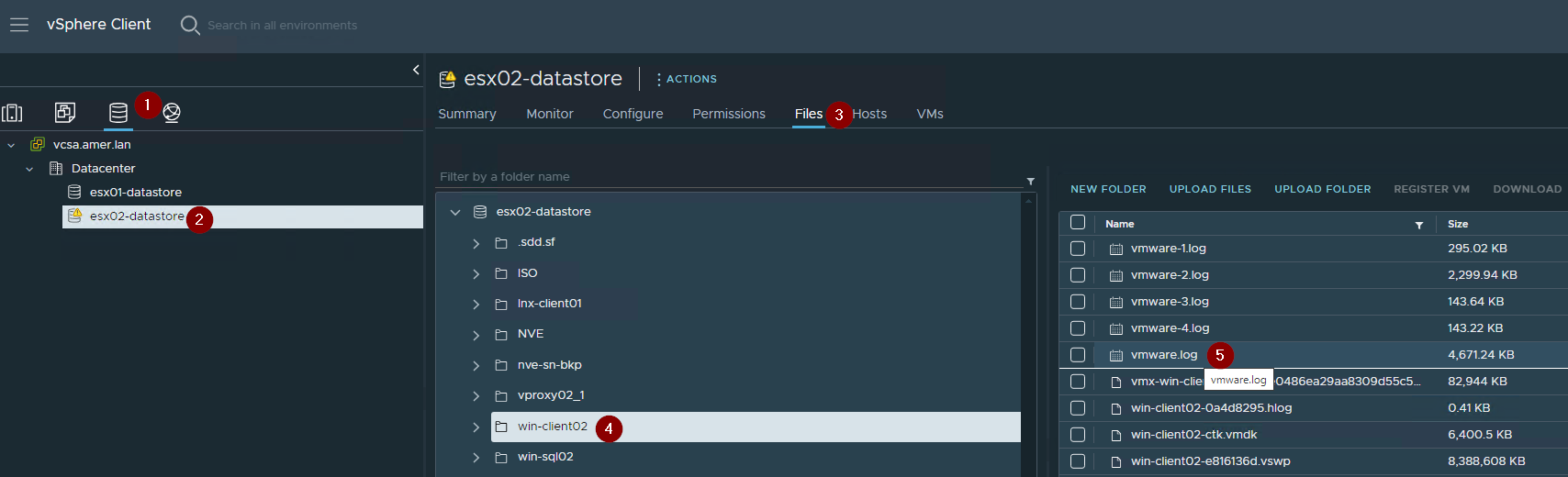
An example of the type of logging seen during NetWorker VM backups:
YYYY-MM-DDTHH:mm:SS In(05) vmx - VigorTransportProcessClientPayload: opID=6c61ca63-a-ab35 seq=1177113: Receiving Snapshot.Take request.
YYYY-MM-DDTHH:mm:SS In(05) vmx 6c61ca63-a-ab35 SnapshotVMX_TakeSnapshot start: 'NetWorker Backup Snapshot', deviceState=0, lazy=0, quiesced=0, forceNative=0, tryNative=1, saveAllocMaps=0
YYYY-MM-DDTHH:mm:SS In(05) vmx 6c61ca63-a-ab35 VVolObjNotifySnapshotPrepare: Changing state to VEC_SNAP_PREPARE_IN_PROG.
YYYY-MM-DDTHH:mm:SS In(05) vmx 6c61ca63-a-ab35 SNAPSHOT: SnapshotPrepareTakeDoneCB: Prepare phase complete (The operation completed successfully).
YYYY-MM-DDTHH:mm:SS In(05) vcpu-0 6c61ca63-a-ab35 SnapshotVMXTakeSnapshotWork: Transition to mode 0.
YYYY-MM-DDTHH:mm:SS In(05) vcpu-0 6c61ca63-a-ab35 SNAPSHOT: SnapshotConfigInfoOpenVmsd: Creating new snapshot dictionary, '/vmfs/volumes/64a73f34-81454bf4-704e-00505606578d/win-client02/win-client02.vmsd.usd'.
YYYY-MM-DDTHH:mm:SS In(05) vcpu-0 6c61ca63-a-ab35 SNAPSHOT: SnapshotDumperOpenFromInfo: Creating checkpoint file /vmfs/volumes/64a73f34-81454bf4-704e-00505606578d/win-client02/win-client02-Snapshot31.vmsn
YYYY-MM-DDTHH:mm:SS In(05) vcpu-0 6c61ca63-a-ab35 VVolObjNotifySnapshot: isEnabled: 1, state: 1
YYYY-MM-DDTHH:mm:SS In(05) vcpu-0 6c61ca63-a-ab35 VVolObjNotifySnapshot: State changed to VEC_SNAP_SNAPSHOT_IN_PROG.
YYYY-MM-DDTHH:mm:SS In(05) vcpu-0 6c61ca63-a-ab35 SnapshotVMXTakeSnapshotWork: Transition to mode 1.
YYYY-MM-DDTHH:mm:SS In(05) vcpu-0 6c61ca63-a-ab35 SnapshotVMXTakeSnapshotComplete: Done with snapshot 'NetWorker Backup Snapshot': 31
YYYY-MM-DDTHH:mm:SS In(05) vcpu-0 6c61ca63-a-ab35 VVolObjNotifySnapshotDone: isEnabled: 1
YYYY-MM-DDTHH:mm:SS In(05) vcpu-0 6c61ca63-a-ab35 VigorTransport_ServerSendResponse opID=6c61ca63-a-ab35 seq=1177113: Completed Snapshot request.
YYYY-MM-DDTHH:mm:SS In(05) vmx - VigorTransportProcessClientPayload: opID=2d4be388-e6-ad11 seq=1177390: Receiving Snapshot.Delete request.
YYYY-MM-DDTHH:mm:SS In(05) vmx 2d4be388-e6-ad11 SNAPSHOT: SnapshotDeleteWork '/vmfs/volumes/64a73f34-81454bf4-704e-00505606578d/win-client02/win-client02.vmx' : 31
YYYY-MM-DDTHH:mm:SS In(05) vmx 2d4be388-e6-ad11 VigorTransport_ServerSendResponse opID=2d4be388-e6-ad11 seq=1177390: Completed Snapshot request.
YYYY-MM-DDTHH:mm:SS In(05) vmx - VigorTransportProcessClientPayload: opID=2d4be388-e6-ad11 seq=1177391: Receiving Snapshot.Consolidate request.
YYYY-MM-DDTHH:mm:SS In(05) vmx 2d4be388-e6-ad11 SnapshotVMX_Consolidate: Starting online snapshot consolidate operation.
YYYY-MM-DDTHH:mm:SS In(05) vmx 2d4be388-e6-ad11 Turning on snapshot info cache. VM=win-client02.vmx.
YYYY-MM-DDTHH:mm:SS In(05) vmx 2d4be388-e6-ad11 SNAPSHOT: Turning on snapshot disk cache.
YYYY-MM-DDTHH:mm:SS In(05) vmx 2d4be388-e6-ad11 SnapshotESXCombineProgressTotal: Snapshot consolidation progress: 0
YYYY-MM-DDTHH:mm:SS In(05) vmx - SnapshotESXCombineProgressTotal: Snapshot consolidation progress: 0
YYYY-MM-DDTHH:mm:SS In(05) vmx - SnapshotESXCombineProgressTotal: Snapshot consolidation progress: 0
YYYY-MM-DDTHH:mm:SS In(05) vmx - SnapshotESXCombineProgressTotal: Snapshot consolidation progress: 7
YYYY-MM-DDTHH:mm:SS In(05) vmx - SnapshotESXCombineProgressTotal: Snapshot consolidation progress: 7
YYYY-MM-DDTHH:mm:SS In(05) vmx - SnapshotESXCombineProgressTotal: Snapshot consolidation progress: 9
YYYY-MM-DDTHH:mm:SS In(05) vmx - SnapshotESXCombineProgressTotal: Snapshot consolidation progress: 10
YYYY-MM-DDTHH:mm:SS In(05) vmx - SnapshotESXCombineProgressTotal: Snapshot consolidation progress: 10
YYYY-MM-DDTHH:mm:SS In(05) vcpu-0 - VigorTransport_ServerSendResponse opID=2d4be388-e6-ad11 seq=1177391: Completed Snapshot request.
YYYY-MM-DDTHH:mm:SS In(05) vcpu-0 - Turning off snapshot info cache.
YYYY-MM-DDTHH:mm:SS In(05) vcpu-0 - Turning off snapshot disk cache.
YYYY-MM-DDTHH:mm:SS In(05) vcpu-0 - ConsolidateEnd: Snapshot consolidate complete: The operation completed successfully (0).
Cause
At the start of a VM backup, the vProxy appliance sends a snapshot request to the vCenter server. vCenter creates and manages snapshots. Any failures occur within VMware and are reported to NetWorker through the VMware API.
The cause of a snapshot or consolidation error can vary. See the Additional Notes field for some KBs specific to some known causes.
The cause of a snapshot or consolidation error can vary. See the Additional Notes field for some KBs specific to some known causes.
Resolution
NOTE: VMware support must be engaged to root cause any snapshot error or issue identified. This can be whether the issue is observed during snapshot creation, or when other issues are identified in the
snapmgr log which indicate problems during snapshot deletion or consolidation. Contact NetWorker support (if not done already) and any collaboration between VMware and NetWorker can be coordinated accordingly.
Here are some initial troubleshooting steps:
Logs:
Review the logs mentioned in the above Symptoms field for any indicators as to why the snapshot or consolidation operation failed.
Manual Snapshot Testing:
If VMware snapshots fail during a VM backup operation, VMware snapshot functionality should also be checked from the vSphere web client.
If the VM backup is a standard image-based backup, a quiesced snapshot is not needed. If the VM is a SQL VM performing MSVMAPPAGENT app consistent backups, a quiesced snapshot must be performed.
If the snapshot is created successfully, consolidate the VM and delete the VM snapshot from VMware vSphere. If the same snapshot error is observed on snapshots performed outside of NetWorker, contact VMware support for a root cause of the snapshot issue. Even if the manual snapshots are completing, other factors may be contributing to this; For example: VMware vCenter and Datastore/storage I/O when the snapshot was taken vs when the backup was performed.

VM File Cleanup
A Storage vMotion can also be performed on the VM to cleanup the VM files.
ProxyHC Cleanup
The ProxyHC utility can also be used to perform some cleanup of potential snapshot or disk-related issues if the following options are used: ./ProxyHC tasks disk cleanup
NVP-vProxy: How to use health check tool ProxyHC on vProxy appliance
NVP-vProxy: How to use health check tool ProxyHC on vProxy appliance
Additional Information
For an overview of VM snapshots, see VMware KB: Overview of virtual machine snapshots in vSphere
Snapshot Error Specific KBs:

- NVP vProxy: VM Backup fails with "snapshot has already been deleted or has not been completely created"
- NVP vProxy: VM backup fails with "Failed to get status of create snapshot task: Operation timed out"
- NVP-vProxy: Virtual Machine will fail to backup with "Unable to create snapshot of virtual machine: Failed to create snapshot."
- NetWorker vProxy backup fails with "Unable to create non-quiesced snapshot after a retry attempt: Detected an invalid snapshot configuration"
- NVP-vProxy: VM Loses Connection During Snapshot Removal Process.
- NVP-vProxy Triage Guide: NetWorker VMware Protection vProxy Triage and Log Overview
VMware:
Affected Products
NetWorkerProducts
NetWorker Family, NetWorker SeriesArticle Properties
Article Number: 000201426
Article Type: Solution
Last Modified: 29 Dec 2025
Version: 12
Find answers to your questions from other Dell users
Support Services
Check if your device is covered by Support Services.