AppSync: AppSync UI에서 고객은 디버그 옵션을 선택할 때 적용 버튼이 비활성화된 상태로 유지됨에 따라 로깅 모드를 디버그로 설정할 수 없습니다.
Summary: AppSync UI에서 고객은 디버그 옵션을 선택할 때 적용 버튼이 비활성화된 상태로 유지됨에 따라 로깅 수준을 디버그로 설정할 수 없었습니다.
This article applies to
This article does not apply to
This article is not tied to any specific product.
Not all product versions are identified in this article.
Symptoms
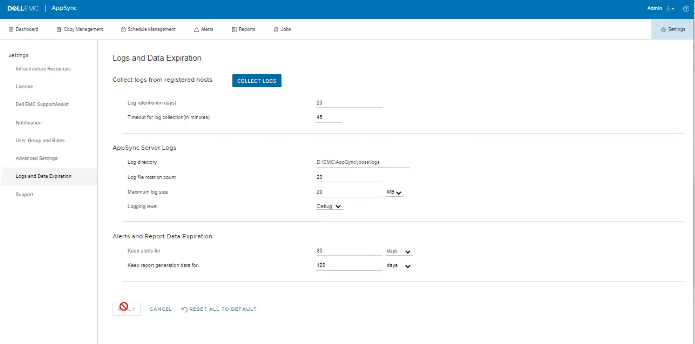
로그에 오류가 없지만 아래와 같이 UI에서 문제를 확인할 수 있습니다.
Cause
이 문제는 동일한 화면에서 고객이 "Timeout for log collection(분 단위)" 옵션 값을 45로 설정했기 때문에 유효하지 않습니다.
Resolution
"Timeout for log collection(분 단위)" 옵션의 값을 유효한 값인 90 및 120으로 설정합니다.
Additional Information
AppSync 4.5에서는 "Timeout for log collection(분)"에 대한 잘못된 값을 허용하지 않습니다.
유효한 값은 90~120일 수 있습니다.
유효한 값은 90~120일 수 있습니다.
Affected Products
Data Protection, Data Backup & Protection Software, AppSync, AppSyncArticle Properties
Article Number: 000203604
Article Type: Solution
Last Modified: 09 Sept 2025
Version: 8
Find answers to your questions from other Dell users
Support Services
Check if your device is covered by Support Services.