Enabling Built-In Camera on Dell P3424WEB, P2424HEB, and P2724DEB Monitors
Summary: Customers may contact Dell because the integrated camera is nonfunctional.
This article applies to
This article does not apply to
This article is not tied to any specific product.
Not all product versions are identified in this article.
Symptoms
Affected Products:
- Dell P3424WEB Monitor
- Dell P2424HEB Monitor
- Dell P2724DEB Monitor
Cause
The camera not being activated properly may be the cause of this issue.
Resolution
- Remove the sticker attached to the camera.
- Twist the camera mechanism counterclockwise to open the camera shutter.
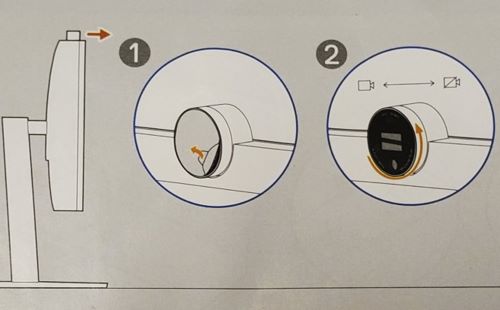
Affected Products
Dell P2424HEB, Dell P2724DEB, Dell P3424WEBArticle Properties
Article Number: 000218877
Article Type: Solution
Last Modified: 17 Apr 2025
Version: 5
Find answers to your questions from other Dell users
Support Services
Check if your device is covered by Support Services.