NVP vProxy: VM backups fail with VDDK Error 13 "You do not have access rights" when CBRC is enabled
Summary: NetWorker VMware Protection (NVP) vProxy Virtual Machine (VM) backups fail for one or more disks. The error returned is a generic VMware Disk Development Kit (VDDK) error "You do not have access rights to this file." This error can appear for several reasons; however, this KB focuses on when Content-Based Read Cache (CBRC) is configured in VMware. ...
This article applies to
This article does not apply to
This article is not tied to any specific product.
Not all product versions are identified in this article.
Symptoms
The VM backup session fails with the following error logged in the vProxy's /opt/emc/vproxy/runtime/logs/vbackupd/vbackupd-vddk.log:
YYYY-MM-DDTHH:mm:SS NOTICE: VDDK INFO VixDiskLib: There is no avaiable transport mode when attempting to open disk. Mounting 42104975-a9ce-e89a-57ec-eed07aaa4eac using transport hotadd failed : Failed to hot-add SCSI targets: Vmomi::MethodFault::Exception: Fault cause: vim.fault.GenericVmConfigFault
YYYY-MM-DDTHH:mm:SS NOTICE: VDDK INFO . at 6502.
YYYY-MM-DDTHH:mm:SS NOTICE: VDDK INFO VixDiskLib: VixDiskLib_OpenEx: Cannot open disk [DATASTORE_NAME] VM_NAME/VM_NAME.vmdk. Error 13 (You do not have access rights to this file) (Mounting 42104975-a9ce-e89a-57ec-eed07aaa4eac using transport hotadd failed : Failed to hot-add SCSI targets: Vmomi::MethodFault::Exception: Fault cause: vim.fault.GenericVmConfigFault
This error only appears when the VM is powered on. When the VM is powered off, hot-add backups are successful.
Alternatively, if the Network Block Device (NBD) transport mode is used, backups are successful.
Cause
The VMware ESXi host where the VM resides is configured with Content-Based Read Cache (CBRC). The VM is also configured with CBRC enabled.
The vCenter server's vpxd.log reports the following error when the vProxy tries to hot-add the disk during backups:
Location of vCenter Server log files

YYYY-MM-DDTHH:mm:SS error vpxd[4017950] [Originator@6876 sub=VmProv opID=77a6f80-01] Get exception while executing action vpx.vmprov.ReconfigureVm:
--> (vim.fault.GenericVmConfigFault) {
-->    faultMessage = (vmodl.LocalizableMessage) [
-->       (vmodl.LocalizableMessage) {
-->          key = "msg.disk.hotadd.digest.nomem",
-->          message = "CBRC cannot be hot-enabled on a disk unless the VM was powered-on with digest disks or cbrc.cacheEnable was set.",
-->       }
-->    ],
-->    reason = "CBRC cannot be hot-enabled on a disk unless the VM was powered-on with digest disks or cbrc.cacheEnable was set.",
-->    msg = "CBRC cannot be hot-enabled on a disk unless the VM was powered-on with digest disks or cbrc.cacheEnable was set."
--> }
YYYY-MM-DDTHH:mm:SS info vpxd[4017950] [Originator@6876 sub=VmProv opID=77a6f80-01] Workflow context:
--> (vpx.vmprov.ReconfigureContext) {
-->    cbData = (vmodl.KeyAnyValue) [
-->       (vmodl.KeyAnyValue) {
-->          key = "workflow.startTime",
-->          value = 11354949631767
-->       },
-->       (vmodl.KeyAnyValue) {
-->          key = "workflow.actionTiming",
-->          value = (vmodl.KeyAnyValue) [
-->             (vmodl.KeyAnyValue) {
-->                key = "vpx.vmprov.InvokePrechecks",
-->                value = "YYYY-MM-DDTHH:mm:SS"
-->             },
-->             (vmodl.KeyAnyValue) {
-->                key = "vpx.vmprov.CheckCompatibility",
-->                value = "YYYY-MM-DDTHH:mm:SS"
-->             },
-->             (vmodl.KeyAnyValue) {
-->                key = "vpx.vmprov.ReserveDirectory",
-->                value = "YYYY-MM-DDTHH:mm:SS"
-->             },
-->             (vmodl.KeyAnyValue) {
-->                key = "vpx.vmprov.InvokeCallbacks",
-->                value = "YYYY-MM-DDTHH:mm:SS"
-->             },
-->             (vmodl.KeyAnyValue) {
-->                key = "vpx.vmprov.ReconfigureVm",
-->                value = "YYYY-MM-DDTHH:mm:SS"
-->             }
-->          ]
-->       },
-->       (vmodl.KeyAnyValue) {
-->          key = "OCM.inited",
-->          value = true
-->       }
-->    ],
-->    configSpec = (vim.vm.ConfigSpec) {
-->       createDate = "YYYY-MM-DDTHH:mm:SS",
-->       files = (vim.vm.FileInfo) {
-->          vmPathName = "ds:///vmfs/volumes/67b62d67-8dbb8f29-52af-f4c7aa35600a/VPROXY_NAME/VPROXY_NAME.vmx",
-->       },
-->       deviceChange = (vim.vm.device.VirtualDeviceSpec) [
-->          (vim.vm.device.VirtualDeviceSpec) {
-->             operation = "add",
-->             device = (vim.vm.device.VirtualDisk) {
-->                key = -1102,
-->                backing = (vim.vm.device.VirtualDisk.FlatVer2BackingInfo) {
-->                   fileName = "ds:///vmfs/volumes/67b62d67-8dbb8f29-52af-f4c7aa35600a/VM_NAME/VM_NAME.vmdk",
CBRC uses digest-enabled disks to cache frequently read blocks. When CBRC is enabled:
- VMware restricts attaching these digest-enabled disks to another VM while the source VM is powered on.
- This restriction directly impacts hot add transport mode, which relies on attaching the source VM’s disks to the backup proxy VM.
Resolution
This issue is occurring outside of NetWorker. Use one of the following options:
Option One:
For VMware 8.0.3+, see: Cannot hot add CBRC (digest) disks to non-CBRC VMs in vSphere 8.0 Update 3, "CBRC cannot be hot-enabled on a disk..."
Option Two:
Consult the VMware Administrator to determine if CBRC must remain enabled on these VMs, or if it can be disabled to support hot-add backups. If necessary, engage with VMware support regarding the CBRC configurations.
Option Three:
Configure the backups of the CBRC VMs to use only Network Block Device (NBD) transport mode.
NOTE: The NBD transport mode uses the ESXi management network. NBD backup performance is expected to be poorer than hot-add. Large amounts of NBD traffic can congest the ESXi management network. See the NetWorker VMwar Integration Guide for additional information regarding backup transport modes.
- Isolate the VMs configured with CBRC into their own NetWorker protection group.
- Create a policy/workflow for the new CBRC-related group.
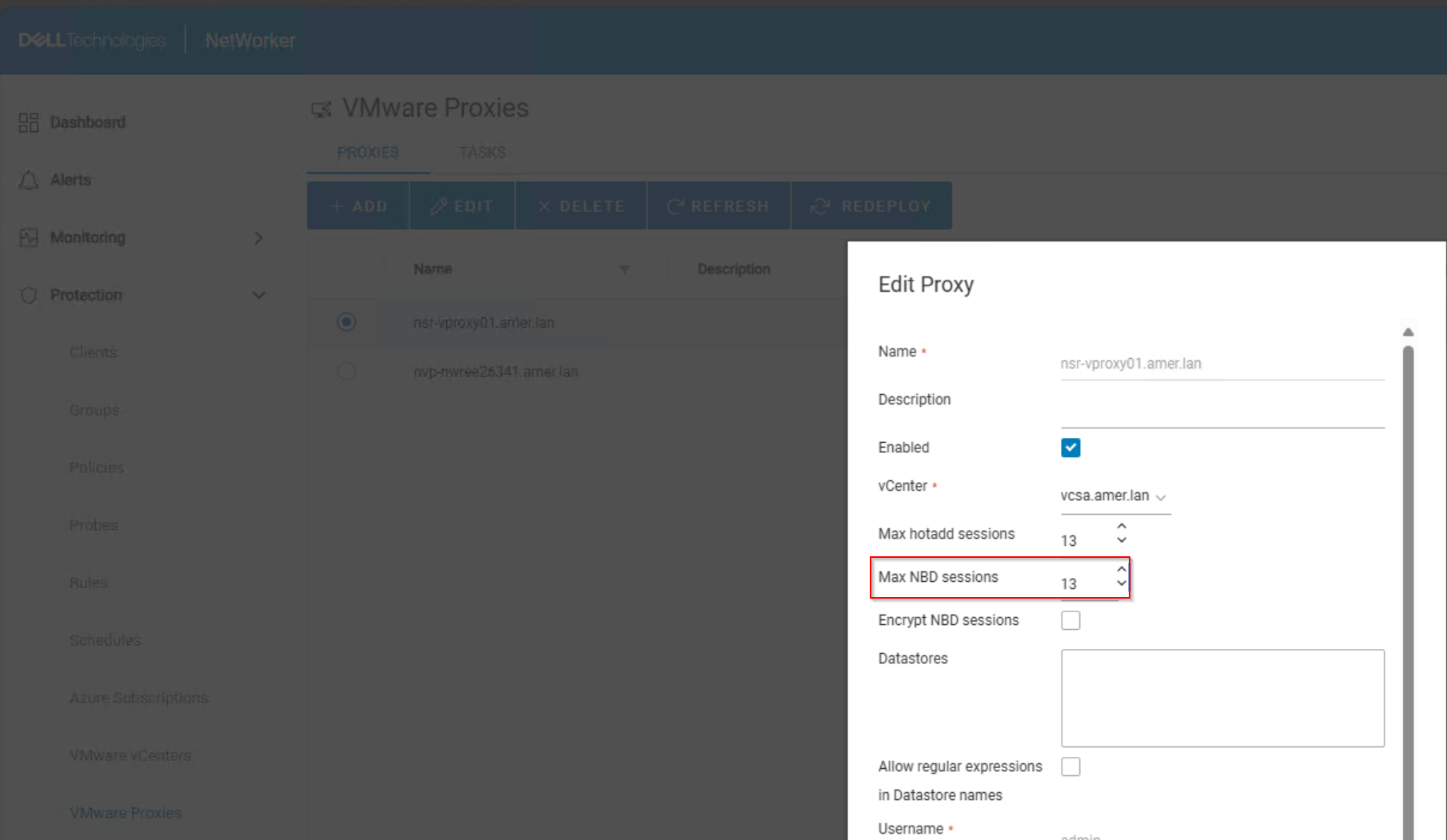
- Ensure that at least one of the vProxies on the NetWorker server has NBD sessions enabled:
NetWorker Management Console (NMC): Devices->VMware Proxies
NetWorker Web User Interface (NWUI): Protection->VMware Proxies
- Perform one of the following configuration options:
- (Preferred) Configure the backup action to only use NBD sessions.
- From the NetWorker Web User Interface (NWUI) open the backup action properties.
- In the VMware-Specific Configuration Options tab, set the Transport Mode to NBD:

- (Preferred) Configure the backup action to only use NBD sessions.
NOTE: This option is only available in the NetWorker Web User Interface (NWUI), for NetWorker 19.10 and later. This restricts VM backup sessions to NBD only. If multiple vProxies have NBD enabled, backups can use several vProxies to process sessions in parallel.
-
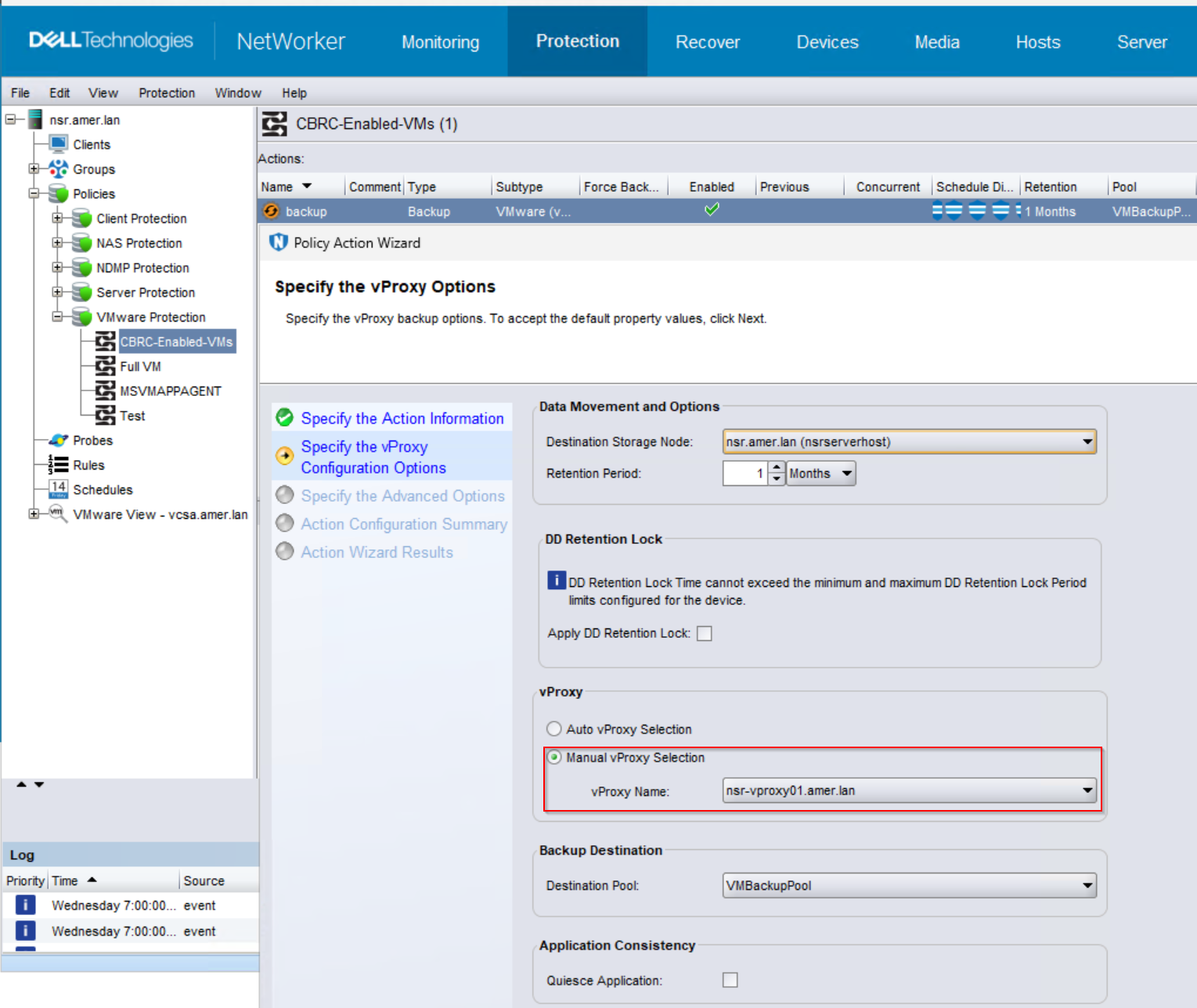
- Configure the backup action to use a specific vProxy with NBD sessions enabled.
- From the NMC or NWUI, open the CRBC-specific backup action and set the vProxy to "manual selection."
- Select the vProxy which was configured with NBD sessions only:
- Configure the backup action to use a specific vProxy with NBD sessions enabled.
Additional Information
There are many potential causes for VDDK Error 13. If CBRC is not configured, see: NVP vProxy: Troubleshooting VM backups fail with "VDDK Error 13: You do not have access rights to this file"
Affected Products
NetWorkerProducts
NetWorker FamilyArticle Properties
Article Number: 000320972
Article Type: Solution
Last Modified: 14 May 2025
Version: 2
Find answers to your questions from other Dell users
Support Services
Check if your device is covered by Support Services.