PowerEdge: Support for Integrated Dell Remote Access Controller 10 (iDRAC10)
Summary: This article provides the information about the Integrated Dell Remote Access Controller (iDRAC10).
This article applies to
This article does not apply to
This article is not tied to any specific product.
Not all product versions are identified in this article.
Instructions

Effective server systems management is built on four foundational pillars: Deploy, Update, Monitor, and Maintain. Deployment involves the discovery and configuration of physical components to ensure that they are ready for their intended use. Updating is critical to maintaining peak security and performance by keeping firmware, drivers, BIOS, and other system elements current. Monitoring enables proactive tracking of component health, helping to prevent failures and sustain optimal performance. Maintenance ensures that the server remains in top condition throughout its life cycle, fulfilling its operational purpose reliably. Powering these capabilities is the Integrated Dell Remote Access Controller 10 (iDRAC10). It brings embedded automation to Dell’s industry-leading servers—reducing manual IT workloads and allowing teams to focus on strategic initiatives.
iDRAC10 is built on top of the iDRAC9 legacy and is intended to provide multigenerational support.
- Agent-free local and remote embedded server management
- Automate with RESTful Application Programming Interface (API) with Distributed Management Task Force (DMTF) Redfish support
- Deploy, update, monitor, and maintain your server
Hardware:
PowerEdge servers leverage the Open Compute Project (OCP) recommendations for Data Center Modular Hardware solutions (DC-MHS). Within that server architecture, the iDRAC10 is a fundamental element on the Data Center Secure Content Module (DC-SCM). Base hardware fundamentals provide layered security management beyond its base in OpenBMC principles.
The new iDRAC10 introduces not only significant software enhancements but also notable hardware advancements over the previous generation. At the heart of the updated Dell integrated remote management controller, iDRAC10 features four cores operating at 1 GHz with a 64-bit architecture. Memory capacity has been doubled, now offering 2GB of DDR4, which enables improved performance and responsiveness. This iDRAC10 silicon feature set increases the calculated DMIPS performance to dramatically.
Key Capabilities:
In the latest release of iDRAC10, several key updates have been introduced to support the evolution toward Autonomous Infrastructure. Foundationally the software is built on OpenBMC with proprietary Dell Intellectual Property. These enhancements are designed to improve operational efficiency, resilience, and intelligence across modern IT environments:
-
Advanced Server Telemetry
iDRAC10 now delivers deeper and more granular telemetry data, enabling better insights for AIOps platforms and ecosystem observability tools. This empowers IT teams to monitor infrastructure health, plan and optimize performance, budget and monitor power usage, and streamline service delivery. iDRAC10 builds on the legacy of iDRAC9 and continues to expand industry-leading telemetry, supporting 24 distinct component telemetry mappings; within the server including CPUs, memories, drives, GPUs and DPUs, to name a few. iDRAC10 also features custom telemetry reporting tailoring data to the unique need of a data center operation for budgeting, monitoring, and real time analytics. -
Smarter Predictive Failure Detection and Auto-Remediation
Leveraging enhanced telemetry analytics and embedded intelligence, iDRAC10 can detect potential hardware failures earlier and more accurately. Combined with automated remediation capabilities, this reduces downtime and minimizes the need for manual intervention, ensuring smoother and more reliable operations. -
Delivering iDRAC speed reboot-less device support
Operational uptime and efficiency are a focus of iDRAC10's Lifecycle Management features. Going beyond monitoring, iDRAC10 continues to add more devices that are allowed for both scheduled and rebootless online updates for the addition of various server components. TheiDRAC10 rebootless update devices include the iDRAC itself, NVMe SSDs, PE Backplane, Chassis Manager, Heater Manager, the PERC controllers, and some Intel PCIe full featured GPUs, when installed on PowerEdge servers equipped with the necessary options.
All these advancements are aimed at delivering a more intelligent, secure, and autonomous infrastructure experience—laying the foundation for future-ready data centers and edge deployments.
What's new:
iDRAC is the heart of our Cyber Resilient Architecture. In addition, several key enhancements have been made to strengthen security, improve usability, and streamline licensing:
iDRAC10 Security Enhancements
-
iDRAC10 built in silicon improvements
-
iDRAC10 built on OpenBMC foundations
iDRAC10 is built upon OpenBMC. The iDRAC10's a key part of the DC-MHS modularity with the Secure Content Module (DC-SCM). The DC-SCM includes the iDRAC10, BIOS, and compute FPGA logic. These collective improvements in the silicon infrastructure allow for smarter predictive failure detection and auto remediation to benefit operator TCO and uptime goals. The iDRAC10 is based on Nuvoton Arbel silicon, which is FIPS 140-3 certified. -
Stronger algorithm support in iDRAC10 compared to iDRAC9
iDRAC10 has stronger and greater than 128-bit cryptography support across the solution. iDRAC10 features SHA-384 and SHA-512 authentication Secure Hash Algorithms IDRAC10 also includes quantum safe Advanced Encryption Standard privacy type AES-256 encryption, symmetric cryptography, an effective encryption algorithm. -
Dedicated integrated security enclave
iDRAC10 features the new integrated security enclave. This is an advanced embedded security enclave that is the heart of the PowerEdge server. The secure enclave is a dedicated silicon subsystem of iDRAC10, it manages cyber resiliency and all our designed for security principles.- Device-level attestation, custom Dell Root-of-Trust (RoT), and BIOS scanning and Encryption
Security is reinforced through a hardware-based Root-of-Trust, ensuring that the system boots securely and that firmware integrity is verified. Device-level and BIOS scanning with attestation and encryption further protect sensitive data, user data and maintains system integrity. - Bundled Security Licenses
iDRAC10 Enterprise and Datacenter license tiers are both bundled at initial sales time. This bundle includes the Secure Enterprise Key Management (SEKM) license, and the Secure Component Verification (SCV) license for advanced supply chain assurance. - Secure Enterprise Key Manager
The Secure Enterprise Key Manager (SEKM) is a licensed feature that allows users to leverage iDRAC10 to authenticate with Gemalto/SafeNet AT KeySecure Management Server through the Key Management Interoperability Protocol (KMIP). SEKM was first introduced in iDRAC9, and iDRAC10 delivers on additional improvements. - Secured Component Verification
A core element of Dell Technologies' security- enabled supply chain program is Secured Component Verification (SCV), now an integral part of the entire PowerEdge Server line. SCV enables end-users to validate that systems delivered are secure. Further that components and configurations set at the time of manufacture conform to the specifications set by the customer. Maintains integrity throughout the journey, from factory to data center.
- Device-level attestation, custom Dell Root-of-Trust (RoT), and BIOS scanning and Encryption
iDRAC10 A Refreshed User Interface
Beginning in September with version 1.20.60.50, the iDRAC10 has a newly enhanced, modular User Interface.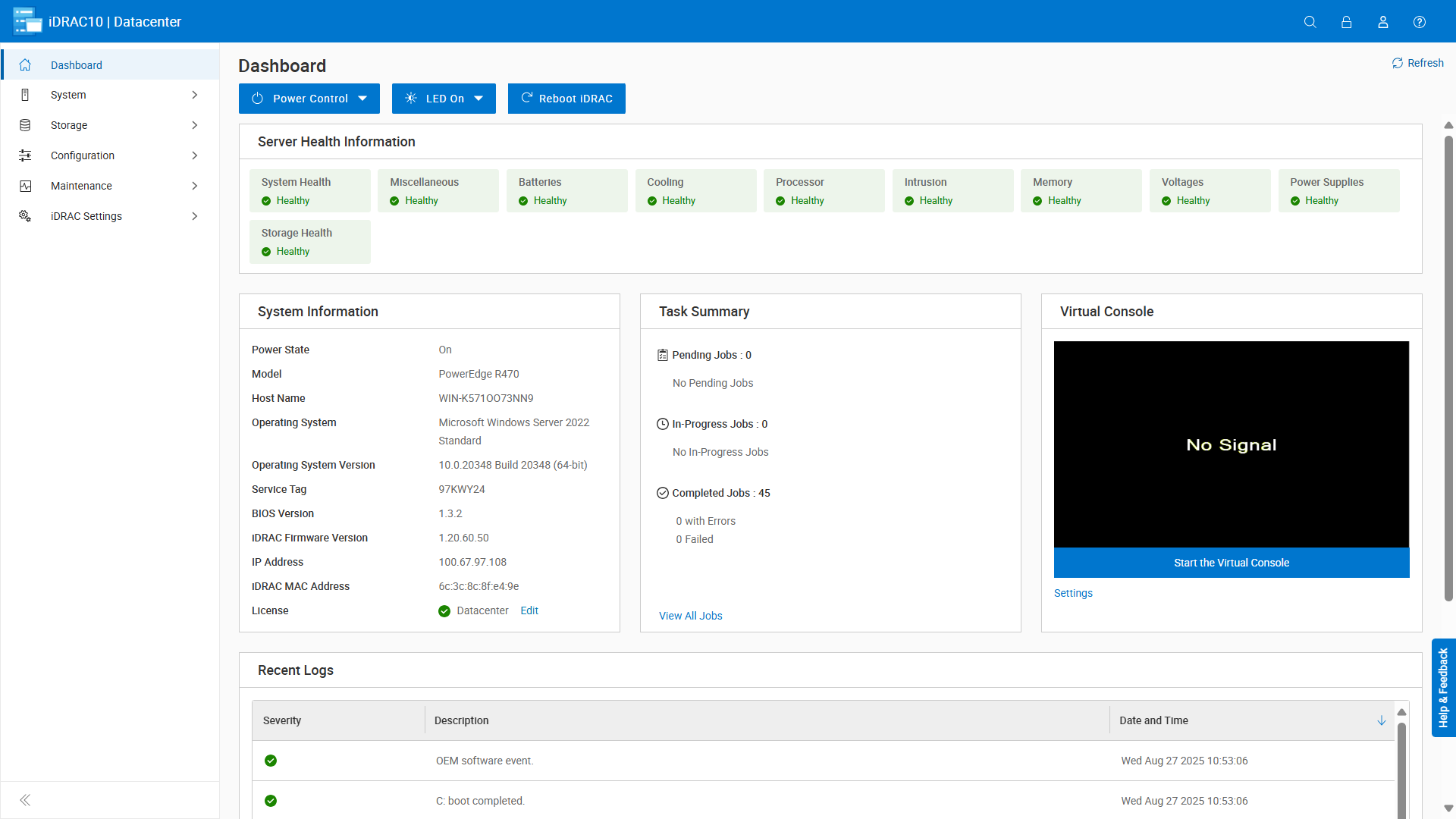
-
Consistent User Experience Across Dell Technologies ISG server products
This new ISG Developed Framework begins a new era that showcases a new UI. This new iDRAC10's UI delivers a unified look and feel that will be showcased across all Dell software platforms. The net benefit is simplifying user training and reducing friction for users managing diverse environments. -
Simplified Interface
Streamlined design elements make it easier to access key features and perform common tasks, improving overall efficiency and reducing the learning curve. -
Easier Navigation
Enhanced layout and intuitive workflows allow users to find and manage system settings more quickly, contributing to a more productive management experience.
New Simplified License Model
| Feature | Core | Enterprise | Datacenter* |
|---|---|---|---|
|
Interfaces |
|||
| iDRAC Direct | Yes | Yes | Yes |
| Quick Sync | Yes | Yes | Yes |
| Web UI | Yes | Yes | Yes |
|
Serviceability |
|||
| Alerts | Yes | Yes | Yes |
| Asset Tracking | Yes | Yes | Yes |
| Connection View | Yes | Yes | Yes |
| Crash Screen/Boot Capture | Yes | Yes | Yes |
| Device Inventory | Yes | Yes | Yes |
| Monitoring | Yes | Yes | Yes |
| Firmware Updates | Yes | Yes | Yes |
| Health Rollup | Yes | Yes | Yes |
| Secure Erase | Yes | Yes | Yes |
| Part Replacement | Yes | Yes | Yes |
| Virtual NMI | Yes | Yes | Yes |
| Work Notes | Yes | Yes | Yes |
|
Core Security |
|||
| Device RoT | Yes | Yes | Yes |
| Intrusion Detection | Yes | Yes | Yes |
| USB Access Control | Yes | Yes | Yes |
|
OpenManage Ecosystem Integration |
|||
| OpenManage Enterprise Basic | Yes | Yes | Yes |
| OME Advanced | No | Yes - separate license | Yes - separate license |
| OME Advanced+ | No | Yes - separate license | Yes - separate license |
| iSM Support | Partial | Full | Full |
|
Advanced Platforms Features |
|||
| 2FA/MFA | No | Yes | Yes |
| Advanced Thermal Management | No | Yes | Yes |
| BIOS live scanning | No | No | Yes |
| Crash Video Capture | No | Yes | Yes |
| Idle Server Detection | No | No | Yes |
| Power/Thermal Control | No | Yes | Yes |
| Remote Syslog | No | Yes | Yes |
| SSO | No | Yes | Yes |
| System Lock Down | No | Yes | Yes |
| Virtual Console | No | Yes | Yes |
| Virtual Media | No | Yes | Yes |
| Zero Touch Configuration | No | Yes | Yes |
|
Accelerated and XE Features |
|||
| Telemetry | No | No | Yes |
| Advanced Power Management | No | No | Yes |
| Device-Level Lockdown Mode | No | No | Yes |
| Discrete GPU Sensor Monitoring | No | No | Yes |
| DLC Monitoring and Leak Detection | No | No | Yes |
| GPU Telemetry | No | No | Yes |
|
Secure Enterprise Key Management |
|||
| SEKM License at Point of Sale | Yes - separate license | Bundled with SCV and iDRAC10 Enterprise | Bundled with SCV and iDRAC10 DC |
|
Secure Component Verification |
|||
| SCV License at Point of Sale | Yes - separate license | Bundled with SEKM and iDRAC10 Enterprise | Bundled with SEKM and iDRAC10 DC |
* Note: iDRAC 10 Datacenter license is the default tier for PowerEdge XE platforms.
Additional Information
Conclusion
iDRAC10 is more than just a management controller—it is the foundation of a future-ready IT infrastructure. With its advanced capabilities, iDRAC10 empowers IT teams to achieve operational excellence while reducing manual workloads. Whether you are managing data centers or edge deployments, iDRAC10 delivers the intelligence, security, and automation you must stay ahead.
Call-to-Action
Are you ready to transform your IT operations with iDRAC10? To learn more about iDRAC10’s capabilities, use these links to the iDRAC10 documents below or contact your account team.
Helpful Links:
Automation Links
- iDRAC10 Redfish API
- Frequently Asked Questions About iDRAC Redfish
- Overview of iDRAC10 Redfish Enhancements
- iDRAC User Interface to Redfish Mapping
- Manage-iDRAC-alerts-using-the-Redfish-Eventing-feature-on-PowerEdge-servers
- Server Configuration Profiles: Reference Guide
- Integrated Dell Remote Access Controller 10 RACADM CLI Guide
Connectivity Links
- iDRAC 802.1X Port-Based Network Access Control Security Including RADIUS Example Configuration
- iDRAC Unleashed: 10 Epic Features for Power Users
- iDRAC10: Direct USB Access for Full PowerEdge Server Control
- Mastering OpenManage Mobile: Server Management from your Mobile Device
- Dell Automation Platform
Security Links
- iDRAC10 Version 1.20.xx Security Configuration Guide
- Secure Your Servers: Ten Quick High-Value Actions Made Simple with Dell PowerEdge Servers
- iDRAC | Secure Enterprise Key Manager (SEKM) Support Enablement
- Dell Technologies Supply Chain Security: Secured Component Verification for PowerEdge
- Improved BIOS security with iDRAC10 using BIOS Image File Authentication and BIOS Live Scanning
- Methods To Manage Web Server Certificates on iDRAC
Telemetry Links
- PowerEdge Server Telemetry Turn Data to Insight
- iDRAC10 Powering Smarter GPU Management in PowerEdge AI Servers | Dell Technologies Info Hub
- Telemetry Custom Reports Getting Started
- What do I do with telemetry data?
- Telemetry Streaming with iDRAC Server — Telemetry Performance Reports
- https://github.com/dell/iDRAC-Telemetry-Scripting/
- https://github.com/dell/iDRAC-Redfish-Scripting
- iDRAC-telemetry-reference-tools-data-visualization.pdf
Dell Connectivity Client Links
- PowerEdge Connectivity and Open Telemetry
- Dell Connectivity Client for iDRAC10 - Release 210.0.0
- Manage-Dell-Connectivity-Client-on-iDRAC
- FAQs-About-Managing-the-Dell-Connectivity-Client-Plugin-on-PowerEdge-Servers
Power Related Links
Important User Links
- iDRAC10 Version 1.20.xx User's Guide
- Set up iDRAC10 IP address and log in (KB article)
- Support for iDRAC10 - 1.20.xx Series | Manuals & Documents (and Release Notes)
- OpenManage Portfolio Software Licensing Guide
- Dell Systems Management Overview Guide
- PowerEdge Servers Error and Event Messages Reference Guide
- iDRAC Error and Event Messages Reference Guide
- www.dell.com/support/idrac9 (legacy)
- Support Home
- Navigating the New iDRAC10 Interface: A User’s Guide
- Demo Center iDRAC10 Hands On Lab
- Simplifying-Lifecycle-Controller-UI-features-on-Dell-PowerEdge-17th-Generation-Servers
Affected Products
iDRAC10 - 1.10.xx Series, iDRAC10 - 1.20.xx SeriesArticle Properties
Article Number: 000348267
Article Type: How To
Last Modified: 25 Nov 2025
Version: 6
Find answers to your questions from other Dell users
Support Services
Check if your device is covered by Support Services.