VxRail: VxRail에서 스트레치 클러스터를 확인하는 방법
Summary: VxRail에서 스트레치 클러스터 기능이 활성화되어 있는지 확인하는 방법.
This article applies to
This article does not apply to
This article is not tied to any specific product.
Not all product versions are identified in this article.
Instructions
코드 7.0.x/8.0.x
- vSphere를 열고 관리자 계정으로 로그인합니다.
- 인벤토리에서 VxRail 클러스터 이름을 선택합니다.
- Configure>Fault Domains를 클릭합니다.
- Configuration 유형을 확인합니다. 단일 사이트라고 표시되면 확장 클러스터가 아닙니다.
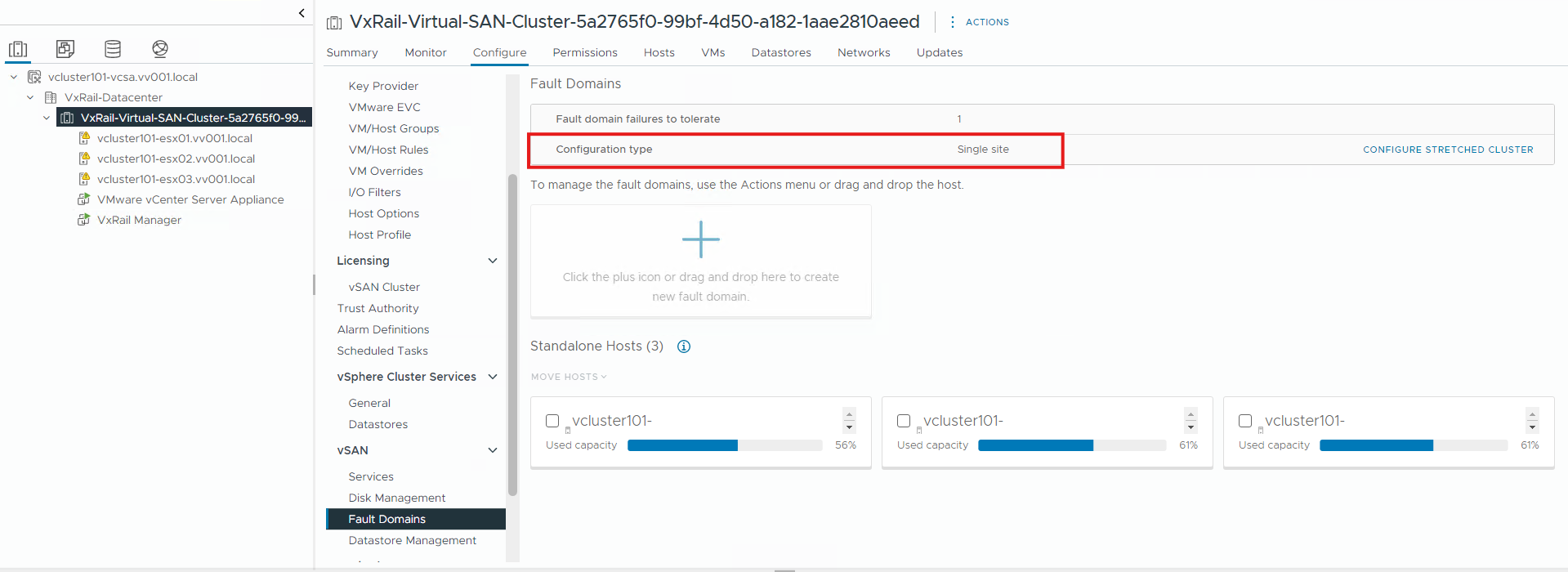
코드 4.7.x에서
- vCenter 웹 클라이언트를 열고 관리자 계정으로 로그인합니다
- 인벤토리에서 VxRail 클러스터 이름을 선택합니다.
- 구성 -> vSAN -> 장애 도메인을 클릭합니다.
- 확장 클러스터의 상태를 확인합니다. 상태가 활성화됨이면 확장 클러스터가 사용 중임을 의미합니다.

Affected Products
VxRail, VxRail Appliance Series, VxRail SoftwareArticle Properties
Article Number: 000013864
Article Type: How To
Last Modified: 03 Mar 2025
Version: 5
Find answers to your questions from other Dell users
Support Services
Check if your device is covered by Support Services.