Cómo habilitar el registro de API REST en Unisphere para PowerMax
Summary: Cómo habilitar el registro de API REST en Unisphere para PowerMax
This article applies to
This article does not apply to
This article is not tied to any specific product.
Not all product versions are identified in this article.
Instructions
Este restapi.log no se genera de manera predeterminada.
Para habilitar el registro de la API REST (generar el registro de la API REST) en Unisphere para PowerMax, consulte los pasos que se indican a continuación:
- Seleccione Support y, en el panel Actions, seleccione Modify Server Logging:
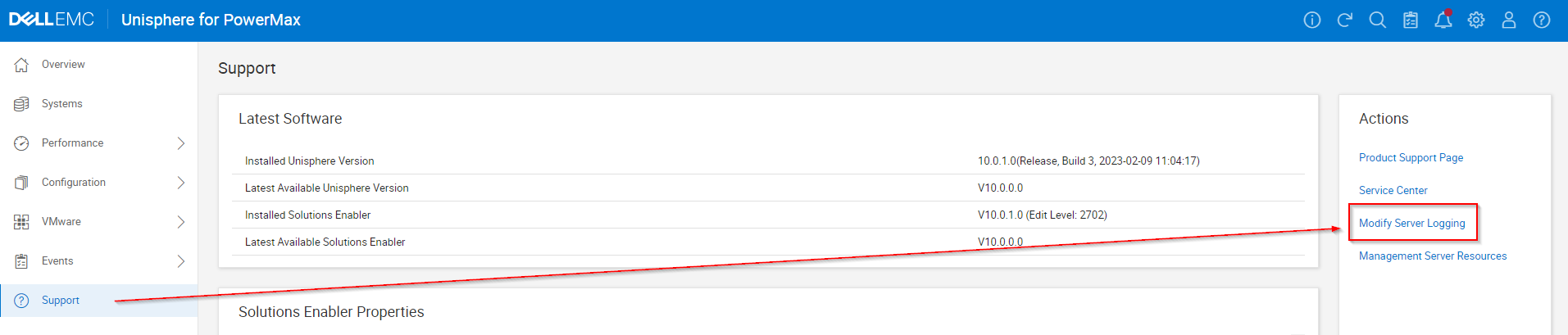
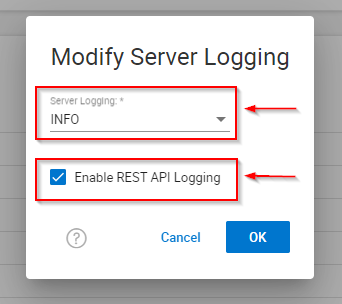
- Configure Server logging WARN en INFO , marque la casilla de verificación "Enable REST API Logging" y haga clic en OK.
- Reproduzca cualquier problema o prueba.
- Recuerde desmarcar la casilla de verificación "Enable REST API Logging" y haga clic en OK.
- Recopile informes de EMC/Grab.
Affected Products
Unisphere for PowerMaxArticle Properties
Article Number: 000019037
Article Type: How To
Last Modified: 21 Feb 2025
Version: 5
Find answers to your questions from other Dell users
Support Services
Check if your device is covered by Support Services.