Come abilitare la registrazione API REST in Unisphere for PowerMax
Summary: Come abilitare la registrazione API REST in Unisphere for PowerMax
This article applies to
This article does not apply to
This article is not tied to any specific product.
Not all product versions are identified in this article.
Instructions
Questo restapi.log non viene generato per impostazione predefinita.
Per abilitare la registrazione API REST (generare il registro restapi) su Unisphere for PowerMax, attenersi alla seguente procedura:
- Selezionare Support e, nel pannello Actions, selezionare Modify Server Logging:
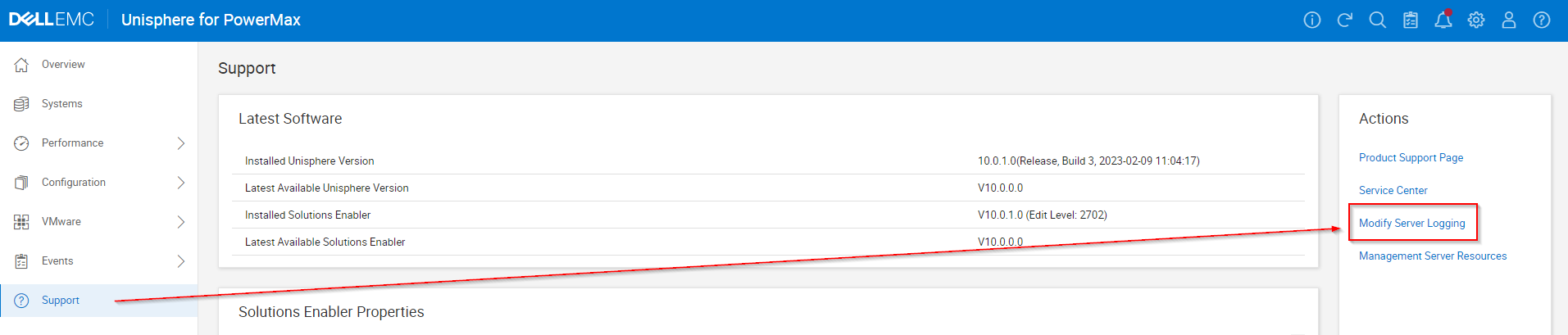
- Impostare Server logging WARN su INFO e selezionare la casella di controllo "Enable REST API Logging" e cliccare su OK.

- Riprodurre eventuali problemi o test.
- Ricordarsi di deselezionare la casella di controllo "Enable REST API Logging" e cliccare su OK.
- Raccolta di report EMC/Grab.
Affected Products
Unisphere for PowerMaxArticle Properties
Article Number: 000019037
Article Type: How To
Last Modified: 21 Feb 2025
Version: 5
Find answers to your questions from other Dell users
Support Services
Check if your device is covered by Support Services.