REST API-logboekregistratie inschakelen in Unisphere voor PowerMax
Summary: REST API-logboekregistratie inschakelen in Unisphere voor PowerMax
This article applies to
This article does not apply to
This article is not tied to any specific product.
Not all product versions are identified in this article.
Instructions
Deze restapi.log wordt niet standaard gegenereerd.
Volg de onderstaande stappen om REST API-logboekregistratie in te schakelen (het restapi-logboek genereren) op Unisphere voor PowerMax:
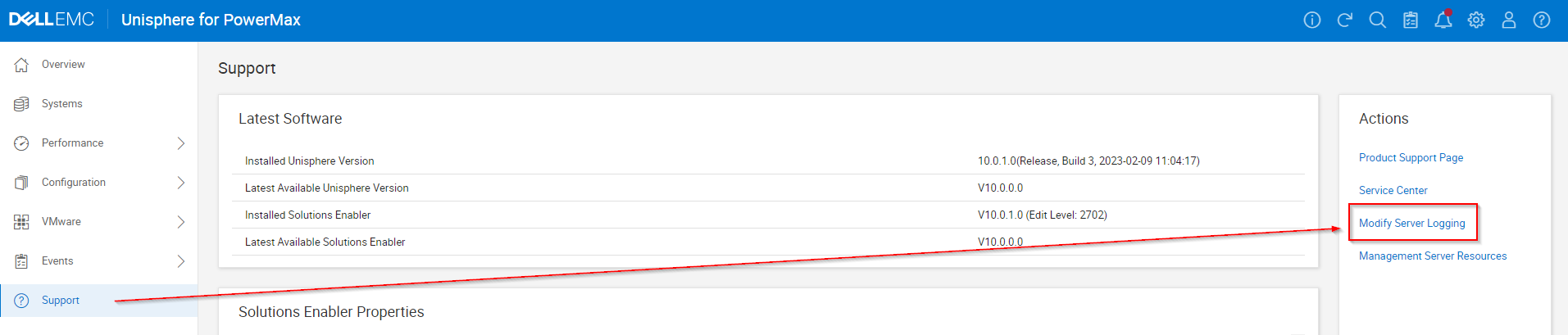
- Selecteer Support en selecteer in het deelvenster Acties de optie Serverregistratie wijzigen:
- Stel Server logging WARN in op INFO en vink het selectievakje "Enable REST API Logging" aan en klik op OK.

- Reproduceer eventuele problemen of tests.
- Vergeet niet om het selectievakje "Enable REST API Logging" uit te schakelen en op OK te klikken.
- EMC-rapporten verzamelen/pakken.
Affected Products
Unisphere for PowerMaxArticle Properties
Article Number: 000019037
Article Type: How To
Last Modified: 21 Feb 2025
Version: 5
Find answers to your questions from other Dell users
Support Services
Check if your device is covered by Support Services.