UnisphereでData Moverのメモリー使用率とCPU使用率のアラートを生成する方法
Summary: UnisphereでData Moverのメモリー使用率とCPU使用率のアラートを生成するための設定手順
This article applies to
This article does not apply to
This article is not tied to any specific product.
Not all product versions are identified in this article.
Instructions
UnisphereでData Mover CPU使用率とメモリー使用率を使用してアラートを生成するように設定する手順を次に示します
Unisphere.
でData Mover CPU使用率とメモリー使用率に関するアラートを設定する手順1.コントローラー ステーションIPを使用してUnisphereを開き、ログインします。
2.次に、(左上の[System]ドロップダウン メニューで)システムを選択します
3.System -> Monitoring and Alertsに移動し、Notifications for Fileを選択します
4.Data Mover Loadタブを選択します
5.[Create]ボタンを選択します
6.値を入力し、 [適用] を選択します。

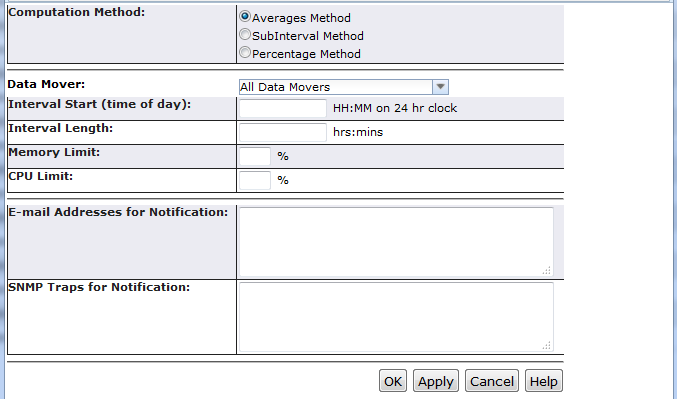
Unisphere.
でData Mover CPU使用率とメモリー使用率に関するアラートを設定する手順1.コントローラー ステーションIPを使用してUnisphereを開き、ログインします。
2.次に、(左上の[System]ドロップダウン メニューで)システムを選択します
3.System -> Monitoring and Alertsに移動し、Notifications for Fileを選択します
4.Data Mover Loadタブを選択します
5.[Create]ボタンを選択します
6.値を入力し、 [適用] を選択します。
Additional Information
DM負荷アラートに間隔メソッドを使用すると、23:50や23:55など、真夜中に近い間隔はトリガーされません。
アラートを受け取るには、「インターバル開始時刻00:05以降」と「インターバル終了時刻23:40前」を設定する必要があります。
* この機能を使用して、Data Moverのメモリー使用率とCPU使用率を終日モニタリングすることはできません。
** インターバル終了時刻 = インターバル開始時刻 + インターバル長。
アラートを受け取るには、「インターバル開始時刻00:05以降」と「インターバル終了時刻23:40前」を設定する必要があります。
* この機能を使用して、Data Moverのメモリー使用率とCPU使用率を終日モニタリングすることはできません。
** インターバル終了時刻 = インターバル開始時刻 + インターバル長。
Affected Products
VNX1 SeriesProducts
VNX1 Series, VNX2 SeriesArticle Properties
Article Number: 000019359
Article Type: How To
Last Modified: 06 Nov 2025
Version: 3
Find answers to your questions from other Dell users
Support Services
Check if your device is covered by Support Services.