Avamar: Gen4S Hardware: How To Locate a Disk on a Gen4s Avamar Node
Summary: The purpose of this article is to describe the method to locate a disk on a Gen4s Avamar node (utility and data).
This article applies to
This article does not apply to
This article is not tied to any specific product.
Not all product versions are identified in this article.
Instructions
To determine which hard drive an error occurred on, the port information from the error message must be translated correctly.
1. Make note of the port mentioned in the error:
<datestamp> <server> MR_MONITOR[PID]: <MRMON091> Controller ID: 0 PD inserted: #012 Port 0 - #:#:#
For example:
Jan 21 16:14:36 myavamar MR_MONITOR[120821]: <MRMON091> Controller ID: 0 PD inserted: #012 Port 0 - 3:2:5
From the example above, this is "Port 0 - 3:2:5."
2. The last digit of "#:#:#" indicates the hard drive slot number (on the front panel). In this example, it is disk number 5.
Note: This configuration is true for all Dragon 12 chassis (M600, M1200, M2400, S2400 Nodes)
3. Locating the hard drive location relates to the node type:
-
If the message relates to a disk on a Utility or Accelerator Node, go to step 4.
-
If the message relates to a disk on a Storage Node, or single-node grid, go to step 5.
4. Utility and Accelerator Node front view:
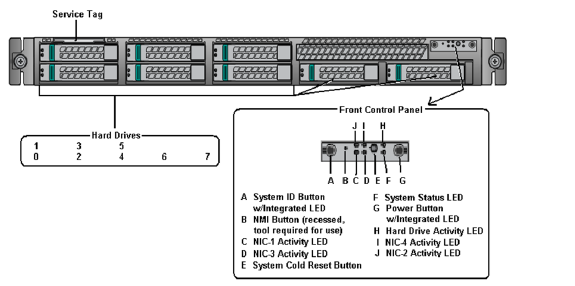
- 8 disk drive slots
- 2 internal disks and 6 blank fillers (Utility Node)
- No internal SSD
From the example, the location of 3:2:5 is highlighted in yellow: 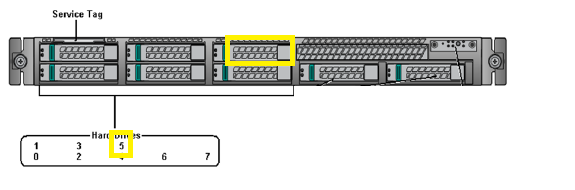
5. Avamar Storage Node, or Single-Node front view:
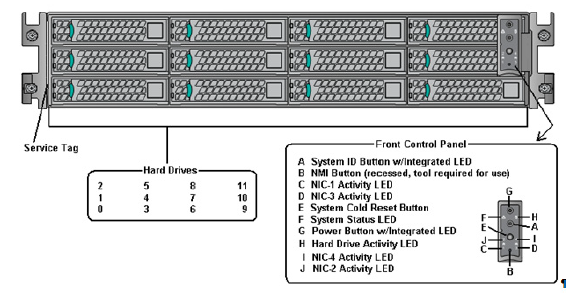
- 12 disk drive slots
- 12 internal disks (M2400 and S400)
- 6 internal disks and 6 blank fillers (M600 and M1200)
- Internal SSD (M2400 and S2400 only)
From the example, the location of 3:2:5 is highlighted in yellow: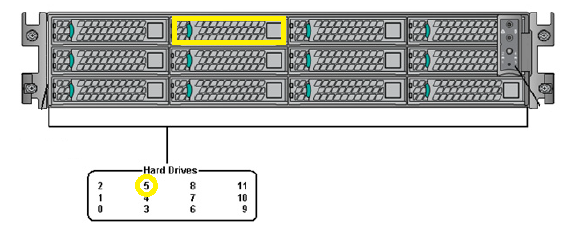 >
>
Note: If a disk has failed, the fault LED may be lit or blinking, however this is not always the case. (For example: when a proactive disk replacement is required.)
Affected Products
Avamar, Avamar ServerArticle Properties
Article Number: 000039458
Article Type: How To
Last Modified: 18 Sept 2025
Version: 17
Find answers to your questions from other Dell users
Support Services
Check if your device is covered by Support Services.