VxRail: 테스트 스크래치로 인한 노드 상태 점검 실패
Summary: 스크래치 파티션 로그에서 최신 업데이트를 확인합니다.
This article applies to
This article does not apply to
This article is not tied to any specific product.
Not all product versions are identified in this article.
Symptoms
'스크래치' 상태 점검은 스크래치 파티션에서 "vmkernel.log"의 로그에 액세스할 수 있는지 확인합니다.
/var/log/vmkernel.log
이 상태 점검의 결과는 다음 중 하나일 수 있습니다.
| 테스트 결과 | 결과 코드 | 결과 해석 |
|---|---|---|
|
Pass |
0 |
최신 VMkernel 로그 항목이 1초가 지났습니다. |
|
Warning |
1 |
이 테스트에는 경고 결과가 없습니다. |
|
Failure |
2 |
vmkernel.log 찾을 수 없음 /var/log/vmkernel.log는 스크래치에 대한 링크가 아닙니다. vmkernel.log에 유효한 날짜-시간 스탬프가 없습니다. |
|
Critical |
3 |
지난 7200초(2시간) 동안 vmkernel.log가 작성되지 않음 |
통과한 각 테스트는 읽기 편의성을 위해 요약 보고서에는 나열되지 않습니다.
상태 점검 결과물의 예는 다음과 같습니다.
#========================#======#=========#====================================================================#==============#
|  Hostname / Category   |Status  Dell_KB |  Warnings or Failures, unless tests Passed                         ; Product S.N. |
#========================#======#=========#====================================================================#==============#
| node02                 | Critical 43145 | scratch: /scratch/log/vmkernel.log has not been written in the last 486096 seconds|
Cause
'스크래치' 테스트는 '/scratch/log/vmkernel.log' 파일에 액세스할 수 있는지 확인합니다.
가장 최근 줄의 타임스탬프를 확인하고 가장 최근 줄이 2시간 이상 지난 경우 오류가 보고됩니다.
어떤 이유로든 스크래치 파티션에서 vmkernel.log 찾을 수 없는 경우 테스트는 심각한 실패를 보고합니다.
Resolution
VMkernel 로그를 확인합니다.
이 테스트에 실패하면 테스트에서 스크래치 파티션을 읽을 수 없으며 이 파티션을 확인해야 합니다.
노드의 명령줄에 액세스하여 스크래치 파티션을 확인합니다.
/scratch
파티션에 액세스할 수 있는 경우 최근 이벤트 줄이 포함되어야 하는 다음 로그의 내용을 확인합니다.
/scratch/log/vmkernel.log
스크래치 로그 위치가 변경되었을 수 있으며 다음 명령을 사용하여 로깅 위치를 확인할 수 있습니다.
esxcli system syslog config get
예:
Local Log Output: /scratch/log
위의 내용이 /scratch/log가 아닌 경우 대체 경로에서 vmkernel.log 확인합니다.
VMkernel 링크를 확인합니다.
/var/log에 스크래치 로그(예: /scratch/log/vmkernel.log)에 대한 링크가 있어야 합니다.
# ls -la /var/log/vmkernel.log
lrwxrwxrwx    1 root     root            25 Sep  8 12:01 /var/log/vmkernel.log -> /scratch/log/vmkernel.log
없는 경우 위 항목과 일치하는 파일 링크를 만듭니다.
vmkernel.log에 로깅 부족 문제를 해결하려면 다음을 수행합니다.
vmkernel.log에 기록되지 않는 경우(모든 항목이 2시간 이상인 경우) 호스트를 재부팅해야 합니다.
재부팅하려면 다음을 수행합니다.
- 노드를 유지 보수 모드로 전환
- 노드 재부팅
- 유지 보수 모드에서 노드 종료
- VxVerify를 다시 실행합니다.
문제가 여전히 존재하는 경우 Dell 지원에 문의하십시오.
Additional Information
또 다른 가능성은 클러스터에 Syslog.global.logDir (VxRail 표준을 벗어남)에 대한 고급 시스템 설정의 맞춤형 글로벌 디렉토리 값이 설정되어 있을 수 있습니다.
네트워크 공유 또는 syslog 서버 구성 오류일 수 있습니다.
예를 들어, 고객은 모든 노드에서 Syslog.global.logDir 을 맞춤 구성하여 아래 예와 같이 NFS(Network File System)에 로그를 저장할 수 있습니다.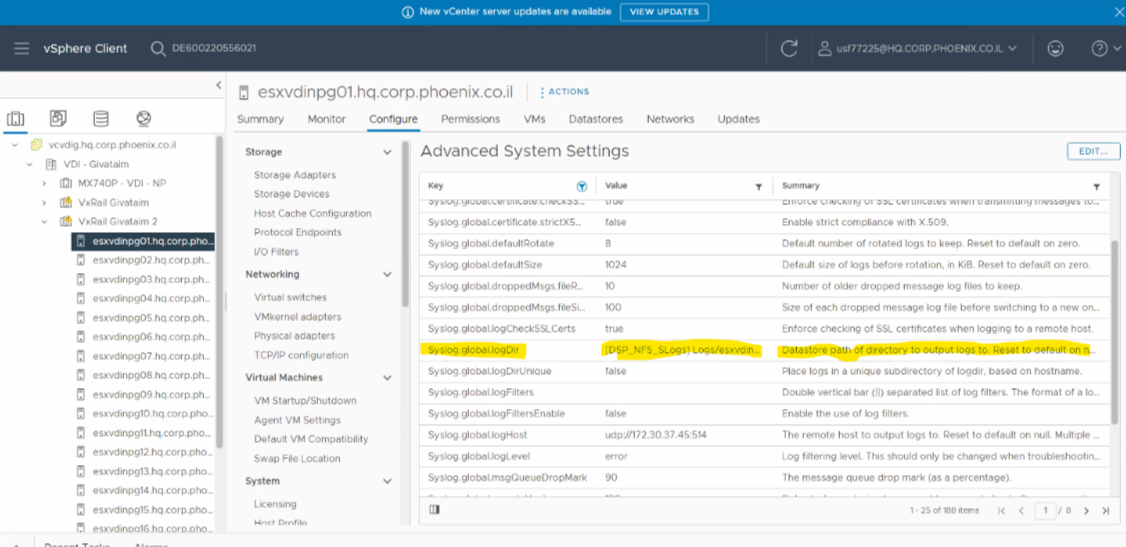
노드의 고급 시스템 설정에서 변수 Syslog.global.logDir을 확인하고 값이 []/scratch/log인지 확인합니다.
값이 기본 []/scratch/log와 다른 경우 상태 점검에서 VMkernel.log 찾을 수 없다고 보고할 수 있습니다.
위의 변수에 대한 자세한 내용은 아래 VMware 문서를 참조하십시오.
https://knowledge.broadcom.com/external/article?legacyId=2003322

Affected Products
VxRail, VxRail 460 and 470 Nodes, VxRail Appliance Series, VxRail G Series Nodes, VxRail D Series Nodes, VxRail D560, VxRail D560F, VxRail E Series Nodes, VxRail E460, VxRail E560, VxRail E560F, VxRail E560N, VxRail E660, VxRail E660F, VxRail E660N
, VxRail E665, VxRail E665F, VxRail E665N, VxRail G560, VxRail G560F, VxRail P Series Nodes, VxRail P470, VxRail P570, VxRail P570F, VxRail P580N, VxRail P670F, VxRail P670N, VxRail P675F, VxRail P675N, VxRail S Series Nodes, VxRail S470, VxRail S570, VxRail S670, VxRail Software, VxRail V Series Nodes, VxRail V470, VxRail V570, VxRail V570F, VXRAIL V670F, VxRail VD-4510C, VxRail VD-4520C, VxRail VD Series Nodes, VxRail VE-660, VxRail VE-6615, VxRail VP-760, VxRail VP-7625, VxRail VS-760
...
Products
VxRail Appliance Family, VxRail Appliance SeriesArticle Properties
Article Number: 000043145
Article Type: Solution
Last Modified: 03 Jul 2025
Version: 10
Find answers to your questions from other Dell users
Support Services
Check if your device is covered by Support Services.