NVP-vProxy: Windows VM FLR이 "탐색하는 동안 오류 발생: 200: vProxy에서 수신된 오류 "디렉토리 콘텐츠를 가져올 수 없음:"으로 실패합니다.
Summary: VM 운영 체제의 관리자 승인 모드(또는 UAC 강화) 설정으로 인해 NVP(NetWorker VMware Protection) vProxy 어플라이언스를 통해 수행된 Microsoft Windows VM(Virtual Machine) FLR이 디렉토리 콘텐츠를 탐색하지 못합니다
This article applies to
This article does not apply to
This article is not tied to any specific product.
Not all product versions are identified in this article.
Symptoms
Microsoft Windows VM에 대한 vProxy FLR(File Level Recovery)이 실패하고 다음 오류가 표시됩니다.
Error while browsing: 200: Error received from vProxy "could not get directory contents: Unable to retrieve file list from 'host' (vm-moref) path 'path'"
Windows VM에는 Windows DFS(Distributed File System)가 포함되어 있지 않습니다. NVP vProxy: 가상 머신 FLR이 "Could not get the directory content..."와 함께 지속적으로 실패합니다.
Cause
이 오류는 운영 체제에서 AAM(Admin Approval Mode)이 활성화된 경우 나타날 수 있습니다. 이렇게 하면 관리자가 최종 사용자의 프로필에 대해 FLR을 수행할 수 없습니다. UAC(사용자 계정 컨트롤) 상호 작용의 경우 관리자는 탑재 작업이 완료될 때까지 기다린 다음 대상 시스템의 탑재 지점에 액세스해야 합니다.
Resolution
사용할 수 있는 엔드포인트 옵션은 세 가지가 있습니다.
옵션 1:
NWUI(NetWorker Web User Interface)에서 FLR을 수행합니다. FLR 프로세스 내에는 "Run with Elevated Privileges"라는 옵션이 있습니다. FLR을 수행할 때 이 옵션을 선택합니다.
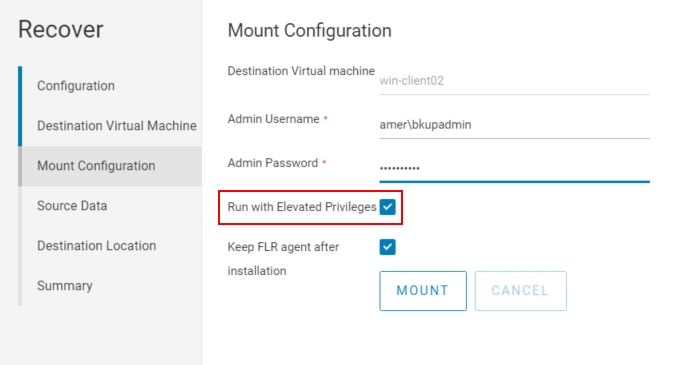
참고: NMC(NetWorker Management Console) 내에서는 이 옵션을 사용할 수 없습니다.
옵션 2:
1. NMC(NetWorker Management Console)에서 FLR 마운트를 시작합니다.
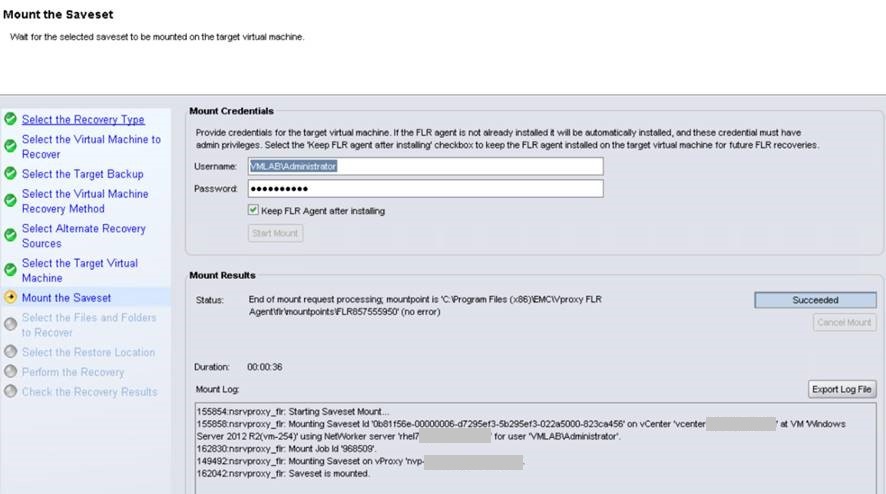
2. NMC에서 복원을 진행하지 마십시오. 타겟 복원 가상 머신에 로그인하고 Windows 파일 탐색기를 사용하여 "C:\Program Files (x86)\EMC\vProxy FLR Agent\flr\mountpoints"로 이동합니다. NMC에서 시작된 마운트의 마운트 지점을 엽니다. 예:
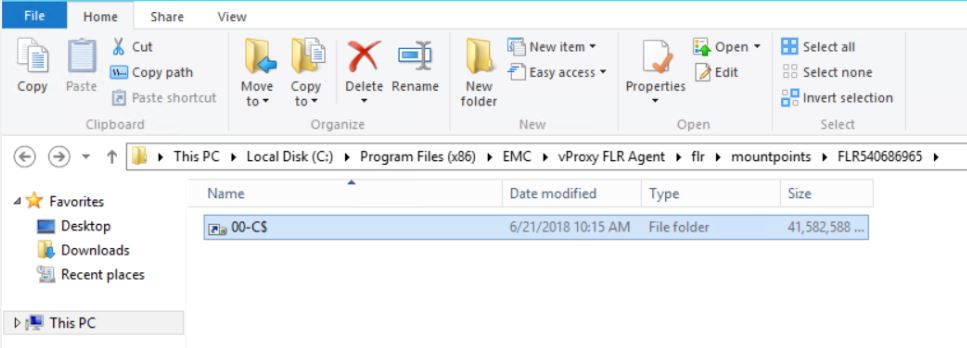
필요한 폴더/파일을 찾아 가상 머신에 복사할 수 있습니다. xcopy  를 사용하여 파일을 복사 할 수도 있습니다.
3. 완료되면 NMC에서 복구 마법사를 닫아 마운트 지점의 연결을 해제합니다.
를 사용하여 파일을 복사 할 수도 있습니다. xcopy mountpoint_folder/file recover_destination /EH
3. 완료되면 NMC에서 복구 마법사를 닫아 마운트 지점의 연결을 해제합니다.
옵션 3:
인스턴트 액세스 복원을 FLR 해결 방법으로 사용할 수도 있습니다. 이 프로세스는 아래에 설명되어 있습니다.
NVP vProxy: vProxy FLR 에이전트 없이 VM FLR 수행
Additional Information
Run with Elevated privileges 옵션을 사용하는 동안에도 이 문제가 발생하는 경우 다음을 참조하십시오.
- NetWorker VMware 통합 가이드의 FLR 제한 사항 섹션 VM OS 또는 파일 시스템 구성이 FLR을 지원하지 않을 수 있습니다. NetWorker 설명서는 다음을 통해 제공됩니다. NetWorker 지원 | 설명서 및 문서 (Dell 지원 계정으로 로그인해야 함)
- Windows DFS가 활성화된 경우: NVP vProxy: 가상 머신 FLR이 "디렉토리 콘텐츠를 가져올 수 없음"과 함께 계속 실패함
- Windows 중복 제거가 활성화된 경우: NVP-vProxy: FLR이 압축 폴더를 탐색하지 못함 - VM에서 FLR 에이전트 작업 'browse_files'를 수행할 수 없음: 액세스가 거부됨
- Linux LVM 구성 제한 사항: NVP vProxy: FLR LVM 제한 사항
사용자 계정 컨트롤 관리자 승인 모드: https://docs.microsoft.com/en-us/windows/security/threat-protection/security-policy-settings/user-account-control-admin-approval-mode-for-the-built-in-administrator-account
Affected Products
NetWorkerProducts
NetWorkerArticle Properties
Article Number: 000044625
Article Type: Solution
Last Modified: 28 Jul 2026
Version: 7
Find answers to your questions from other Dell users
Support Services
Check if your device is covered by Support Services.