Dell EMC Unity: "Invalid credentials" displayed on Unity Unisphere Login page when user's UPN is entered for LDAP authentication (User Correctable)
This article applies to
This article does not apply to
This article is not tied to any specific product.
Not all product versions are identified in this article.
Symptoms
LDAP authentication was recently configured
Unisphere login fails when the user attempts an LDAP login by providing a UPN (Example: unityadmin1@peeps.lab). It occurs even though the named user is verified to exist, and the connection to the LDAP server successfully verifies 'OK' (Green checkmark).
Unisphere login fails when the user attempts an LDAP login by providing a UPN (Example: unityadmin1@peeps.lab). It occurs even though the named user is verified to exist, and the connection to the LDAP server successfully verifies 'OK' (Green checkmark).
Cause
The LDAP look-up is a case-sensitive match. The domain name portion of the entered UPN must match the case of the LDAP Domain as entered on "Configure LDAP Server Credentials" page.

In this case, the LDAP Domain was configured in upper-case as "PEEPS.LAB" and the user was entering the UPN with the domain name in lowercase (See images). The same error would occur if the LDAP Domain was configured in lower-case as "peeps.lab" and the user was entering the UPN with the domain name in uppercase.
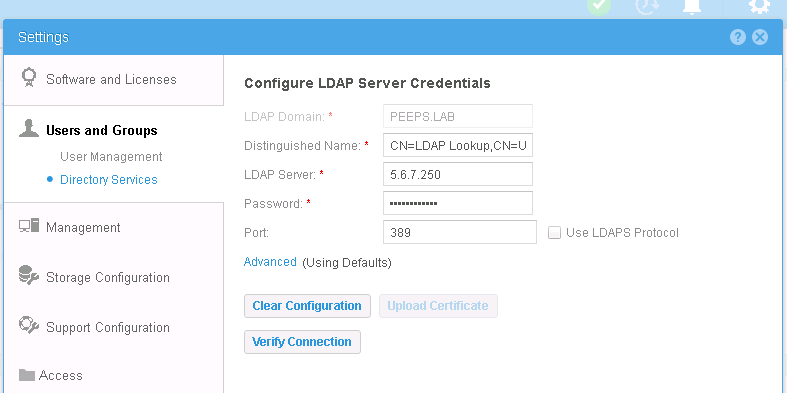
In this case, the LDAP Domain was configured in upper-case as "PEEPS.LAB" and the user was entering the UPN with the domain name in lowercase (See images). The same error would occur if the LDAP Domain was configured in lower-case as "peeps.lab" and the user was entering the UPN with the domain name in uppercase.
Resolution
Make sure the LDAP Domain is configured using the same case, upper or lower, that users will use when entering their UPN for login to Unisphere. Our experience suggests that usage of lower-case is most common, but either is acceptable.
Once configured, the LDAP Domain field is greyed out and uneditable. You must "Clear Configuration" and enter a new corrected configuration. Please be aware that when you clear the configuration, any domain user and groups that you had added to the prior configuration will be removed (due to the validation that is required). This will NOT affect local, non-LDAP accounts.
Once configured, the LDAP Domain field is greyed out and uneditable. You must "Clear Configuration" and enter a new corrected configuration. Please be aware that when you clear the configuration, any domain user and groups that you had added to the prior configuration will be removed (due to the validation that is required). This will NOT affect local, non-LDAP accounts.
Affected Products
Dell EMC Unity FamilyProducts
Dell EMC Unity FamilyArticle Properties
Article Number: 000055028
Article Type: Solution
Last Modified: 11 Dec 2025
Version: 3
Find answers to your questions from other Dell users
Support Services
Check if your device is covered by Support Services.