VxRail:vCenter 顯示 ESXi 主機沒有回應,且問題在主機重新開機後仍持續數日
Summary: 如果在 iSM 3.4 升級期間或之後將 iDRAC9 升級至 v3.30.30,iSM 會失敗並發生 TLS 錯誤。
This article applies to
This article does not apply to
This article is not tied to any specific product.
Not all product versions are identified in this article.
Symptoms
可能會有部分 ESXi 主機在 vCenter 中顯示為無回應。將主機重新開機可能會暫時解決問題,但幾天後,問題仍會再次發生。只有搭載 iDRAC9 的 Dell PowerEdge 14G 伺服器才會發生此問題。
在 TSR 記錄中,有如下訊息:
2019-06-04 15:26:05 ISM0049 The iDRAC Service Module (iSM) is unable to communicate to the iDRAC because the client certificate is either unavailable or invalid.
vmkernel.log年,
2019-06-04T02:05:56.920Z cpu61:2105520)WARNING: VisorFSObj: 1576: Cannot create file /etc/cim/dell/srvadmin/iSM/ini/tttttttttttttyZxIL9 for process sfcb-dcism because the inode table of its ramdisk (etc) is full.
hostd.log年,
2019-06-02T13:39:59.688Z error hostd[2105490] [Originator@6876 sub=Libs opID=e4a0107a-853b-11e9-f2a3 user=dcui:vsanmgmtd] VsanUtil: Failed to lock esx.conf /etc/vmware/esx.conf.LOCK.2104629: symlink failed: No space left on device
在 iDRAC UI 中,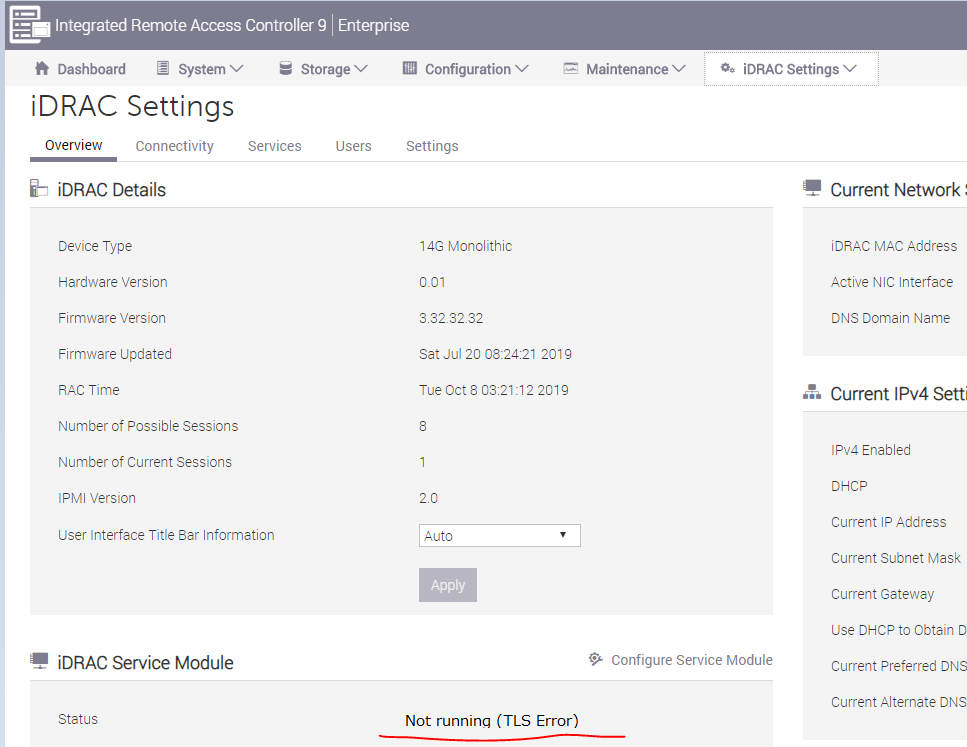
Cause
iDRAC9 v3.30.30 推出了強制性要求,必須使用 iSM v3.4.0-1471 或更新版本建立安全的 TLS 通道。
Dell 工程部門已識別出,如果 iDRAC 韌體在升級之前已安裝或升級 iSM v3.4.0-1471,且 iDRAC9 尚未協商此安全 TLS 連線,便會發生記憶體流失的情況。洩漏最終也會導致內核 inode 計數丟失,因為在 /etc/dell 中創建了大量臨時 INI 檔。
VxRail SW 版本 4.5.400、4.7.200 及更新版本的整合式 iSM v3.4.0-1471。在 4.5.400 和 4.7.212 中新增了防止此問題的因應措施。4.7.210 不受影響,因為它為僅限製造版本,因此無法升級。因此,VxRail 4.7.200 和 4.7.211 版本極有可能遇到此問題。
注意:如果因為硬體故障而更換系統主機板,也可能遇到此問題。這適用於執行 4.7.2xx 的節點 [包括 4.7.212 和未來的程式碼]
Resolution
如果 ESXi 主機在 vCenter 中已顯示為沒有回應,請將其重新開機。
重新安裝 iSM 可觸發安全 TLS 通道與 iDRAC9 重新協商,並解決問題,不再發生此問題。
在受影響的 ESXi 主機上,執行下列命令以重新安裝 iSM。
esxcli software vib remove -n dcism
esxcli software vib install -d <path to iSM VIB>
如果 ESXi 中沒有可用的 inode,您可以先移除不必要的檔案,因為此問題也可能導致 inode 用完。
ls -l /etc/cim/dell/srvadmin/iSM/ini/
rm -f /etc/cim/dell/srvadmin/iSM/ini/tttttt*
如果因為硬體故障而更換系統主機板,上述解決方案步驟亦適用。
Affected Products
VxRail Appliance SeriesProducts
VxRail Appliance SeriesArticle Properties
Article Number: 000060464
Article Type: Solution
Last Modified: 29 Nov 2024
Version: 4
Find answers to your questions from other Dell users
Support Services
Check if your device is covered by Support Services.