VxRail:ESXi 主机在 vCenter 中显示为无响应,并在重新启动主机数天后再次出现问题
Summary: 如果在 iSM 3.4 升级期间或之后将 iDRAC9 升级到 v3.30.30,则 iSM 会失败并显示 TLS 错误。
This article applies to
This article does not apply to
This article is not tied to any specific product.
Not all product versions are identified in this article.
Symptoms
某些 ESXi 主机可能会在 vCenter 中显示为无响应。重新启动主机可能会暂时解决问题,但是,在几天后,问题再次出现。此问题仅发生在具有 iDRAC9 的 Dell PowerEdge 第 14 代服务器上。
在 TSR 日志中,会显示如下消息:
2019-06-04 15:26:05 ISM0049 The iDRAC Service Module (iSM) is unable to communicate to the iDRAC because the client certificate is either unavailable or invalid.
在vmkernel.log,
2019-06-04T02:05:56.920Z cpu61:2105520)WARNING: VisorFSObj: 1576: Cannot create file /etc/cim/dell/srvadmin/iSM/ini/tttttttttttttyZxIL9 for process sfcb-dcism because the inode table of its ramdisk (etc) is full.
在hostd.log,
2019-06-02T13:39:59.688Z error hostd[2105490] [Originator@6876 sub=Libs opID=e4a0107a-853b-11e9-f2a3 user=dcui:vsanmgmtd] VsanUtil: Failed to lock esx.conf /etc/vmware/esx.conf.LOCK.2104629: symlink failed: No space left on device
在 iDRAC UI 中,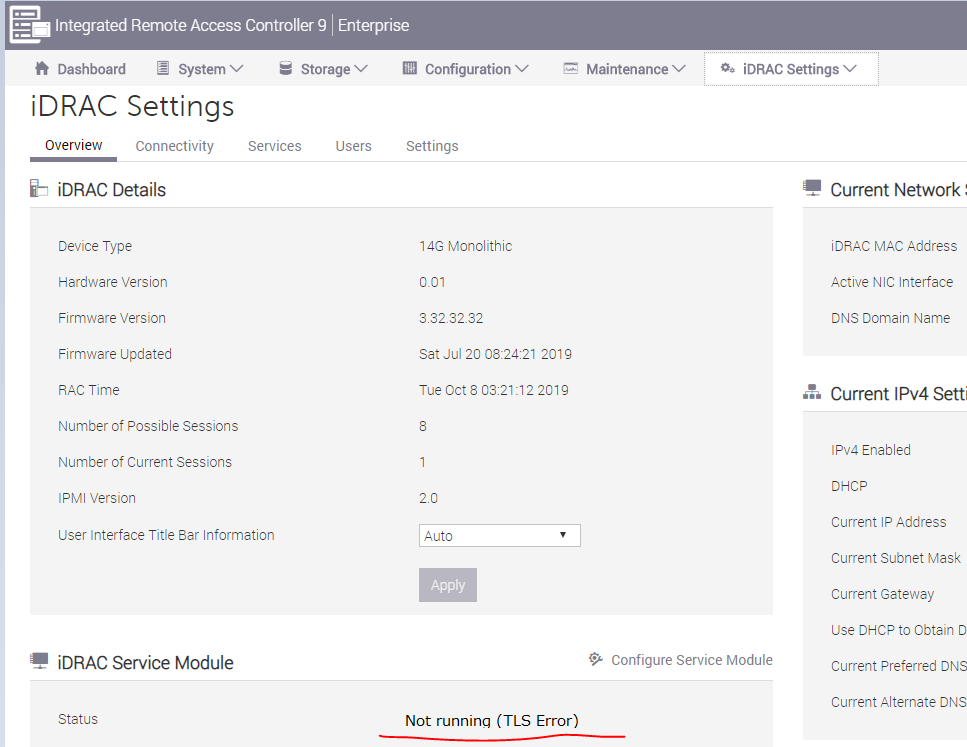
Cause
iDRAC9 v3.30.30 引入了一项强制性要求,即使用 iSM v3.4.0-1471 或更高版本创建安全 TLS 通道。
如果在升级 iDRAC 固件之前安装或升级了 iSM v3.4.0-1471,如果 iDRAC9 尚未协商此安全 TLS 连接,则戴尔工程部门发现了这样一种情况:内存泄漏。由于在 /etc/dell中创建了大量临时 INI 文件,泄漏最终还会导致内核索引节点计数丢失。
VxRail 软件版本 4.5.400、4.7.200 及更高版本集成了 iSM v3.4.0-1471。4.5.400 和 4.7.212 中添加了防止此问题的解决方法。4.7.210 不受影响,因为它是仅限制造版本,因此无需升级。因此,VxRail 4.7.200 和 4.7.211 版本最有可能遇到此问题。
提醒:如果由于硬件故障更换了系统主板,也可能会遇到此问题。这适用于运行 4.7.2xx [包括 4.7.212 和未来代码] 的节点
Resolution
如果 ESXi 主机已在 vCenter 中显示为无响应,请重新启动它。
重新安装 iSM 可以触发安全 TLS 通道与 iDRAC9 重新协商,并解决此问题,使其不再发生。
在受影响的 ESXi 主机上,运行以下命令以重新安装 iSM。
esxcli software vib remove -n dcism
esxcli software vib install -d <path to iSM VIB>
如果 ESXi 中没有可用的索引节点,您可以先删除不必要的文件,因为此问题也可能导致索引节点耗尽。
ls -l /etc/cim/dell/srvadmin/iSM/ini/
rm -f /etc/cim/dell/srvadmin/iSM/ini/tttttt*
如果由于硬件故障更换了系统主板,则上述解决步骤也适用。
Affected Products
VxRail Appliance SeriesProducts
VxRail Appliance SeriesArticle Properties
Article Number: 000060464
Article Type: Solution
Last Modified: 29 Nov 2024
Version: 4
Find answers to your questions from other Dell users
Support Services
Check if your device is covered by Support Services.