SourceOne 离线访问:静默安装未填充 SourceOne 检索服务器详细信息
Summary: 静默安装未填充 SourceOne 检索服务器详细信息。
This article applies to
This article does not apply to
This article is not tied to any specific product.
Not all product versions are identified in this article.
Symptoms
静默安装未填充 SourceOne 检索服务器详细信息。
运行离线访问静默安装命令后(使用具有管理员权限的 CMD):
ES1_OfflineAccess.exe /s /v“/qn /L*v C:\EMC_OfflineAccess.log INSTALLDIR=C:\Users\s1service\Downloads EX_TCP_PRIMARY_SERVER=Retrieval_SourceOne EX_TCP_PRIMARY_PORT=8001 EX_TCP_SECONDARY_SERVER=Retrieval_SourceOne EX_TCP_SECONDARY_PORT=8002 REBOOT=ReallySuppress ”
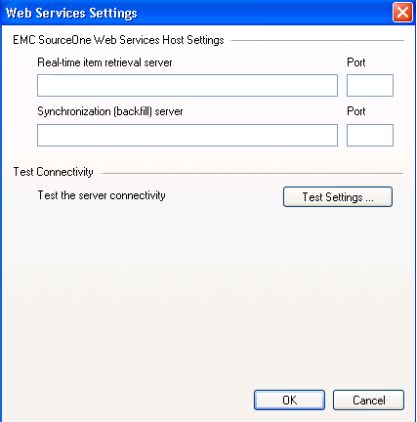
安装完成且没有任何问题,但在查看离线访问配置设置时, 服务器设置 不包含有关 SourceOne 检索服务器的任何详细信息。
Cause
上述问题状态的原因与缺少对 Windows 文件夹的权限有关。运行 CMD 的用户仅具有 C:\Windows 的 读取 权限 。
本地管理员组成员仅具有只读权限。
可以在 Procmon 跟踪中找到以下条目:
RegSvr32.exe 20812 CreateFileMapping C:\Windows\System32\regsvr32.exe FILE LOCKED WITH ONLY READERS SyncType:SyncTypeCreateSection、PageProtection:PAGE_EXECUTE|PAGE_NOCACHE
本地管理员组成员仅具有只读权限。
可以在 Procmon 跟踪中找到以下条目:
RegSvr32.exe 20812 CreateFileMapping C:\Windows\System32\regsvr32.exe FILE LOCKED WITH ONLY READERS SyncType:SyncTypeCreateSection、PageProtection:PAGE_EXECUTE|PAGE_NOCACHE
Resolution
为离线访问运行静默安装时,必须使用至少对文件夹 C:\Windows具有读/写权限的帐户登录到 CMD。
Affected Products
SourceOneProducts
SourceOne, SourceOne Email ManagementArticle Properties
Article Number: 000063458
Article Type: Solution
Last Modified: 02 Jun 2025
Version: 4
Find answers to your questions from other Dell users
Support Services
Check if your device is covered by Support Services.