Dell EMC Unity:使用 vCenter 探索到的 ESXi 伺服器會顯示 IP 位址而非主機名稱
Summary: Dell EMC Unity:使用 vCenter 探索到的 ESXi 伺服器會顯示 IP 位址而非主機名稱
This article applies to
This article does not apply to
This article is not tied to any specific product.
Not all product versions are identified in this article.
Symptoms
使用者有疑問,為什麼使用 vCenter 探索的 ESXi 伺服器會在「ACCESS」中顯示 IP 位址而非主機名稱 -- 「VMware」-「ESXi 主機」,而自動探索到的 ESXi 伺服器卻在「ACCESS」-「主機」中顯示主機名稱。
Cause
vCenter 中的 ESXi 伺服器是使用 IP 位址新增的。
Resolution
使用 vCenter 探索到的 ESXi 伺服器會根據在 vCenter 中的新增方式顯示主機名稱或 IP 位址。
如果 ESXi 伺服器是使用 IP 位址新增至 vCenter 中,則在 Dell EMC Unity 中使用 vCenter 探索到的 ESXi 伺服器會顯示 IP 位址。
如果使用主機名稱將 ESXi 伺服器加到 vCenter 中,則在 Dell EMC Unity 中使用 vCenter 探索到的 ESXi 伺服器會顯示主機名稱。
以下是使用主機名稱 vm3.example.com 新增 ESXi 伺服器的範例。
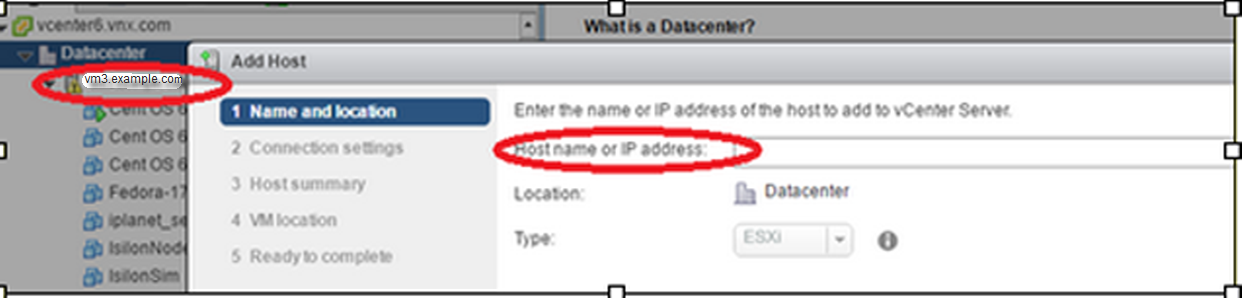
接著,Dell EMC Unity 中的 ESXi 伺服器會顯示主機名稱。

如果 ESXi 伺服器是使用 IP 位址新增至 vCenter 中,則在 Dell EMC Unity 中使用 vCenter 探索到的 ESXi 伺服器會顯示 IP 位址。
如果使用主機名稱將 ESXi 伺服器加到 vCenter 中,則在 Dell EMC Unity 中使用 vCenter 探索到的 ESXi 伺服器會顯示主機名稱。
以下是使用主機名稱 vm3.example.com 新增 ESXi 伺服器的範例。
接著,Dell EMC Unity 中的 ESXi 伺服器會顯示主機名稱。
Affected Products
Dell EMC Unity FamilyProducts
Dell EMC Unity FamilyArticle Properties
Article Number: 000064490
Article Type: Solution
Last Modified: 12 Mar 2025
Version: 4
Find answers to your questions from other Dell users
Support Services
Check if your device is covered by Support Services.