Avamar: Unable to access the Avamar Administrator via the DTLT website on multihomed Avamar systems
Summary: Avamar Server: Unable to access the Avamar Administrator via the DTLT website on multihomed Avamar systems.
This article applies to
This article does not apply to
This article is not tied to any specific product.
Not all product versions are identified in this article.
Symptoms
Accessing the DTLT website.

Clicking on the Administrator button attempts to launch the Avamar Administrator and fails. Note that the host name used to access the DTLT page will be different than one in the error screen.
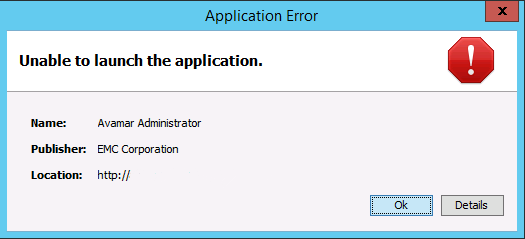
The details button has the following error under the Exceptions tab. Note that the Avamar host name will be different than the DTLT website.
om.sun.deploy.net.FailedDownloadException: Unable to load resource: http://<avamar host name>/mc/lib/mcclient.jar
at com.sun.deploy.net.DownloadEngine.actionDownload(Unknown Source)
at com.sun.deploy.net.DownloadEngine.downloadResource(Unknown Source)
at com.sun.deploy.cache.ResourceProviderImpl.getResource(Unknown Source)
at com.sun.deploy.cache.ResourceProviderImpl.getResource(Unknown Source)
at com.sun.javaws.LaunchDownload$DownloadTask.call(Unknown Source)
at java.util.concurrent.FutureTask.run(Unknown Source)
at java.util.concurrent.ThreadPoolExecutor.runWorker(Unknown Source)
at java.util.concurrent.ThreadPoolExecutor$Worker.run(Unknown Source)
at java.lang.Thread.run(Unknown Source)
Wrapped Exception:
java.net.ConnectException: Connection timed out: connect
at com.sun.deploy.net.DownloadEngine.actionDownload(Unknown Source)
at com.sun.deploy.net.DownloadEngine.downloadResource(Unknown Source)
at com.sun.deploy.cache.ResourceProviderImpl.getResource(Unknown Source)
at com.sun.deploy.cache.ResourceProviderImpl.getResource(Unknown Source)
at com.sun.javaws.LaunchDownload$DownloadTask.call(Unknown Source)
at java.util.concurrent.FutureTask.run(Unknown Source)
at java.util.concurrent.ThreadPoolExecutor.runWorker(Unknown Source)
at java.util.concurrent.ThreadPoolExecutor$Worker.run(Unknown Source)
at java.lang.Thread.run(Unknown Source)
Wrapped Exception:
java.net.ConnectException: Connection timed out: connect
Cause
Known issue for multihomed Avamar grids with DTLT where the hfsaddr value is used from the mcserver.xml is used for downloading the Avamar Administor from the DTLT website. If the different networks on the Avamar grid do not communicate with each other as designed, the hfsaddr value may be a network that cannot be accessed from the client.
Resolution
Workarounds
1) Download the Avamar Administrator and run it locally.
2) Add /mcgui to the end of the Avamar host name in your web browser to launch the the Avamar Administrator.
Permanent fix
This issue is fixed in Avamar v7.5.x.
1) Download the Avamar Administrator and run it locally.
2) Add /mcgui to the end of the Avamar host name in your web browser to launch the the Avamar Administrator.
Permanent fix
This issue is fixed in Avamar v7.5.x.
Affected Products
Avamar ServerProducts
Avamar ServerArticle Properties
Article Number: 000065302
Article Type: Solution
Last Modified: 23 Oct 2025
Version: 4
Find answers to your questions from other Dell users
Support Services
Check if your device is covered by Support Services.