Dell EMC Unity: Could not find the candidate software if OE image’s name is modified (User Correctable)
Summary: Could not find the candidate software if OE image’s name is modified
This article applies to
This article does not apply to
This article is not tied to any specific product.
Not all product versions are identified in this article.
Symptoms
Upload a new software image fails with error:
The system could not find the candidate software during software upgrade. Reboot your Primary storage processor and try upgrading again. (Error Code:0x6000cb6)
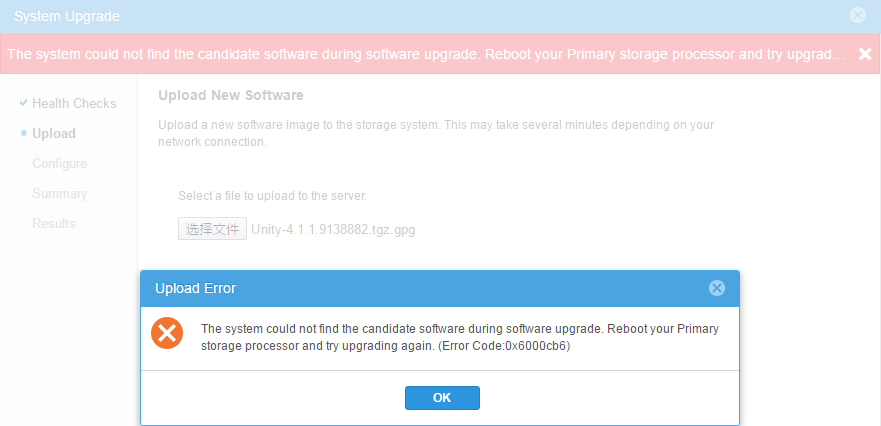
Reboot Primary SP does not work.
OE image's MD5 checksum is correct.
Both SPs have enough space in root partition and /cores/service, so space is not the cause.
Cause
OE image's name is modified. In this case, OE image s name is changed from Unity-4.1.1.9138882.tgz.bin.gpg to Unity-4.1.1.9138882.tgz.gpg which caused the issue.
It is not support to change the OE image's name.
It is not support to change the OE image's name.
Resolution
Change the OE image's name back or download a new OE image.
Additional Information
OE image is successfully uploaded and extracted on primary SP:
root@spa:/var/tmp/upgrade/images>ll
total 2087424
-rwx------ 1 root root 2137510687 Mar 2 07:30 Unity-4.1.1.9138882.tgz <<<<<Correct file name should be Unity-4.1.1.9138882.tgz.bin
drwxr-xr-x 9 root root 4096 Feb 9 14:36 Unity-4.1.1.9138882.tgz.tmpdir <<<<<Correct directory name should be Unity-4.1.1.9138882.tgz.bin.tmpdir
upgrade.log is empty and does not log any error.
cemtracer.log shows only "Could not find candidateSoftwareVersion after upload." and does not show any space issue
21 Feb 2017 19:05:40 - [UIS_UpgradeServices] ERROR - {0:8980615:726522080}[30163|9564|e23ffb40][UpdateCandidatesInPostgres @ components/providers/osls/UIS_UpgradeServices/src/C4CB_UIS_UpgradeServices.cpp:546] Could not find candidateSoftwareVersion after upload.
root@spa:/var/tmp/upgrade/images>ll
total 2087424
-rwx------ 1 root root 2137510687 Mar 2 07:30 Unity-4.1.1.9138882.tgz <<<<<Correct file name should be Unity-4.1.1.9138882.tgz.bin
drwxr-xr-x 9 root root 4096 Feb 9 14:36 Unity-4.1.1.9138882.tgz.tmpdir <<<<<Correct directory name should be Unity-4.1.1.9138882.tgz.bin.tmpdir
upgrade.log is empty and does not log any error.
cemtracer.log shows only "Could not find candidateSoftwareVersion after upload." and does not show any space issue
21 Feb 2017 19:05:40 - [UIS_UpgradeServices] ERROR - {0:8980615:726522080}[30163|9564|e23ffb40][UpdateCandidatesInPostgres @ components/providers/osls/UIS_UpgradeServices/src/C4CB_UIS_UpgradeServices.cpp:546] Could not find candidateSoftwareVersion after upload.
Affected Products
Dell EMC Unity FamilyProducts
Dell Unity 300, Dell EMC Unity 300F, Dell EMC Unity 400, Dell EMC Unity 400F, Dell EMC Unity 500, Dell EMC Unity 500F, Dell EMC Unity 600, Dell EMC Unity 600F, Dell EMC Unity Family |Dell EMC Unity All Flash, Dell EMC Unity Family
, Dell EMC Unity Hybrid
...
Article Properties
Article Number: 000065328
Article Type: Solution
Last Modified: 25 Apr 2025
Version: 3
Find answers to your questions from other Dell users
Support Services
Check if your device is covered by Support Services.