断开笔记本电脑 Alienware 显卡增强加速器连接时缺少通知
Summary: 以下文章介绍使用 Alienware 显卡增强加速器的 Alienware 笔记本电脑上的通知问题。
This article applies to
This article does not apply to
This article is not tied to any specific product.
Not all product versions are identified in this article.
Symptoms
在具有 Alienware 显卡增强加速器的 Windows 10 Alienware 笔记本电脑上,Toast 通知不起作用
功能键 Fn + F1 快捷方式在断开 Alienware 显卡增强加速器 (AGA) 与 Alienware 笔记本电脑的连接时不显示弹出式通知。这意味着无法断开 AGA 的连接。
以重复模式输出到外接显示器时,会发生这种情况。
这会影响以下 Alienware 产品:(所有发货时附带 AGA 端口的 Alienware 笔记本电脑。)
- Alienware 13 R2 和 R3
- Alienware 15 R2、R3 和 R4
- Alienware 17 R3、R4 和 R5
- Alienware Area-51m
- Alienware Area-51m R2
- Alienware m15 R1、R2、R3 和 R4
- Alienware m17 R1、R2、R3 和 R4
Cause
这不是笔记本电脑的故障。Windows Focus Assist 会阻止快捷方式,这会阻止大多数弹出窗口和通知。
有关 Windows 10 专注助手的更多详细信息,请参阅下面链接的 Microsoft 页面:

Resolution
按照以下步骤启用通知:
-
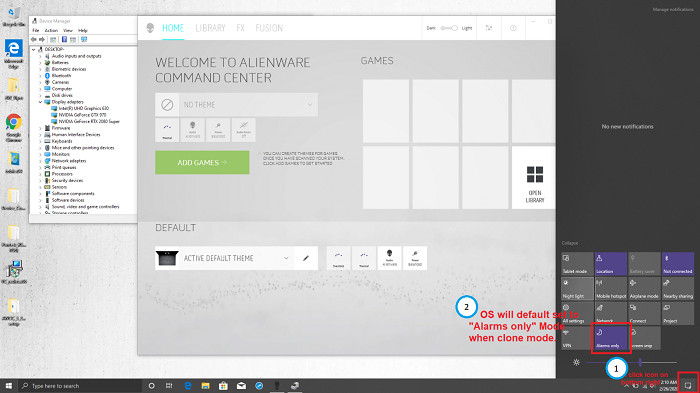
单击 Windows 桌面右下角的作中心 图标。
或者,转至:设置 > 系统 > 对焦助手
-
默认情况下,当笔记本电脑处于重复模式时,对焦辅助设置为 仅警报 。
-
将通知更改为关闭或仅优先级。(选择“优先级”仅意味着必须手动添加应用程序。)
-
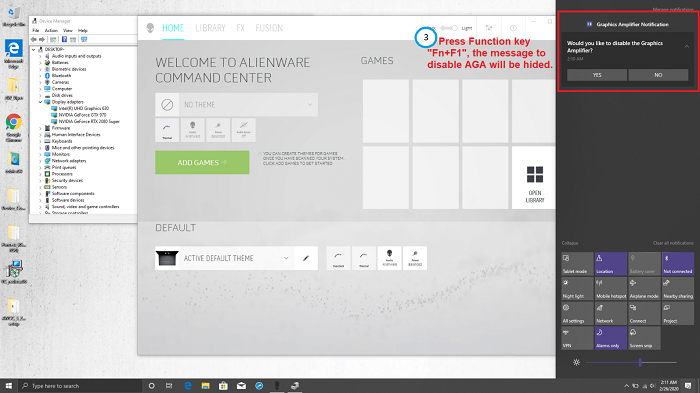
通知更改为 OFF 后,按功能键 Fn + F1 快捷方式并断开 AGA 连接。
-
单击 YES 以断开 Alienware 显卡增强加速器的连接。
Affected Products
Alienware 13 R3, Alienware 13 R2, Alienware 15 R3, Alienware 15 R2, Alienware 15 R4, Alienware Area-51m, Alienware 17 R4, Alienware 17 R3, Alienware 17 R5, Alienware Area-51m R2Products
Alienware M15, Alienware M15 R2, Alienware M15 R3, Alienware m15 R4, Alienware M17, Alienware M17 R2, Alienware M17 R3, Alienware m17 R4Article Properties
Article Number: 000130700
Article Type: Solution
Last Modified: 02 Sept 2025
Version: 6
Find answers to your questions from other Dell users
Support Services
Check if your device is covered by Support Services.