Troubleshoot Windows Desktop Offset Screen Not Aligned or Shifted
Summary: Learn how to fix desktop offset issues by updating drivers, adjusting display settings, and matching screen resolutions.
This article applies to
This article does not apply to
This article is not tied to any specific product.
Not all product versions are identified in this article.
Instructions
Offset Windows Desktop
If your Windows desktop display is offset to the right or left side by a few degrees. The following troubleshooting steps should help resolve this issue:
- Verify that all drivers are up to date. You can update drivers by running Windows Update or using Dell SupportAssist.
- Check the resolution limits of the computer or docking station that you are using to ensure that you are not exceeding the video limit.
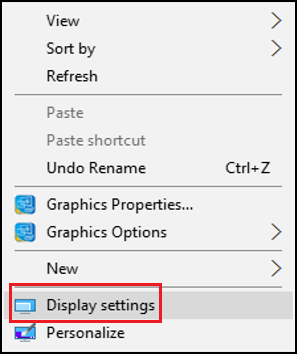
- Right-click your desktop, and select Display settings.
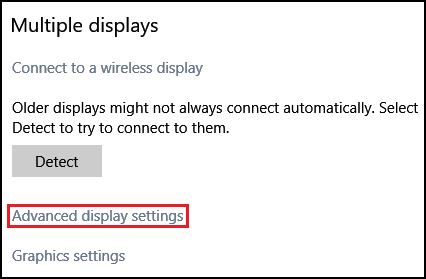
- Select Advanced display settings to the bottom center.
- Verify that the desktop and active resolutions are the same (red box).
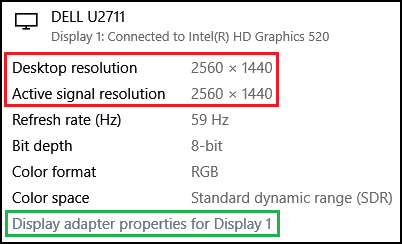
- If the resolutions are not the same, click Display adapter properties (green box) to change the resolution in the Display adapter properties.
- Click List All Modes.
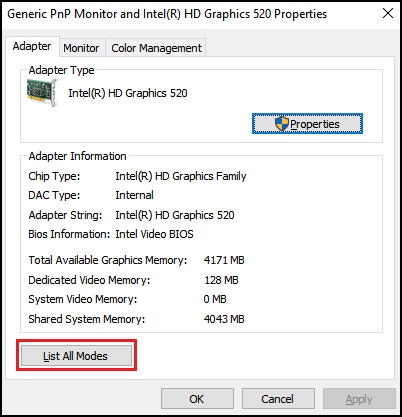
- From the list given, select the proper resolution.
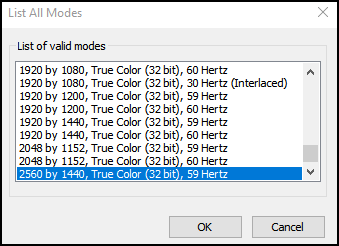
Your desktop image should align properly once the matching resolution is selected.
Affected Products
Alienware, Dell All-in-One, Dell Pro All-in-One, Dell Pro Max Micro, Dell Pro Max Slim, Dell Pro Max Tower, Dell Pro Micro, Dell Pro Slim, Dell Pro Tower, Dell Slim, Dell Tower, Inspiron, OptiPlex, Vostro, XPS, G Series, G Series, Alienware
, Dell Laptops, Dell Plus, Dell Pro, Dell Pro Max, Dell Pro Plus, Dell Pro Premium, Inspiron, Latitude, Dell Pro Rugged, Vostro, XPS, Fixed Workstations, Mobile Workstations, Dell Pro Max Micro XE FCM2250, Dell Pro Max Slim XE FCS1250, Dell Pro Max Tower T2 XE FCT2250, Dell Pro Max 16 XE MC16250, Dell Pro Micro Plus XE QBM1250, Dell Pro Slim Plus XE5 QBS1250, Dell Pro Tower Plus XE5 QBT1250
...
Article Properties
Article Number: 000138732
Article Type: How To
Last Modified: 30 Apr 2026
Version: 9
Find answers to your questions from other Dell users
Support Services
Check if your device is covered by Support Services.