Stopping the Headless Operation Mode Active message appearing during POST
Summary: The following article explains what the Headless Operation Mode Active message during Power On Self-Test (POST) means. It goes through how to stop it from appearing during the computers start up. ...
This article applies to
This article does not apply to
This article is not tied to any specific product.
Not all product versions are identified in this article.
Symptoms
Is there an error message as the computer starts up?
Is it an error message or is it an information message?
Does it contain the following statement?
***HEADLESS OPERATION MODE ACTIVE***This message is not an error and only shows on-screen for two seconds during POST. It is instead an informational message to advise that Warnings and Error messaging during POST have not been configured in your devices BIOS. That they do not appear on your computer.
Cause
Follow the instructions below to configure this setting in order to stop this message appearing. If a different message is seen on boot, then search using the term from the message on-screen for another guide.
Resolution
Steps to stop the message from appearing
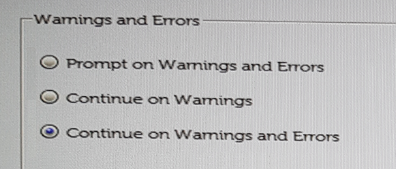
Stop the message from appearing by configuring your BIOS to provide warnings and errors and stop during POST. The two continue options result in the Headless Operation Mode Active message to be shown. There are three possible options, the steps go through what each option means. This helps to make the best choice for your situation.
-
The easiest and quickest way into your BIOS is to rapidly tap the F2 key, when your computer reaches the Dell Splash Screen.
-
Browse POST Behavior.
-
Under Warnings and Errors, select one of the three following options:
-
Prompt on Warnings and Errors causes the computer to stop at the warning or error during POST.
-
Continue on Warnings let the computer continue to POST and Boot without addressing the warning.
-
Continue on Warnings and Errors let the computer continue to POST and Boot without addressing the warning or error.
-
Note: Any errors deemed critical to the operation of the computer hardware continue to cause the computer to stop.
Affected Products
Dell Laptops, Dell Plus, Dell Pro, Dell Pro Max, Dell Pro Plus, Dell Pro Premium, Latitude, Dell Pro Rugged, XPS, Mobile Workstations, Dell Canvas 27Article Properties
Article Number: 000139731
Article Type: Solution
Last Modified: 24 Jul 2025
Version: 13
Find answers to your questions from other Dell users
Support Services
Check if your device is covered by Support Services.