Certain Ports Are Not Functional When Docked with Precision 7520 and 7720 UMA Graphics Configuration
Summary: This article provides information about some docking station ports not working on Precision 7520 and 7720 systems with an integrated Graphics (UMA) only configuration.
This article applies to
This article does not apply to
This article is not tied to any specific product.
Not all product versions are identified in this article.
Symptoms
It may happen that some of the ports on a docking station do not work when docking with Precision 7520 and 7720.
Cause
This occurs because of a design limitation of the system if the integrated graphics are used. This only occurs on System with UMA Graphics without a discrete Graphics Option.
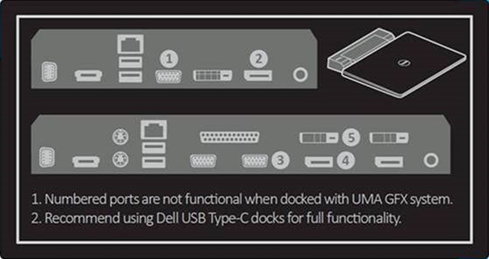
Figure 1: Label on the System with Docking Station Ports affected.
The label on the bottom cover illustrates the ports that do not work with the integrated graphics-only configuration.
Figure 1: Label on the System with Docking Station Ports affected.
Resolution
Try to only use the ports not marked above in Figure 1.
As a workaround, you should use Dell USB Type-C Docks like WD15 and TB16.
Affected Products
Precision 7520, Precision 7720Article Properties
Article Number: 000142291
Article Type: Solution
Last Modified: 15 Sept 2025
Version: 5
Find answers to your questions from other Dell users
Support Services
Check if your device is covered by Support Services.