「Dell Command PowerShell Provider Advanced Battery Charge機能」
Summary: BYOD、エンタープライズ クライアント、およびモビリティ ソリューションを導入、管理、保護、仮想化する方法を専門家と同僚から学習します。
This article applies to
This article does not apply to
This article is not tied to any specific product.
Not all product versions are identified in this article.
Symptoms
対象製品:
- Dell Command | PowerShell Provider
Cause
-
Resolution
高度なバッテリー充電機能により、日中の頻繁な使用をサポートしながら、バッテリーの正常性を最大限に高めます。ExpressCharge™は、基本的に高度なバッテリー充電機能と同様に、始業時から就業時間中までバッテリーを高速充電するために使用されます。それ以外の時間帯は、バッテリーの性能を最大限に高めるために標準充電が使用されます。BIOSにはこの機能があります。
ユーザーには曜日ごとに[一日の始まり]と[作業時間]のフィールドが提供され、すべての曜日に対してこの機能を有効/無効にするチェックボックスがあることは明らかです。ExpressCharge™を使用する時間と作業時間を設定できます。
Dell Command |PowerShell プロバイダー (DCPP) は、この機能をできるだけ F2 画面に近い位置で提供するために懸命に努力しています。DCPPには、高度なバッテリ充電を取得および設定するための2つの属性、すなわち AdvancedBatteryChargeCfg と AdvancedBatteryChargeConfigurationが用意されています。これを以下に示します。

AdvancedBatteryChargeCfgは、高度なバッテリー充電機能をそれぞれ有効または無効にするために有効と無効の値のみを取る単純な列挙属性です。この属性を設定する例を以下に示します。
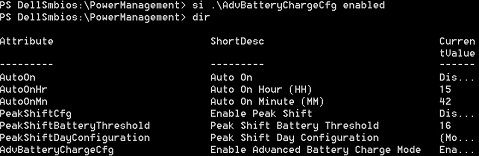
AdvancedBatteryChargeConfiguration は、BIOSに似たインターフェイスを提供する、より複雑な属性です。これにより、ユーザーは高度なバッテリー充電データを取得および設定できます。
Dir AdvancedBatteryChargeConfiguration|select – ExpandProperty CurrentValue
指定した曜日のデータを設定するには:
Set-item AdvancedBatteryChargeConfiguration Sunday – BeginningOfDay "13:45" –WorkPeriod "1:30"
ユーザーは、日曜日の詳細なバッテリー充電データを、1日の始まりを「13:45」、作業時間を「1:30」に設定しました。
注:
- 分は 15 の倍数 (0、15、30、45 など) でなければならないという検証。
- システムパスワードまたは管理者パスワードのいずれかが設定されている場合は、
–Passwordスイッチは使用できません。 - 次に例を示します。
Set-item AdvancedBatteryChargeConfiguration Sunday – BeginningOfDay "13:45" –WorkPeriod "1:30" –Password mySysPassword
Additional Information
関連記事:
Affected Products
Dell Command | Powershell ProviderArticle Properties
Article Number: 000146339
Article Type: Solution
Last Modified: 02 May 2026
Version: 8
Find answers to your questions from other Dell users
Support Services
Check if your device is covered by Support Services.