How to Read the Invoice for a Dell Computer
Summary: Follow the steps and information provided below to find your Dell Invoice for a Dell computer.
This article applies to
This article does not apply to
This article is not tied to any specific product.
Not all product versions are identified in this article.
Symptoms
Finding your Dell Invoice
Cause
Where to find your Dell Invoice
Resolution
How to Find Information on Your Invoice
Your invoice contains important information about your computer configuration and your Dell customer account. Store your invoice in a safe place.
The sample invoice highlights important information.
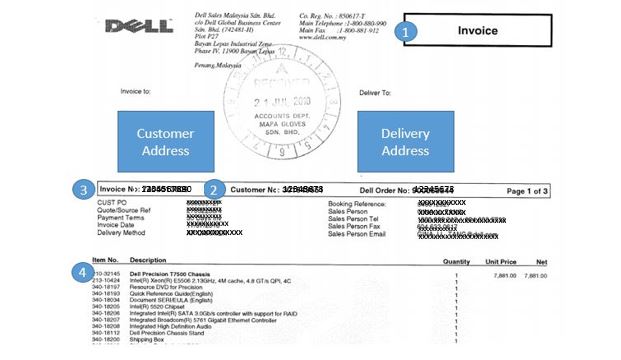
Numbers reference image above:
 Dell contact information
 Customer number
 Invoice number
 Detailed item description
How Can I Request a Copy of My Dell Invoice?
If you have not received your invoice within 2 weeks after receiving your Dell product, you can request that a copy of your invoice be sent to you on the Invoice Page.
NOTE: It takes approximately 3 to 5 business days to process your request.
Article Properties
Article Number: 000155165
Article Type: Solution
Last Modified: 04 May 2026
Version: 6
Find answers to your questions from other Dell users
Support Services
Check if your device is covered by Support Services.