ViPR SRM Unity arrays discovery failure
Summary: ViPR SRM Unity arrays discovery failure
This article applies to
This article does not apply to
This article is not tied to any specific product.
Not all product versions are identified in this article.
Symptoms
Made LDAP setting changes on the Unity array
Unity arrays discovery using operator account failed with errors. This was working fine prior to recent LDAP setting changes on the Unity array. When switching to local account it works again.
Test result
Displaying results from test ran at Oct 28, 2019 10:20:04 AM
Execution steps
Testing management connectivity (open port)
Testing public API
Testing authentication
Tests completed WITH ERROR(S). See details in full result.
Click to show/hide the full result
line 53: fail: command returned with a non-zero status (status: 1) !
Testing Unity/VNXe2 configuration
>>>INFO: Initial SSL connection succeeded.
>>>INFO: API version ok: 9.0
>>>ERROR: Unity script returned an error: source: command returned with a non-zero status (status: 1) !
line 64: json2xml: command returned with a non-zero status (status: 1) !
Unexpected character ('<' (code 60)): expected a valid value (number, String, array, object, 'true', 'false' or 'null')
at [Source: com.watch4net.script.core.util.Pipeline$PipelineReader@49363232; line: 4, column: 2]
Unity arrays discovery using operator account failed with errors. This was working fine prior to recent LDAP setting changes on the Unity array. When switching to local account it works again.
Test result
Displaying results from test ran at Oct 28, 2019 10:20:04 AM
Execution steps
Testing management connectivity (open port)
Testing public API
Testing authentication
Tests completed WITH ERROR(S). See details in full result.
Click to show/hide the full result
line 53: fail: command returned with a non-zero status (status: 1) !
Testing Unity/VNXe2 configuration
>>>INFO: Initial SSL connection succeeded.
>>>INFO: API version ok: 9.0
>>>ERROR: Unity script returned an error: source: command returned with a non-zero status (status: 1) !
line 64: json2xml: command returned with a non-zero status (status: 1) !
Unexpected character ('<' (code 60)): expected a valid value (number, String, array, object, 'true', 'false' or 'null')
at [Source: com.watch4net.script.core.util.Pipeline$PipelineReader@49363232; line: 4, column: 2]
Cause
The unexpected character error was caused by this system popup message in Unisphere.
Note: Try to log into Unisphere with operator account to reveal this popup message.
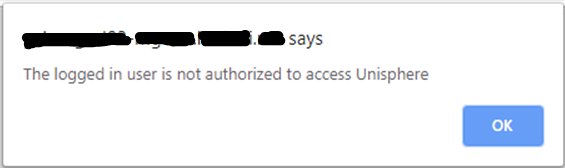
Note: Try to log into Unisphere with operator account to reveal this popup message.
Resolution
Review and correct your most recent LDAP setting changes made on the Unity array. If necessary, open an SR with Unity team for further assistance.
Article Properties
Article Number: 000165445
Article Type: Solution
Last Modified: 30 May 2024
Version: 4
Find answers to your questions from other Dell users
Support Services
Check if your device is covered by Support Services.