IDPA: UI에 배포 후 원형 회전과 함께 백업 에이전트 설치가 진행 중임을 표시
Summary: IDPA(Integrated Data Protection Appliance) UI(User Interface)에 에이전트 설치 진행 중, 설치 프로그램 완료가 표시됩니다. 성공 식별이 누락되면 UI에서 에이전트가 설치되고 있다고 생각하게 됩니다.
This article applies to
This article does not apply to
This article is not tied to any specific product.
Not all product versions are identified in this article.
Symptoms
- A
Backup Agents installation in Progress메시지가 ACM(Appliance Configuration Manager)에 나타납니다. - AVI에 설치 준비가 된 패키지가 표시되지 않습니다. 기록에는 패키지가 완료된 것으로 표시되지만 ACM에서는
- A
Backup Agents installation in Progress다음과 같은 메시지가 나타납니다.
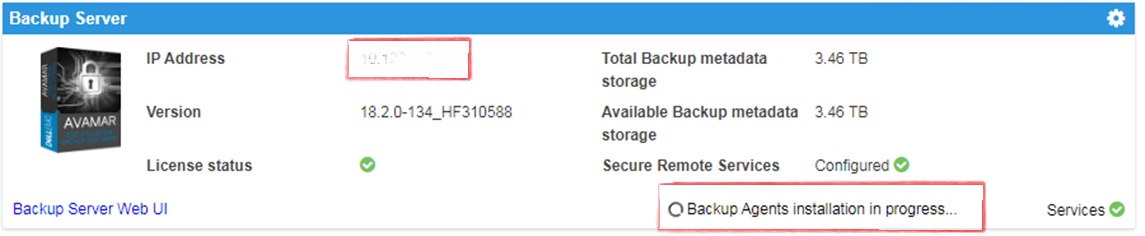
Cause
이 문제는 새 배포 후에 발생합니다.
Resolution
- Avamar에 로그인합니다.
https://<Avamar_IP>/avi
Avamar의 확인된 AVI 설치 관리자 사용자 인터페이스에는 설치 대기 중인 패키지가 표시되지 않으며 내역에는 완료된 패키지가 표시됩니다.
- Avamar SSH에 로그인합니다.
확인된 상태: dpnctl 상태이고 모든 서비스가 정상적으로 실행 중입니다.
다음 명령을 실행합니다. dpnctl status
- ACM SSH에 로그인하고 다음 명령을 실행하여
Backup Agents installation in Progress메시지:touch /usr/local/dataprotection/var/av_ucd_install_success
- 아래 명령을 사용하여 ACM webapp 서비스를 재시작합니다.
Stop webapp
웹앱 서비스 중지:
웹앱 서비스 시작:
service dataprotection_webapp
웹앱 서비스 시작:
service dataprotection_webapp start
Affected Products
Integrated Data Protection Appliance FamilyProducts
PowerProtect Data Protection Software, Integrated Data Protection Appliance FamilyArticle Properties
Article Number: 000170900
Article Type: Solution
Last Modified: 20 Jan 2026
Version: 4
Find answers to your questions from other Dell users
Support Services
Check if your device is covered by Support Services.