IDPA: ESXi Host shows disconnected on the vCenter WebClient causing all IDPA components to appear with red exclamation in the ACM UI
Summary: This KB article walks you through the issue where the ESXi Host may be disconnected from the IDPA vCenter. This causes connection issues and the ACM showing problems.
This article applies to
This article does not apply to
This article is not tied to any specific product.
Not all product versions are identified in this article.
Symptoms
Log in to the vCenter WebClient and verify the ESXi Host showing disconnected: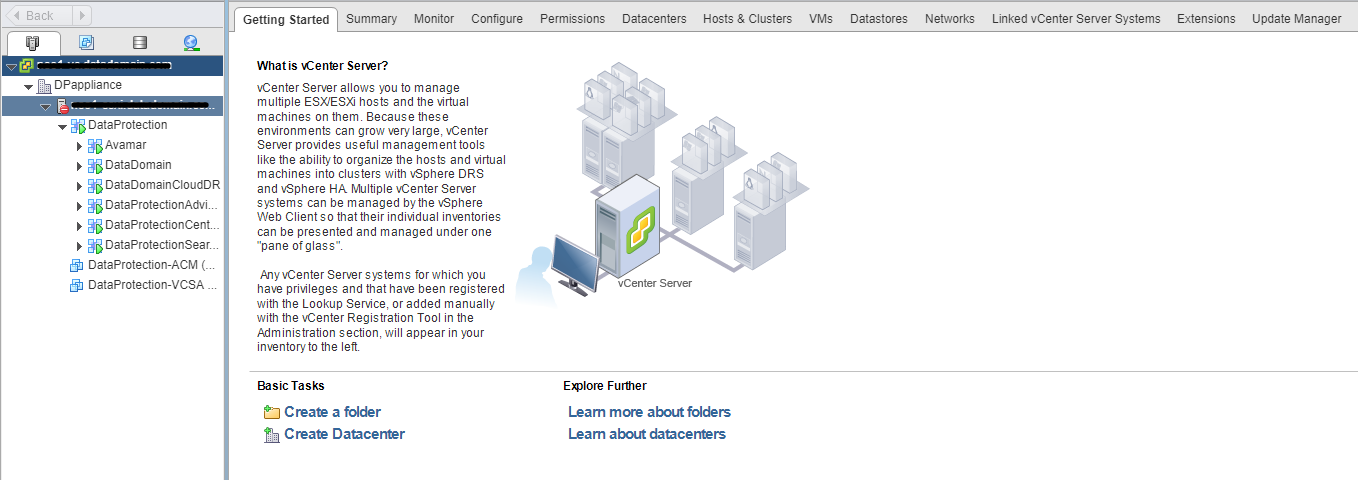
Right click the ESXi Host > Connection > Connect.
If the ESXi Host does not automatically reconnect, a wizard appears.
Follow the wizard and provide the ESXi host root username and password in the authentication tab and click Connect.
If there are any issues, the connect operation may fail.
Note: Confirm that the root user password is correct. Remove the ESXi host from vCenter inventory and try readding or re-registering the same again.
If the following error message is seen, review the vCenter vpxd log:
Unable to add the ESXi Host << Error message: There was an error communicating with the remote host
SSH to the vCenter and traverse to /var/log/vmware/vmware-vpxd/vpxd.log and review the vpxd.log. The following error message may be seen:
2019-08-13T10:08:41.753-06:00 info vpxd[7F1D96978700] [Originator@6876 sub=Default opID=AddHostWizard-add-45159-ngc:70005260-7a] [VpxLRO] -- ERROR task-2395 -- group-h4
 -- vim.Folder.addStandaloneHost: vmodl.fault.HostCommunication:
--> Result:
--> (vmodl.fault.HostCommunication) {
-->   faultCause = (vmodl.MethodFault) null,
-->   faultMessage = <unset>
-->   msg = ""
--> }
--> Args:
-->
--> Arg spec:
--> (vim.host.ConnectSpec) {
-->   hostName = "x.x.x.x",
-->   port = <unset>,
-->   sslThumbprint = <unset>,
-->   userName = "root",
-->   password = (not shown),
-->   vmFolder = 'vim.Folder:78a59c25-81c3-4169-85a6-61914d3e00c8:group-v3',
-->   force = true,
-->   vimAccountName = "vpxuser",
-->   vimAccountPassword = (not shown),
-->   managementIp = <unset>,
-->   lockdownMode = "lockdownDisabled",
-->   hostGateway = (vim.host.GatewaySpec) null
--> }
--> Arg compResSpec:
-->
--> Arg addConnected:
--> true
--> Arg license:
-->
2019-08-13T10:08:41.753-06:00 error vpxd[7F1D95FE5700] [Originator@6876 sub=licenseClient opID=AddHostWizard-add-45159-ngc:70005260-7a-LicenseClientUnregisterHostAsync-
60e04d00] Swallowing exception 'vim.fault.LicenseEntityNotFound' thrown when unregister entity 'host-106'
Cause
The ESXi Host vpxa password is already available in the vCenter cache or the vCenter database. This resulted in the ESXi Connect operation to fail with an error message:
Error message: There was an error communicating with the remote host
Resolution
-
SSH to ESXi Host as root user and stop the vpxa service:
/etc/init.d/vpxa stop
-
On the vCenter WebClient UI, try readding the ESXi Host.
- Right click the datacenter 'DPappliance' and select 'Add Host'
- Walk through the wizard and provide ESXi host 'root' user credentials to connect.
-
ESXi integration/connect should work fine without issues.
-
On the ESXi Host CLI session, verify that the vpxa service came up automatically after the integration.
/etc/init.d/vpxa status
The service status should show as running.
-
The ESXi Host should start showing as connected again in the vCenter WebClient.
Affected Products
Integrated Data Protection Appliance FamilyProducts
PowerProtect DP4400, PowerProtect Data Protection Software, Integrated Data Protection Appliance Family, PowerProtect Data Protection Hardware, Integrated Data Protection Appliance SoftwareArticle Properties
Article Number: 000171544
Article Type: Solution
Last Modified: 30 Oct 2025
Version: 4
Find answers to your questions from other Dell users
Support Services
Check if your device is covered by Support Services.