SCゾーン名またはノードIPアドレスを使用してOneFS Webuiにアクセスするときの異常な動作
Summary: OneFS Webuiを開くと、クラスターのhttp設定により、以下に示す現象が発生します。
This article applies to
This article does not apply to
This article is not tied to any specific product.
Not all product versions are identified in this article.
Symptoms
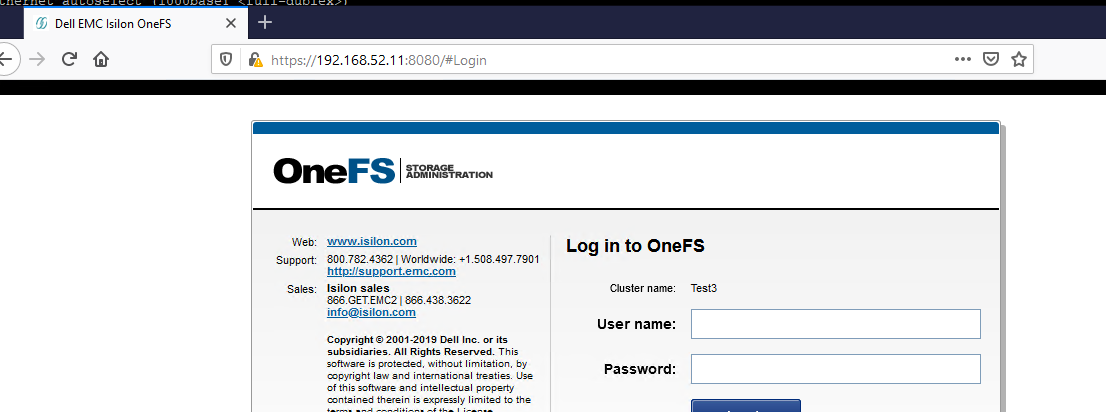
ポート8080を指定せずにブラウザーにsmartconnectゾーン名またはノードIPアドレスを入力すると、次のページが表示されます。

OneFS Webuiにアクセスするには、このページの[Isilon Administration]をクリックするか、ポート8080を指定する必要があります。
その後、Webuiへのアクセスは通常どおりに動作するはずです。
Cause
この動作は、クラスターのhttpサービス設定が原因です。
ここに示す変更により、上記の動作が発生します。
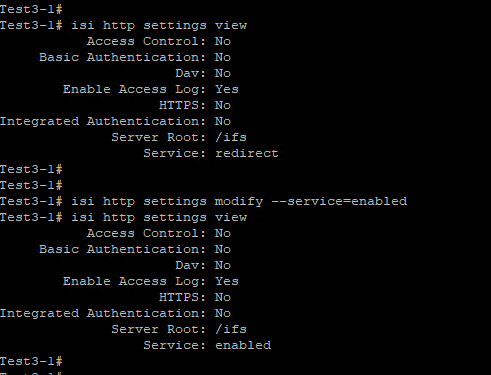
ここに示す変更により、上記の動作が発生します。
Resolution
これを解決するには、http設定をデフォルト(redirect:
isi http settings modify --service=redirect)に戻す必要があります。
isi http settings modify --service=redirect)に戻す必要があります。
Affected Products
PowerScale OneFSArticle Properties
Article Number: 000180120
Article Type: Solution
Last Modified: 07 Jul 2025
Version: 4
Find answers to your questions from other Dell users
Support Services
Check if your device is covered by Support Services.